
 NIO基础
NIO基础
本套netty知识点为黑马程序员-netty的学习记录:传送门 (opens new window)
non-blocking io 非阻塞 IO
# 三大组件
# Channel & Buffer
channel 有一点类似于 stream,它就是读写数据的双向通道,可以从 channel 将数据读入 buffer,也可以将 buffer 的数据写入 channel,而之前的 stream 要么是输入,要么是输出,channel 比 stream 更为底层
Java NIO系统的核心在于:通道(Channel)和缓冲区(Buffer)。通道表示打开到 IO 设备(例如:文件、套接字)的连接。若需要使用 NIO 系统,需要获取用于连接 IO 设备的通道以及用于容纳数据的缓冲区。然后操作缓冲区,对数据进行处理
简而言之,通道负责传输,缓冲区负责存储
常见的Channel有以下四种,其中FileChannel主要用于文件传输,其余三种用于网络通信
FileChannelDatagramChannelSocketChannelServerSocketChannel
Buffer有以下几种,其中使用较多的是ByteBuffer
ByteBufferMappedByteBufferDirectByteBufferHeapByteBuffer
ShortBufferIntBufferLongBufferFloatBufferDoubleBufferCharBuffer

# Selector
selector 单从字面意思不好理解,需要结合服务器的设计演化来理解它的用途
在使用Selector之前,处理socket连接还有以下两种方法
使用多线程技术
为每个连接分别开辟一个线程,分别去处理对应的socke连接
这种方法存在以下几个问题
- 内存占用高
- 每个线程都需要占用一定的内存,当连接较多时,会开辟大量线程,导致占用大量内存
- 线程上下文切换成本高
- 只适合连接数少的场景
- 连接数过多,会导致创建很多线程,从而出现问题
使用线程池技术
使用线程池,让线程池中的线程去处理连接
这种方法存在以下几个问题
- 阻塞模式下,线程仅能处理一个连接
- 线程池中的线程获取任务(task)后,只有当其执行完任务之后(断开连接后),才会去获取并执行下一个任务
- 若socket连接一直未断开,则其对应的线程无法处理其他socket连接
- 仅适合短连接场景
- 短连接即建立连接发送请求并响应后就立即断开,使得线程池中的线程可以快速处理其他连接
使用选择器
selector 的作用就是配合一个线程来管理多个 channel(fileChannel因为是阻塞式的,所以无法使用selector),获取这些 channel 上发生的事件,这些 channel 工作在非阻塞模式下,不会让线程吊死在一个 channel 上。当一个channel中没有执行任务时,可以去执行其他channel中的任务。适合连接数特别多,但流量低的场景(low traffic)
若事件未就绪,调用 selector 的 select() 方法会阻塞线程,直到 channel 发生了读写就绪事件。这些事件就绪后,select 方法就会返回这些事件交给 thread 来处理
# ByteBuffer
# 使用方式
- 向 buffer 写入数据,例如调用
channel.read(buffer) - 调用
flip()切换至读模式- flip会使得buffer中的limit变为position,position变为0
- 从 buffer 读取数据,例如调用 buffer.get()
- 调用
clear()或者compact()切换至写模式- 调用clear()方法时position=0,limit变为capacity
- 调用compact()方法时,会将缓冲区中的未读数据压缩到缓冲区前面
- 重复以上步骤
# 使用案例
有一普通文本文件 data.txt,内容为
1234567890abcd
使用 FileChannel 来读取文件内容
@Slf4j
public class ChannelDemo1 {
    public static void main(String[] args) {
        try (RandomAccessFile file = new RandomAccessFile("helloword/data.txt", "rw")) {
            FileChannel channel = file.getChannel();
            ByteBuffer buffer = ByteBuffer.allocate(10);
            do {
                // 向 buffer 写入
                int len = channel.read(buffer);
                log.debug("读到字节数:{}", len);
                if (len == -1) {
                    break;
                }
                // 切换 buffer 读模式
                buffer.flip();
                while(buffer.hasRemaining()) {
                    log.debug("{}", (char)buffer.get());
                }
                // 切换 buffer 写模式
                buffer.clear();
            } while (true);
        } catch (IOException e) {
            e.printStackTrace();
        }
    }
}
2
3
4
5
6
7
8
9
10
11
12
13
14
15
16
17
18
19
20
21
22
23
24
25
26
输出
10:39:03 [DEBUG] [main] c.i.n.ChannelDemo1 - 读到字节数:10
10:39:03 [DEBUG] [main] c.i.n.ChannelDemo1 - 1
10:39:03 [DEBUG] [main] c.i.n.ChannelDemo1 - 2
10:39:03 [DEBUG] [main] c.i.n.ChannelDemo1 - 3
10:39:03 [DEBUG] [main] c.i.n.ChannelDemo1 - 4
10:39:03 [DEBUG] [main] c.i.n.ChannelDemo1 - 5
10:39:03 [DEBUG] [main] c.i.n.ChannelDemo1 - 6
10:39:03 [DEBUG] [main] c.i.n.ChannelDemo1 - 7
10:39:03 [DEBUG] [main] c.i.n.ChannelDemo1 - 8
10:39:03 [DEBUG] [main] c.i.n.ChannelDemo1 - 9
10:39:03 [DEBUG] [main] c.i.n.ChannelDemo1 - 0
10:39:03 [DEBUG] [main] c.i.n.ChannelDemo1 - 读到字节数:4
10:39:03 [DEBUG] [main] c.i.n.ChannelDemo1 - a
10:39:03 [DEBUG] [main] c.i.n.ChannelDemo1 - b
10:39:03 [DEBUG] [main] c.i.n.ChannelDemo1 - c
10:39:03 [DEBUG] [main] c.i.n.ChannelDemo1 - d
10:39:03 [DEBUG] [main] c.i.n.ChannelDemo1 - 读到字节数:-1
2
3
4
5
6
7
8
9
10
11
12
13
14
15
16
17
# 核心属性
字节缓冲区的父类Buffer中有几个核心属性,如下
// Invariants: mark <= position <= limit <= capacity
private int mark = -1;
private int position = 0;
private int limit;
private int capacity;
2
3
4
5
- capacity:缓冲区的容量。通过构造函数赋予,一旦设置,无法更改
- limit:缓冲区的界限。位于limit 后的数据不可读写。缓冲区的限制不能为负,并且不能大于其容量
- position:下一个读写位置的索引。缓冲区的位置不能为负,并且不能大于limit
- mark:记录当前position的值。position被改变后,可以通过调用reset() 方法恢复到mark的位置。
以上四个属性必须满足以下要求
mark <= position <= limit <= capacity
一开始
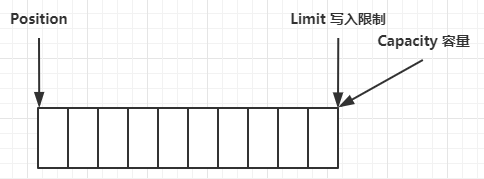
写模式下,position 是写入位置,limit 等于容量,下图表示写入了 4 个字节后的状态

flip 动作发生后,position 切换为读取位置,limit 切换为读取限制

读取 4 个字节后,状态

clear 动作发生后,状态
compact 方法,是把未读完的部分向前压缩,然后切换至写模式

clear() VS compact() clear只是对position、limit、mark进行重置,而compact在对position进行设置,以及limit、mark进行重置的同时,还涉及到数据在内存中拷贝(会调用
arraycopy)。所以compact比clear更耗性能。 但compact能保存你未读取的数据,将新数据追加到为读取的数据之后;而clear则不行,若你调用了clear,则未读取的数据就无法再读取到了所以需要根据情况来判断使用哪种方法进行模式切换
# ByteBuffer 常见方法
# 分配空间
可以使用 allocate 方法为 ByteBuffer 分配空间,其它 buffer 类也有该方法
Bytebuffer buf = ByteBuffer.allocate(16);
# 向 buffer 写入数据
有两种办法
- 调用 channel 的 read 方法
- 调用 buffer 自己的 put 方法
int readBytes = channel.read(buf);
和
buf.put((byte)127);
# 从 buffer 读取数据
同样有两种办法
- 调用 channel 的 write 方法
- 调用 buffer 自己的 get 方法
int writeBytes = channel.write(buf);
和
byte b = buf.get();
get 方法会让 position 读指针向后走,如果想重复读取数据
- 可以调用 rewind 方法将 position 重新置为 0
- 或者调用 get(int i) 方法获取索引 i 的内容,它不会移动读指针
# mark 和 reset
mark 是在读取时,做一个标记,即使 position 改变,只要调用 reset 就能回到 mark 的位置
注意
rewind 和 flip 都会清除 mark 位置
# 方法调用及演示
需要先导入netty依赖
<dependency>
  <groupId>io.netty</groupId>
  <artifactId>netty-all</artifactId>
  <version>4.1.51.Final</version>
</dependency>
2
3
4
5
# 💡 调试工具类
public class ByteBufferUtil {
    private static final char[] BYTE2CHAR = new char[256];
    private static final char[] HEXDUMP_TABLE = new char[256 * 4];
    private static final String[] HEXPADDING = new String[16];
    private static final String[] HEXDUMP_ROWPREFIXES = new String[65536 >>> 4];
    private static final String[] BYTE2HEX = new String[256];
    private static final String[] BYTEPADDING = new String[16];

    static {
        final char[] DIGITS = "0123456789abcdef".toCharArray();
        for (int i = 0; i < 256; i++) {
            HEXDUMP_TABLE[i << 1] = DIGITS[i >>> 4 & 0x0F];
            HEXDUMP_TABLE[(i << 1) + 1] = DIGITS[i & 0x0F];
        }

        int i;

        // Generate the lookup table for hex dump paddings
        for (i = 0; i < HEXPADDING.length; i++) {
            int padding = HEXPADDING.length - i;
            StringBuilder buf = new StringBuilder(padding * 3);
            for (int j = 0; j < padding; j++) {
                buf.append("   ");
            }
            HEXPADDING[i] = buf.toString();
        }

        // Generate the lookup table for the start-offset header in each row (up to 64KiB).
        for (i = 0; i < HEXDUMP_ROWPREFIXES.length; i++) {
            StringBuilder buf = new StringBuilder(12);
            buf.append(NEWLINE);
            buf.append(Long.toHexString(i << 4 & 0xFFFFFFFFL | 0x100000000L));
            buf.setCharAt(buf.length() - 9, '|');
            buf.append('|');
            HEXDUMP_ROWPREFIXES[i] = buf.toString();
        }

        // Generate the lookup table for byte-to-hex-dump conversion
        for (i = 0; i < BYTE2HEX.length; i++) {
            BYTE2HEX[i] = ' ' + StringUtil.byteToHexStringPadded(i);
        }

        // Generate the lookup table for byte dump paddings
        for (i = 0; i < BYTEPADDING.length; i++) {
            int padding = BYTEPADDING.length - i;
            StringBuilder buf = new StringBuilder(padding);
            for (int j = 0; j < padding; j++) {
                buf.append(' ');
            }
            BYTEPADDING[i] = buf.toString();
        }

        // Generate the lookup table for byte-to-char conversion
        for (i = 0; i < BYTE2CHAR.length; i++) {
            if (i <= 0x1f || i >= 0x7f) {
                BYTE2CHAR[i] = '.';
            } else {
                BYTE2CHAR[i] = (char) i;
            }
        }
    }

    /**
     * 打印所有内容
     * @param buffer
     */
    public static void debugAll(ByteBuffer buffer) {
        int oldlimit = buffer.limit();
        buffer.limit(buffer.capacity());
        StringBuilder origin = new StringBuilder(256);
        appendPrettyHexDump(origin, buffer, 0, buffer.capacity());
        System.out.println("+--------+-------------------- all ------------------------+----------------+");
        System.out.printf("position: [%d], limit: [%d]\n", buffer.position(), oldlimit);
        System.out.println(origin);
        buffer.limit(oldlimit);
    }

    /**
     * 打印可读取内容
     * @param buffer
     */
    public static void debugRead(ByteBuffer buffer) {
        StringBuilder builder = new StringBuilder(256);
        appendPrettyHexDump(builder, buffer, buffer.position(), buffer.limit() - buffer.position());
        System.out.println("+--------+-------------------- read -----------------------+----------------+");
        System.out.printf("position: [%d], limit: [%d]\n", buffer.position(), buffer.limit());
        System.out.println(builder);
    }

    private static void appendPrettyHexDump(StringBuilder dump, ByteBuffer buf, int offset, int length) {
        if (isOutOfBounds(offset, length, buf.capacity())) {
            throw new IndexOutOfBoundsException(
                    "expected: " + "0 <= offset(" + offset + ") <= offset + length(" + length
                            + ") <= " + "buf.capacity(" + buf.capacity() + ')');
        }
        if (length == 0) {
            return;
        }
        dump.append(
                "         +-------------------------------------------------+" +
                        NEWLINE + "         |  0  1  2  3  4  5  6  7  8  9  a  b  c  d  e  f |" +
                        NEWLINE + "+--------+-------------------------------------------------+----------------+");

        final int startIndex = offset;
        final int fullRows = length >>> 4;
        final int remainder = length & 0xF;

        // Dump the rows which have 16 bytes.
        for (int row = 0; row < fullRows; row++) {
            int rowStartIndex = (row << 4) + startIndex;

            // Per-row prefix.
            appendHexDumpRowPrefix(dump, row, rowStartIndex);

            // Hex dump
            int rowEndIndex = rowStartIndex + 16;
            for (int j = rowStartIndex; j < rowEndIndex; j++) {
                dump.append(BYTE2HEX[getUnsignedByte(buf, j)]);
            }
            dump.append(" |");

            // ASCII dump
            for (int j = rowStartIndex; j < rowEndIndex; j++) {
                dump.append(BYTE2CHAR[getUnsignedByte(buf, j)]);
            }
            dump.append('|');
        }

        // Dump the last row which has less than 16 bytes.
        if (remainder != 0) {
            int rowStartIndex = (fullRows << 4) + startIndex;
            appendHexDumpRowPrefix(dump, fullRows, rowStartIndex);

            // Hex dump
            int rowEndIndex = rowStartIndex + remainder;
            for (int j = rowStartIndex; j < rowEndIndex; j++) {
                dump.append(BYTE2HEX[getUnsignedByte(buf, j)]);
            }
            dump.append(HEXPADDING[remainder]);
            dump.append(" |");

            // Ascii dump
            for (int j = rowStartIndex; j < rowEndIndex; j++) {
                dump.append(BYTE2CHAR[getUnsignedByte(buf, j)]);
            }
            dump.append(BYTEPADDING[remainder]);
            dump.append('|');
        }

        dump.append(NEWLINE +
                "+--------+-------------------------------------------------+----------------+");
    }

    private static void appendHexDumpRowPrefix(StringBuilder dump, int row, int rowStartIndex) {
        if (row < HEXDUMP_ROWPREFIXES.length) {
            dump.append(HEXDUMP_ROWPREFIXES[row]);
        } else {
            dump.append(NEWLINE);
            dump.append(Long.toHexString(rowStartIndex & 0xFFFFFFFFL | 0x100000000L));
            dump.setCharAt(dump.length() - 9, '|');
            dump.append('|');
        }
    }

    public static short getUnsignedByte(ByteBuffer buffer, int index) {
        return (short) (buffer.get(index) & 0xFF);
    }
}
2
3
4
5
6
7
8
9
10
11
12
13
14
15
16
17
18
19
20
21
22
23
24
25
26
27
28
29
30
31
32
33
34
35
36
37
38
39
40
41
42
43
44
45
46
47
48
49
50
51
52
53
54
55
56
57
58
59
60
61
62
63
64
65
66
67
68
69
70
71
72
73
74
75
76
77
78
79
80
81
82
83
84
85
86
87
88
89
90
91
92
93
94
95
96
97
98
99
100
101
102
103
104
105
106
107
108
109
110
111
112
113
114
115
116
117
118
119
120
121
122
123
124
125
126
127
128
129
130
131
132
133
134
135
136
137
138
139
140
141
142
143
144
145
146
147
148
149
150
151
152
153
154
155
156
157
158
159
160
161
162
163
164
165
166
167
168
# 调用ByteBuffer的方法
public class TestByteBuffer {
    public static void main(String[] args) {
        ByteBuffer buffer = ByteBuffer.allocate(10);
        // 向buffer中写入1个字节的数据
        buffer.put((byte)97);
        // 使用工具类,查看buffer状态
        ByteBufferUtil.debugAll(buffer);

        // 向buffer中写入4个字节的数据
        buffer.put(new byte[]{98, 99, 100, 101});
        ByteBufferUtil.debugAll(buffer);

        // 获取数据
        buffer.flip();
        ByteBufferUtil.debugAll(buffer);
        System.out.println(buffer.get());
        System.out.println(buffer.get());
        ByteBufferUtil.debugAll(buffer);

        // 使用compact切换模式
        buffer.compact();
        ByteBufferUtil.debugAll(buffer);

        // 再次写入
        buffer.put((byte)102);
        buffer.put((byte)103);
        ByteBufferUtil.debugAll(buffer);
    }
}
2
3
4
5
6
7
8
9
10
11
12
13
14
15
16
17
18
19
20
21
22
23
24
25
26
27
28
29
30
运行结果
// 向缓冲区写入了一个字节的数据,此时postition为1
+--------+-------------------- all ------------------------+----------------+
position: [1], limit: [10]
         +-------------------------------------------------+
         |  0  1  2  3  4  5  6  7  8  9  a  b  c  d  e  f |
+--------+-------------------------------------------------+----------------+
|00000000| 61 00 00 00 00 00 00 00 00 00                   |a.........      |
+--------+-------------------------------------------------+----------------+

// 向缓冲区写入四个字节的数据,此时position为5
+--------+-------------------- all ------------------------+----------------+
position: [5], limit: [10]
         +-------------------------------------------------+
         |  0  1  2  3  4  5  6  7  8  9  a  b  c  d  e  f |
+--------+-------------------------------------------------+----------------+
|00000000| 61 62 63 64 65 00 00 00 00 00                   |abcde.....      |
+--------+-------------------------------------------------+----------------+

// 调用flip切换模式,此时position为0,表示从第0个数据开始读取
+--------+-------------------- all ------------------------+----------------+
position: [0], limit: [5]
         +-------------------------------------------------+
         |  0  1  2  3  4  5  6  7  8  9  a  b  c  d  e  f |
+--------+-------------------------------------------------+----------------+
|00000000| 61 62 63 64 65 00 00 00 00 00                   |abcde.....      |
+--------+-------------------------------------------------+----------------+
// 读取两个字节的数据
97
98

// position变为2
+--------+-------------------- all ------------------------+----------------+
position: [2], limit: [5]
         +-------------------------------------------------+
         |  0  1  2  3  4  5  6  7  8  9  a  b  c  d  e  f |
+--------+-------------------------------------------------+----------------+
|00000000| 61 62 63 64 65 00 00 00 00 00                   |abcde.....      |
+--------+-------------------------------------------------+----------------+

// 调用compact切换模式,此时position及其后面的数据被压缩到ByteBuffer前面去了
// 此时position为3,会覆盖之前的数据
+--------+-------------------- all ------------------------+----------------+
position: [3], limit: [10]
         +-------------------------------------------------+
         |  0  1  2  3  4  5  6  7  8  9  a  b  c  d  e  f |
+--------+-------------------------------------------------+----------------+
|00000000| 63 64 65 64 65 00 00 00 00 00                   |cdede.....      |
+--------+-------------------------------------------------+----------------+

// 再次写入两个字节的数据,之前的 0x64 0x65 被覆盖
+--------+-------------------- all ------------------------+----------------+
position: [5], limit: [10]
         +-------------------------------------------------+
         |  0  1  2  3  4  5  6  7  8  9  a  b  c  d  e  f |
+--------+-------------------------------------------------+----------------+
|00000000| 63 64 65 66 67 00 00 00 00 00                   |cdefg.....      |
+--------+-------------------------------------------------+----------------+
2
3
4
5
6
7
8
9
10
11
12
13
14
15
16
17
18
19
20
21
22
23
24
25
26
27
28
29
30
31
32
33
34
35
36
37
38
39
40
41
42
43
44
45
46
47
48
49
50
51
52
53
54
55
56
57
58
# 调用ByteBuffer的分配内存的方法
public class TestByteBufferAllocate {
    public static void main(String[] args) {
        ByteBuffer allocate = ByteBuffer.allocate(10);
        ByteBuffer allocateDirect = ByteBuffer.allocateDirect(10);
        System.out.println(allocate.getClass()); // class java.nio.HeapByteBuffer 堆内存中的对象,所以收到垃圾(GC)回收的影响;读写效率相对不高;
        System.out.println(allocateDirect.getClass()); // class java.nio.DirectByteBuffer 直接内存(系统内存)里面的对象,不会受到垃圾回收的影响;读写效率比较高,会少一次的复制拷贝;分配时的效率比较低,并且容易出现内存泄露,需要手动释放内存
    }
}
2
3
4
5
6
7
8
# 字符串与 ByteBuffer 互转
# 方法一
编码:字符串调用getByte方法获得byte数组,将byte数组放入ByteBuffer中
解码:先调用ByteBuffer的flip方法,然后通过StandardCharsets的decoder方法解码
public class Translate {
    public static void main(String[] args) {
        // 准备两个字符串
        String str1 = "hello";
        String str2 = "";


        ByteBuffer buffer1 = ByteBuffer.allocate(16);
        // 通过字符串的getByte方法获得字节数组,放入缓冲区中
        buffer1.put(str1.getBytes());
        ByteBufferUtil.debugAll(buffer1);

        // 将缓冲区中的数据转化为字符串
        // 切换模式
        buffer1.flip();

        // 通过StandardCharsets解码,获得CharBuffer,再通过toString获得字符串
        str2 = StandardCharsets.UTF_8.decode(buffer1).toString();
        System.out.println(str2);
        ByteBufferUtil.debugAll(buffer1);
    }
}
2
3
4
5
6
7
8
9
10
11
12
13
14
15
16
17
18
19
20
21
22
运行结果
+--------+-------------------- all ------------------------+----------------+
position: [5], limit: [16]
         +-------------------------------------------------+
         |  0  1  2  3  4  5  6  7  8  9  a  b  c  d  e  f |
+--------+-------------------------------------------------+----------------+
|00000000| 68 65 6c 6c 6f 00 00 00 00 00 00 00 00 00 00 00 |hello...........|
+--------+-------------------------------------------------+----------------+
hello
+--------+-------------------- all ------------------------+----------------+
position: [5], limit: [5]
         +-------------------------------------------------+
         |  0  1  2  3  4  5  6  7  8  9  a  b  c  d  e  f |
+--------+-------------------------------------------------+----------------+
|00000000| 68 65 6c 6c 6f 00 00 00 00 00 00 00 00 00 00 00 |hello...........|
+--------+-------------------------------------------------+----------------+
2
3
4
5
6
7
8
9
10
11
12
13
14
15
# 方法二
编码:通过StandardCharsets的encode方法获得ByteBuffer,此时获得的ByteBuffer为读模式,无需通过flip切换模式
解码:通过StandardCharsets的decoder方法解码
public class Translate {
    public static void main(String[] args) {
        // 准备两个字符串
        String str1 = "hello";
        String str2 = "";

        // 通过StandardCharsets的encode方法获得ByteBuffer
        // 此时获得的ByteBuffer为读模式,无需通过flip切换模式
        ByteBuffer buffer1 = StandardCharsets.UTF_8.encode(str1);
        ByteBufferUtil.debugAll(buffer1);

        // 将缓冲区中的数据转化为字符串
        // 通过StandardCharsets解码,获得CharBuffer,再通过toString获得字符串
        str2 = StandardCharsets.UTF_8.decode(buffer1).toString();
        System.out.println(str2);
        ByteBufferUtil.debugAll(buffer1);
    }
}
2
3
4
5
6
7
8
9
10
11
12
13
14
15
16
17
18
运行结果
+--------+-------------------- all ------------------------+----------------+
position: [0], limit: [5]
         +-------------------------------------------------+
         |  0  1  2  3  4  5  6  7  8  9  a  b  c  d  e  f |
+--------+-------------------------------------------------+----------------+
|00000000| 68 65 6c 6c 6f                                  |hello           |
+--------+-------------------------------------------------+----------------+
hello
+--------+-------------------- all ------------------------+----------------+
position: [5], limit: [5]
         +-------------------------------------------------+
         |  0  1  2  3  4  5  6  7  8  9  a  b  c  d  e  f |
+--------+-------------------------------------------------+----------------+
|00000000| 68 65 6c 6c 6f                                  |hello           |
+--------+-------------------------------------------------+----------------+
2
3
4
5
6
7
8
9
10
11
12
13
14
15
# ⚠️ Buffer 的线程安全
Buffer 是非线程安全的
# ByteBuffer分散读集中写
# 分散读
public class TestScatteringRead {
    public static void main(String[] args) {
        // 获取channel的两种方式 1. 通过输入输出流getChannel;2. 通过RandomAccessFile.getChannel()获取
        try (FileChannel channel = new RandomAccessFile("word1.txt", "r").getChannel()) {
            ByteBuffer allocate0 = ByteBuffer.allocate(3);
            ByteBuffer allocate1 = ByteBuffer.allocate(3);
            ByteBuffer allocate2 = ByteBuffer.allocate(5);

            // 将通道(channel)中的数据依次读入缓存区中
            channel.read(new ByteBuffer[]{allocate0, allocate1, allocate2});
            // 切换缓冲区读写模式
            allocate0.flip();
            allocate1.flip();
            allocate2.flip();

            ByteBufferUtil.debugAll(allocate0);
            ByteBufferUtil.debugAll(allocate1);
            ByteBufferUtil.debugAll(allocate2);

        } catch (IOException e) {
        }
    }
}
2
3
4
5
6
7
8
9
10
11
12
13
14
15
16
17
18
19
20
21
22
23
# 集中写
public class TestGatheringWrite {
    public static void main(String[] args) {
        // 将指定字符串转换为bytebuffer
        ByteBuffer buffer1 = StandardCharsets.UTF_8.encode("hello");
        ByteBuffer buffer2 = StandardCharsets.UTF_8.encode("word");
        ByteBuffer buffer3 = StandardCharsets.UTF_8.encode("李雷");

        // 获取到文件对应的通道
        try (FileChannel channel = new RandomAccessFile("word2.txt", "rw").getChannel()) {
            // 将缓冲区中的数据写入通道中
            channel.write(new ByteBuffer[]{buffer1, buffer2, buffer3});
        } catch (IOException e) {
        }
    }
}
2
3
4
5
6
7
8
9
10
11
12
13
14
15
# 粘(黏)包与半包
# 现象
网络上有多条数据发送给服务端,数据之间使用 \n 进行分隔
但由于某种原因这些数据在接收时,被进行了重新组合,例如原始数据有3条为
Hello,world\nI’m Nyima\nHow are you?\n
变成了下面的两个 byteBuffer (粘包,半包)
Hello,world\nI’m Nyima\nHow are you?\n
# 出现原因
粘包
发送方在发送数据时,并不是一条一条地发送数据,而是将数据整合在一起,当数据达到一定的数量后再一起发送。这就会导致多条信息被放在一个缓冲区中被一起发送出去
半包
接收方的缓冲区的大小是有限的,当接收方的缓冲区满了以后,就需要将信息截断,等缓冲区空了以后再继续放入数据。这就会发生一段完整的数据最后被截断的现象
# 解决办法
通过get(index)方法遍历ByteBuffer,遇到分隔符时进行处理。
注意: get(index)不会改变position的值
- 记录该段数据长度,以便于申请对应大小的缓冲区
- 将缓冲区的数据通过get()方法写入到target中
调用compact方法切换模式,因为缓冲区中可能还有未读的数据
public class ByteBufferDemo {
    public static void main(String[] args) {
        ByteBuffer buffer = ByteBuffer.allocate(32);
        // 模拟粘包+半包
        buffer.put("Hello,world\nI'm Nyima\nHo".getBytes());
        // 调用split函数处理
        split(buffer);
        buffer.put("w are you?\n".getBytes());
        split(buffer);
    }

    private static void split(ByteBuffer buffer) {
        // 切换为读模式
        buffer.flip();
        for(int i = 0; i < buffer.limit(); i++) {

            // 遍历寻找分隔符
            // get(i)不会移动position
            if (buffer.get(i) == '\n') {
                // 缓冲区长度
                int length = i+1-buffer.position();
                ByteBuffer target = ByteBuffer.allocate(length);
                // 将前面的内容写入target缓冲区
                for(int j = 0; j < length; j++) {
                    // 将buffer中的数据写入target中
                    target.put(buffer.get());
                }
                // 打印查看结果
                ByteBufferUtil.debugAll(target);
            }
        }
        // 切换为写模式,但是缓冲区可能未读完,这里需要使用compact
        buffer.compact();
    }
}
2
3
4
5
6
7
8
9
10
11
12
13
14
15
16
17
18
19
20
21
22
23
24
25
26
27
28
29
30
31
32
33
34
35
36
运行结果
+--------+-------------------- all ------------------------+----------------+
position: [12], limit: [12]
         +-------------------------------------------------+
         |  0  1  2  3  4  5  6  7  8  9  a  b  c  d  e  f |
+--------+-------------------------------------------------+----------------+
|00000000| 48 65 6c 6c 6f 2c 77 6f 72 6c 64 0a             |Hello,world.    |
+--------+-------------------------------------------------+----------------+
+--------+-------------------- all ------------------------+----------------+
position: [10], limit: [10]
         +-------------------------------------------------+
         |  0  1  2  3  4  5  6  7  8  9  a  b  c  d  e  f |
+--------+-------------------------------------------------+----------------+
|00000000| 49 27 6d 20 4e 79 69 6d 61 0a                   |I'm Nyima.      |
+--------+-------------------------------------------------+----------------+
+--------+-------------------- all ------------------------+----------------+
position: [13], limit: [13]
         +-------------------------------------------------+
         |  0  1  2  3  4  5  6  7  8  9  a  b  c  d  e  f |
+--------+-------------------------------------------------+----------------+
|00000000| 48 6f 77 20 61 72 65 20 79 6f 75 3f 0a          |How are you?.   |
+--------+-------------------------------------------------+----------------+
2
3
4
5
6
7
8
9
10
11
12
13
14
15
16
17
18
19
20
21
# 文件编程
# FileChannel
# ⚠️ FileChannel 工作模式
FileChannel 只能工作在阻塞模式下,所以无法搭配Selector
# 获取
不能直接打开 FileChannel,必须通过 FileInputStream、FileOutputStream 或者 RandomAccessFile 来获取 FileChannel,它们都有 getChannel 方法
- 通过
FileInputStream获取的 channel 只能读 - 通过
FileOutputStream获取的 channel 只能写 - 通过
RandomAccessFile是否能读写根据构造RandomAccessFile时的读写模式决定
# 读取
通过 FileInputStream 获取channel,通过read方法将数据写入到ByteBuffer中
read方法的返回值表示读到了多少字节,若读到了文件末尾则返回-1
int readBytes = channel.read(buffer);
可根据返回值判断是否读取完毕
while(channel.read(buffer) > 0) {
    // 进行对应操作
    ...
}
2
3
4
# 写入
因为channel也是有大小的,所以 write 方法并不能保证一次将 buffer 中的内容全部写入 channel。必须需要按照以下规则进行写入
写入的正确姿势如下, SocketChannel
ByteBuffer buffer = ...;
buffer.put(...); // 存入数据
buffer.flip();   // 切换读模式

// 通过hasRemaining()方法查看缓冲区中是否还有数据未写入到通道中
while(buffer.hasRemaining()) {
    channel.write(buffer);
}
2
3
4
5
6
7
8
在 while 中调用 channel.write 是因为 write 方法并不能保证一次将 buffer 中的内容全部写入 channel
# 关闭
通道需要close,一般情况通过try-with-resource进行关闭,最好使用以下方法获取stream以及channel,避免某些原因使得资源未被关闭
调用了 FileInputStream、FileOutputStream 或者 RandomAccessFile 的 close 方法会间接地调用 channel 的 close 方法
public class TestChannel {
    public static void main(String[] args) throws IOException {
        try (FileInputStream fis = new FileInputStream("stu.txt");
             FileOutputStream fos = new FileOutputStream("student.txt");
             FileChannel inputChannel = fis.getChannel();
             FileChannel outputChannel = fos.getChannel()) {

            // 执行对应操作
            ...

        }
    }
}
2
3
4
5
6
7
8
9
10
11
12
13
# 位置
position
channel也拥有一个保存读取数据位置的属性,即position
long pos = channel.position();
可以通过position(int pos)设置channel中position的值
long newPos = ...;
channel.position(newPos);
2
设置当前位置时,如果设置为文件的末尾
- 这时读取会返回 -1
- 这时写入,会追加内容,但要注意如果 position 超过了文件末尾,再写入时在新内容和原末尾之间会有空洞(00)
# 大小
使用 size 方法获取文件的大小
# 强制写入
操作系统出于性能的考虑,会将数据缓存,不是立刻写入磁盘,而是等到缓存满了以后将所有数据一次性的写入磁盘。可以调用 force(true) 方法将文件内容和元数据(文件的权限等信息)立刻写入磁盘
# 两个Channel传输数据
# transferTo方法
使用transferTo方法可以快速、高效地将一个channel中的数据传输到另一个channel中,但一次只能传输2G的内容
transferTo底层使用了零拷贝技术
public class TestChannel {
    public static void main(String[] args){
        try (FileInputStream fis = new FileInputStream("stu.txt");
             FileOutputStream fos = new FileOutputStream("student.txt");
             FileChannel inputChannel = fis.getChannel();
             FileChannel outputChannel = fos.getChannel()) {
            // 参数:inputChannel的起始位置,传输数据的大小,目的channel
            // 返回值为传输的数据的字节数
            // transferTo一次只能传输2G的数据
            inputChannel.transferTo(0, inputChannel.size(), outputChannel);
        } catch (IOException e) {
            e.printStackTrace();
        }
    }
}
2
3
4
5
6
7
8
9
10
11
12
13
14
15
当传输的文件大于2G时,需要使用以下方法进行多次传输
public class TestChannel {
    public static void main(String[] args){
        try (FileInputStream fis = new FileInputStream("stu.txt");
             FileOutputStream fos = new FileOutputStream("student.txt");
             FileChannel inputChannel = fis.getChannel();
             FileChannel outputChannel = fos.getChannel()) {
            long size = inputChannel.size();
            long capacity = inputChannel.size();
            // 分多次传输
            while (capacity > 0) {
                // transferTo返回值为传输了的字节数
                capacity -= inputChannel.transferTo(size-capacity, capacity, outputChannel);
            }
        } catch (IOException e) {
            e.printStackTrace();
        }
    }
}
2
3
4
5
6
7
8
9
10
11
12
13
14
15
16
17
18
# Path与Paths
jdk7 引入了 Path 和 Paths 类
- Path 用来表示文件路径
- Paths 是工具类,用来获取 Path 实例
Path source = Paths.get("1.txt"); // 相对路径 使用 user.dir 环境变量来定位 1.txt

Path source = Paths.get("d:\\1.txt"); // 绝对路径 代表了  d:\1.txt

Path source = Paths.get("d:/1.txt"); // 绝对路径 同样代表了  d:\1.txt

Path projects = Paths.get("d:\\data", "projects"); // 代表了  d:\data\projects
2
3
4
5
6
7
.代表了当前路径..代表了上一级路径
例如目录结构如下
d:
	|- data
		|- projects
			|- a
			|- b
2
3
4
5
代码
Path path = Paths.get("d:\\data\\projects\\a\\..\\b");
System.out.println(path);
System.out.println(path.normalize()); // 正常化路径会去除 . 以及 ..
2
3
输出结果为
d:\data\projects\a\..\b
d:\data\projects\b
2
# Files
# 查找
检查文件是否存在
Path path = Paths.get("helloword/data.txt");
System.out.println(Files.exists(path));
2
# 创建
创建一级目录
Path path = Paths.get("helloword/d1");
Files.createDirectory(path);
2
- 如果目录已存在,会抛异常
FileAlreadyExistsException - 不能一次创建多级目录,否则会抛异常
NoSuchFileException
创建多级目录用
Path path = Paths.get("helloword/d1/d2");
Files.createDirectories(path);
2
# 拷贝及移动
拷贝文件
Path source = Paths.get("helloword/data.txt");
Path target = Paths.get("helloword/target.txt");

Files.copy(source, target);
2
3
4
- 如果文件已存在,会抛异常
FileAlreadyExistsException
如果希望用 source 覆盖掉 target,需要用 StandardCopyOption 来控制
Files.copy(source, target, StandardCopyOption.REPLACE_EXISTING);
移动文件
Path source = Paths.get("helloword/data.txt");
Path target = Paths.get("helloword/data.txt");

Files.move(source, target, StandardCopyOption.ATOMIC_MOVE);
2
3
4
StandardCopyOption.ATOMIC_MOVE保证文件移动的原子性
删除文件
Path target = Paths.get("helloword/target.txt");

Files.delete(target);
2
3
- 如果文件不存在,会抛异常
NoSuchFileException
删除目录
Path target = Paths.get("helloword/d1");

Files.delete(target);
2
3
- 如果目录还有内容,会抛异常
DirectoryNotEmptyException
# 遍历
可以使用Files工具类中的walkFileTree(Path, FileVisitor)方法,其中需要传入两个参数
Path:文件起始路径FileVisitor:文件访问器,使用访问者模式- 接口的实现类
SimpleFileVisitor有四个方法:preVisitDirectory:访问目录前的操作visitFile:访问文件的操作visitFileFailed:访问文件失败时的操作postVisitDirectory:访问目录后的操作
- 接口的实现类
遍历目录文件
public class TestWalkFileTree {
    public static void main(String[] args) throws IOException {
        Path path = Paths.get("D:\\JDK 8");
        // 文件目录数目
        AtomicInteger dirCount = new AtomicInteger();
        // 文件数目
        AtomicInteger fileCount = new AtomicInteger();
        Files.walkFileTree(path, new SimpleFileVisitor<Path>(){
            @Override
            public FileVisitResult preVisitDirectory(Path dir, BasicFileAttributes attrs) throws IOException {
                System.out.println("===>"+dir);
                // 增加文件目录数
                dirCount.incrementAndGet();
                return super.preVisitDirectory(dir, attrs);
            }

            @Override
            public FileVisitResult visitFile(Path file, BasicFileAttributes attrs) throws IOException {
                System.out.println(file);
                // 增加文件数
                fileCount.incrementAndGet();
                return super.visitFile(file, attrs);
            }
        });
        // 打印数目
        System.out.println("文件目录数:"+dirCount.get());
        System.out.println("文件数:"+fileCount.get());
    }
}
2
3
4
5
6
7
8
9
10
11
12
13
14
15
16
17
18
19
20
21
22
23
24
25
26
27
28
29
运行结果如下
...
===>D:\JDK 8\lib\security\policy\unlimited
D:\JDK 8\lib\security\policy\unlimited\local_policy.jar
D:\JDK 8\lib\security\policy\unlimited\US_export_policy.jar
D:\JDK 8\lib\security\trusted.libraries
D:\JDK 8\lib\sound.properties
D:\JDK 8\lib\tzdb.dat
D:\JDK 8\lib\tzmappings
D:\JDK 8\LICENSE
文件目录数:23
文件数:280
2
3
4
5
6
7
8
9
10
11
统计 jar 的数目
Path path = Paths.get("C:\\Program Files\\Java\\jdk1.8.0_91");
AtomicInteger fileCount = new AtomicInteger();
Files.walkFileTree(path, new SimpleFileVisitor<Path>(){
    @Override
    public FileVisitResult visitFile(Path file, BasicFileAttributes attrs)
        throws IOException {
        if (file.toFile().getName().endsWith(".jar")) {
            fileCount.incrementAndGet();
        }
        return super.visitFile(file, attrs);
    }
});
System.out.println(fileCount); // 724
2
3
4
5
6
7
8
9
10
11
12
13
删除多级目录
Path path = Paths.get("d:\\a");
Files.walkFileTree(path, new SimpleFileVisitor<Path>(){
    @Override
    public FileVisitResult visitFile(Path file, BasicFileAttributes attrs)
        throws IOException {
        Files.delete(file);
        return super.visitFile(file, attrs);
    }

    @Override
    public FileVisitResult postVisitDirectory(Path dir, IOException exc)
        throws IOException {
        Files.delete(dir);
        return super.postVisitDirectory(dir, exc);
    }
});
2
3
4
5
6
7
8
9
10
11
12
13
14
15
16
⚠️ 删除很危险
删除是危险操作,确保要递归删除的文件夹没有重要内容
拷贝多级目录
long start = System.currentTimeMillis();
String source = "D:\\Snipaste-1.16.2-x64";
String target = "D:\\Snipaste-1.16.2-x64aaa";

Files.walk(Paths.get(source)).forEach(path -> {
    try {
        String targetName = path.toString().replace(source, target);
        // 是目录
        if (Files.isDirectory(path)) {
            Files.createDirectory(Paths.get(targetName));
        }
        // 是普通文件
        else if (Files.isRegularFile(path)) {
            Files.copy(path, Paths.get(targetName));
        }
    } catch (IOException e) {
        e.printStackTrace();
    }
});
long end = System.currentTimeMillis();
System.out.println(end - start);
2
3
4
5
6
7
8
9
10
11
12
13
14
15
16
17
18
19
20
21
# 网络编程
# 非阻塞 vs 阻塞
# 阻塞
- 阻塞模式下,相关方法都会导致线程暂停
ServerSocketChannel.accept会在没有连接建立时让线程暂停SocketChannel.read会在通道中没有数据可读时让线程暂停- 阻塞的表现其实就是线程暂停了,暂停期间不会占用 cpu,但线程相当于闲置,不能处理其他的任务
- 单线程下,阻塞方法之间相互影响,几乎不能正常工作,需要多线程支持
- 但多线程下,有新的问题,体现在以下方面
- 32 位 jvm 一个线程 320k,64 位 jvm 一个线程 1024k,如果连接数过多,必然导致 OOM,并且线程太多,反而会因为频繁上下文切换导致性能降低
- 可以采用线程池技术来减少线程数和线程上下文切换,但治标不治本,如果有很多连接建立,但长时间 inactive,会阻塞线程池中所有线程,因此不适合长连接,只适合短连接
服务器端
public class Server {
    public static void main(String[] args) {
        // 创建缓冲区
        ByteBuffer buffer = ByteBuffer.allocate(16);
        // 获得服务器通道
        try(ServerSocketChannel server = ServerSocketChannel.open()) {
            // 为服务器通道绑定端口
            server.bind(new InetSocketAddress(8089));
            // 用户存放连接的集合
            ArrayList<SocketChannel> channels = new ArrayList<>();
            // 循环接收连接
            while (true) {
                System.out.println("before connecting...");
                // 没有连接时,会阻塞线程
                SocketChannel socketChannel = server.accept();
                System.out.println("after connecting...");
                channels.add(socketChannel);
                // 循环遍历集合中的连接
                for(SocketChannel channel : channels) {
                    System.out.println("before reading");
                    // 处理通道中的数据
                    // 当通道中没有数据可读时,会阻塞线程
                    channel.read(buffer);
                    buffer.flip();
                    ByteBufferUtil.debugRead(buffer);
                    buffer.clear();
                    System.out.println("after reading");
                }
            }
        } catch (IOException e) {
            e.printStackTrace();
        }
    }
}
2
3
4
5
6
7
8
9
10
11
12
13
14
15
16
17
18
19
20
21
22
23
24
25
26
27
28
29
30
31
32
33
34
客户端
public class Client {
    public static void main(String[] args) {
        try (SocketChannel socketChannel = SocketChannel.open()) {
            socketChannel.connect(new InetSocketAddress("localhost", 8089));
            socketChannel.write(StandardCharsets.UTF_8.encode("hello"));
            System.out.println("waiting...");
        } catch (IOException e) {
            e.printStackTrace();
        }
    }
}
2
3
4
5
6
7
8
9
10
11
运行结果
- 客户端-服务器建立连接前:服务器端因accept阻塞

- 客户端-服务器建立连接后,客户端发送消息前:服务器端因通道为空被阻塞

- 客户端发送数据后,服务器处理通道中的数据。再次进入循环时,再次被accept阻塞

- 之前的客户端再次发送消息**,服务器端因为被accept阻塞**,无法处理之前客户端发送到通道中的信息

# 非阻塞
- 可以通过
ServerSocketChannel的configureBlocking(false)方法将获得连接设置为非阻塞的。此时若没有连接,accept会返回null - 可以通过
SocketChannel的configureBlocking(false)方法将从通道中读取数据设置为非阻塞的。若此时通道中没有数据可读,read会返回0
- 但非阻塞模式下,即使没有连接建立,和可读数据,线程仍然在不断运行,白白浪费了 cpu
- 数据复制过程中,线程实际还是阻塞的(AIO 改进的地方)
服务器端,客户端代码不变
public class Server {
 public static void main(String[] args) {
        // 创建缓冲区
        ByteBuffer buffer = ByteBuffer.allocate(16);
        // 获得服务器通道
        try (ServerSocketChannel serverSocketChannel = ServerSocketChannel.open()) {
            // 为服务器通道绑定端口
            serverSocketChannel.bind(new InetSocketAddress(8089));
            // 将服务端连接通道设置为非阻塞模式,此种状模式,server.accept()在没有客户端连接请求建立时,返回值是null此时若没有连接,accept会返回null
            serverSocketChannel.configureBlocking(false);
            // 用户存放连接的集合
            List<SocketChannel> channelList = new ArrayList<>();
            // 循环接收连接
            while (true) {
                // configureBlocking = false (非阻塞模式)下,执行到此代码,如没有客户端连接请求建立,返回值为null
                SocketChannel socketChannel = serverSocketChannel.accept();
                // 通道不为空时才将连接放入到集合中
                if (null != socketChannel) {
                    System.out.println("client connecting...");
                    // 客户端socket通道,设置为非阻塞模式,则使用channel.read()是非阻塞,不会阻塞线程的执行
                    socketChannel.configureBlocking(false);
                    channelList.add(socketChannel);
                }
                for (SocketChannel channel : channelList) {
                    // 处理通道中的数据
                    // 在通道channel的configureBlocking = false (非阻塞模式)下,若通道中没有数据,则返回值是0,不会阻塞线程的执行
                    int read = channel.read(buffer);
                    if (read > 0) {
                        buffer.flip();
                        ByteBufferUtil.debugRead(buffer);
                        buffer.clear();
                        System.out.println("after reading");
                    }
                }
            }
        } catch (IOException e) {
            e.printStackTrace();
        }
    }
}
2
3
4
5
6
7
8
9
10
11
12
13
14
15
16
17
18
19
20
21
22
23
24
25
26
27
28
29
30
31
32
33
34
35
36
37
38
39
40
41
这样写存在一个问题,因为设置为了非阻塞,会一直执行while(true)中的代码,CPU一直处于忙碌状态,会使得性能变低,所以实际情况中不使用这种方法处理请求
# 多路复用
单线程可以配合 Selector 完成对多个 Channel 可读写事件的监控,这称之为多路复用
多路复用仅针对网络 IO,普通文件 IO 无法利用多路复用
如果不用 Selector 的非阻塞模式,线程大部分时间都在做无用功,而 Selector 能够保证
- 有可连接事件时才去连接
- 有可读事件才去读取
- 有可写事件才去写入
- 限于网络传输能力,Channel 未必时时可写,一旦 Channel 可写,会触发 Selector 的可写事件
# Selector
好处
- 一个线程配合 selector 就可以监控多个 channel 的事件,事件发生线程才去处理。避免非阻塞模式下所做无用功
- 让这个线程能够被充分利用
- 节约了线程的数量
- 减少了线程上下文切换
# 💡 select 何时不阻塞
- 事件发生时
- 客户端发起连接请求,会触发 accept 事件
- 客户端发送数据过来,客户端正常、异常关闭时,都会触发 read 事件,另外如果发送的数据大于 buffer 缓冲区,会触发多次读取事件
- channel 可写,会触发 write 事件
- 在 linux 下 nio bug 发生时
- 调用 selector.wakeup()
- 调用 selector.close()
- selector 所在线程 interrupt
# 使用及Accpet事件
要使用Selector实现多路复用,服务端代码如下改进
public class SelectorServer {
    public static void main(String[] args) {
        // 创建缓冲区
        ByteBuffer allocate = ByteBuffer.allocate(32);
        // 开启服务器通信通道
        try (ServerSocketChannel serverSocketChannel = ServerSocketChannel.open()) {
            // 为服务器绑定端口
            serverSocketChannel.bind(new InetSocketAddress(8089));
            // 设置服务器通道为非阻塞性形式
            serverSocketChannel.configureBlocking(false);
            // 获取selector,实现多路复用,注意fileChannel没有非阻塞形式,所以不能配合selector使用,进行非阻塞多路复用
            Selector selector = Selector.open();
            // 将服务器通信通道注册到selector中,并设置关注(感兴趣的)的事件
            serverSocketChannel.register(selector, SelectionKey.OP_ACCEPT);
            // 循环处理通道事件
            while (true) {
                System.out.println("selector before ready,thread is block");
                // 获取到选择器selector中的事件,若没有事件,则线程会处于阻塞状态;反之不会阻塞。此类现象避免了CPU空转
                // 返回值为已经就绪的事件数
                int readySelect = selector.select();
                System.out.println("selector ready counts : " + readySelect);
                // 获取选择器所有事件
                Set<SelectionKey> selectionKeys = selector.selectedKeys();
                // 获取事件的迭代器
                Iterator<SelectionKey> iterator = selectionKeys.iterator();
                while (iterator.hasNext()) {
                    // 获取当前事件的key
                    SelectionKey selectionKey = iterator.next();
                    // 判断事件的类型,不同的事件做出不同的处理
                    if (selectionKey.isAcceptable()) {
                        // 服务端连接事件
                        ServerSocketChannel channel = (ServerSocketChannel) selectionKey.channel();
                        System.out.println("before accepting...");
                        // 获取链接通道
                        SocketChannel socketChannel = channel.accept();
                        System.out.println("after accepting..." + socketChannel);
                        // 需要将当前的选择器事件key进行移除,否则下次处理事件会出现 nullPointException
                        iterator.remove();
                    }
                }
            }
        } catch (IOException e) {
            e.printStackTrace();
        }
    }
}
2
3
4
5
6
7
8
9
10
11
12
13
14
15
16
17
18
19
20
21
22
23
24
25
26
27
28
29
30
31
32
33
34
35
36
37
38
39
40
41
42
43
44
45
46
步骤解析
- 获得选择器Selector
Selector selector = Selector.open();
- 将通道设置为非阻塞模式,并注册到选择器中,并设置感兴趣的事件
- channel 必须工作在非阻塞模式
- FileChannel 没有非阻塞模式,因此不能配合 selector 一起使用
- 绑定的事件类型可以有:
- connect - 客户端连接成功时触发
- accept - 服务器端成功接受连接时触发
- read - 数据可读入时触发,有因为接收能力弱,数据暂不能读入的情况
- write - 数据可写出时触发,有因为发送能力弱,数据暂不能写出的情况
// 通道必须设置为非阻塞模式
server.configureBlocking(false);
// 将通道注册到选择器中,并设置感兴趣的事件
server.register(selector, SelectionKey.OP_ACCEPT);
2
3
4
通过Selector监听事件,并获得就绪的通道个数,若没有通道就绪,线程会被阻塞
阻塞直到绑定事件发生
int count = selector.select();1阻塞直到绑定事件发生,或是超时(时间单位为 ms)
int count = selector.select(long timeout);1不会阻塞,也就是不管有没有事件,立刻返回,自己根据返回值检查是否有事件
int count = selector.selectNow();1
获取就绪事件并得到对应的通道,然后进行处理
// 获取所有事件
Set<SelectionKey> selectionKeys = selector.selectedKeys();

// 使用迭代器遍历事件
Iterator<SelectionKey> iterator = selectionKeys.iterator();

while (iterator.hasNext()) {
	SelectionKey key = iterator.next();

	// 判断key的类型,此处为Accept类型
	if(key.isAcceptable()) {
        // 获得key对应的channel
        ServerSocketChannel channel = (ServerSocketChannel) key.channel();

        // 获取连接并处理,而且是必须处理,否则需要取消
        SocketChannel socketChannel = channel.accept();

        // 处理完毕后移除
        iterator.remove();
	}
}
2
3
4
5
6
7
8
9
10
11
12
13
14
15
16
17
18
19
20
21
# 💡 事件发生后能否不处理
事件发生后,要么处理,要么取消(cancel),不能什么都不做,否则下次该事件仍会触发,这是因为 nio 底层使用的是水平触发
# Read事件
- 在Accept事件中,若有客户端与服务器端建立了连接,需要将其对应的SocketChannel设置为非阻塞,并注册到选择其中
- 添加Read事件,触发后进行读取操作
public class SelectServer {
    public static void main(String[] args) {
        ByteBuffer buffer = ByteBuffer.allocate(16);
        // 获得服务器通道
        try(ServerSocketChannel server = ServerSocketChannel.open()) {
            server.bind(new InetSocketAddress(8080));
            // 创建选择器
            Selector selector = Selector.open();
            // 通道必须设置为非阻塞模式
            server.configureBlocking(false);
            // 将通道注册到选择器中,并设置感兴趣的实践
            server.register(selector, SelectionKey.OP_ACCEPT);
            // 为serverKey设置感兴趣的事件
            while (true) {
                // 若没有事件就绪,线程会被阻塞,反之不会被阻塞。从而避免了CPU空转
                // 返回值为就绪的事件个数
                int ready = selector.select();
                System.out.println("selector ready counts : " + ready);
                // 获取所有事件
                Set<SelectionKey> selectionKeys = selector.selectedKeys();
                // 使用迭代器遍历事件
                Iterator<SelectionKey> iterator = selectionKeys.iterator();
                while (iterator.hasNext()) {
                    SelectionKey key = iterator.next();
                    // 判断key的类型
                    if(key.isAcceptable()) {
                        // 获得key对应的channel
                        ServerSocketChannel channel = (ServerSocketChannel) key.channel();
                        System.out.println("before accepting...");
                        // 获取连接
                        SocketChannel socketChannel = channel.accept();
                        System.out.println("after accepting...");
                        // 设置为非阻塞模式,同时将连接的通道也注册到选择其中
                        socketChannel.configureBlocking(false);
                        socketChannel.register(selector, SelectionKey.OP_READ);
                        // 处理完毕后移除
                        iterator.remove();
                    } else if (key.isReadable()) {
                        SocketChannel channel = (SocketChannel) key.channel();
                        System.out.println("before reading...");
                        channel.read(buffer);
                        System.out.println("after reading...");
                        buffer.flip();
                        ByteBufferUtil.debugRead(buffer);
                        buffer.clear();
                        // 处理完毕后移除
                        iterator.remove();
                    }
                }
            }
        } catch (IOException e) {
            e.printStackTrace();
        }
    }
}
2
3
4
5
6
7
8
9
10
11
12
13
14
15
16
17
18
19
20
21
22
23
24
25
26
27
28
29
30
31
32
33
34
35
36
37
38
39
40
41
42
43
44
45
46
47
48
49
50
51
52
53
54
55
删除事件
当处理完一个事件后,一定要调用迭代器的remove方法移除对应事件,否则会出现错误。 原因如下
以我们上面的 Read事件 的代码为例
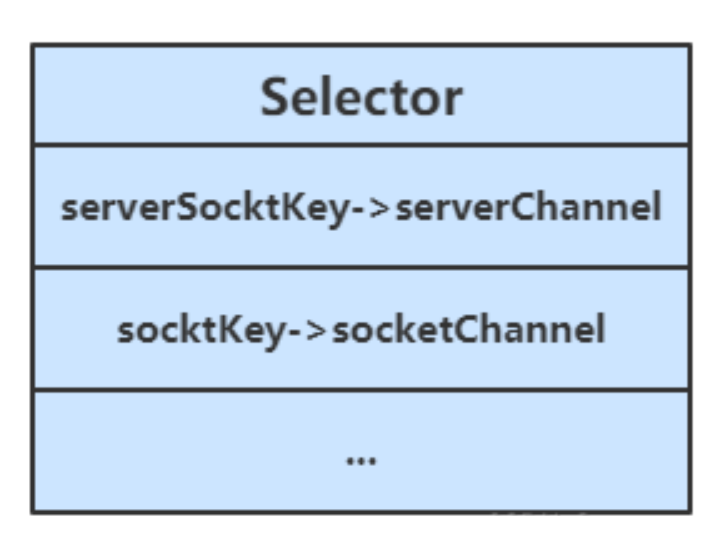
当调用了 server.register(selector, SelectionKey.OP_ACCEPT)后,Selector中维护了一个集合,用于存放SelectionKey以及其对应的通道
// WindowsSelectorImpl 中的 SelectionKeyImpl数组
private SelectionKeyImpl[] channelArray = new SelectionKeyImpl[8];
1
2public class SelectionKeyImpl extends AbstractSelectionKey { // Key对应的通道 final SelChImpl channel; ... }1
2
3
4
5![image-20241028001128485]()
当选择器中的通道对应的事件发生后,selecionKey会被放到另一个集合中,但是selecionKey不会自动移除,所以需要我们在处理完一个事件后,通过迭代器手动移除其中的selecionKey。否则会导致已被处理过的事件再次被处理,就会引发错误
![image-20241028001227530]()

# 断开处理
当客户端与服务器之间的连接断开时,会给服务器端发送一个读事件,对异常断开和正常断开需要加以不同的方式进行处理
正常断开
正常断开时,服务器端的channel.read(buffer)方法的返回值为-1,所以当结束到返回值为-1时,需要调用key的cancel方法取消此事件,并在取消后移除该事件
int read = channel.read(buffer);
// 断开连接时,客户端会向服务器发送一个写事件,此时read的返回值为-1
if(read == -1) {
    // 取消该事件的处理
	key.cancel();
    channel.close();
} else {
    ...
}
// 取消或者处理,都需要移除key
iterator.remove();
1
2
3
4
5
6
7
8
9
10
11
异常断开
- 异常断开时,会抛出IOException异常, 在try-catch的catch块中捕获异常并调用key的cancel方法即可
# 💡 cancel 的作用
cancel 会取消注册在 selector 上的 channel,并从 keys 集合中删除 key 后续不会再监听事件
# 消息边界
不处理消息边界存在的问题
将缓冲区的大小设置为4个字节,发送2个汉字(你好),通过decode解码并打印时,会出现乱码
ByteBuffer buffer = ByteBuffer.allocate(4);
// 解码并打印
System.out.println(StandardCharsets.UTF_8.decode(buffer));
你�
��
2
3
4
5
这是因为UTF-8字符集下,1个汉字占用3个字节,此时缓冲区大小为4个字节,一次读时间无法处理完通道中的所有数据,所以一共会触发两次读事件。这就导致 你好 的 好 字被拆分为了前半部分和后半部分发送,解码时就会出现问题
处理消息边界
传输的文本可能有以下三种情况
- 文本大于缓冲区大小
- 此时需要将缓冲区进行扩容
- 发生半包现象
- 发生粘包现象

解决思路大致有以下三种
- 固定消息长度,数据包大小一样,服务器按预定长度读取,当发送的数据较少时,需要将数据进行填充,直到长度与消息规定长度一致。缺点是浪费带宽
- 另一种思路是按分隔符拆分,缺点是效率低,需要一个一个字符地去匹配分隔符
- TLV 格式,即 Type 类型、Length 长度、Value 数据,(也就是在消息开头用一些空间存放后面数据的长度,如HTTP请求头中的Content-Type与Content-Length)。类型和长度已知的情况下,就可以方便获取消息大小,分配合适的 buffer,缺点是 buffer 需要提前分配,如果内容过大,则影响 server 吞吐量
- Http 1.1 是 TLV 格式
- Http 2.0 是 LTV 格式
下文的消息边界处理方式为第二种:按分隔符拆分
附件与扩容
Channel的register方法还有第三个参数:附件,可以向其中放入一个Object类型的对象,该对象会与登记的Channel以及其对应的SelectionKey绑定,可以从SelectionKey获取到对应通道的附件
public final SelectionKey register(Selector sel, int ops, Object att)
可通过SelectionKey的attachment()方法获得附件
ByteBuffer buffer = (ByteBuffer) key.attachment();
我们需要在Accept事件发生后,将通道注册到Selector中时,对每个通道添加一个ByteBuffer附件,让每个通道发生读事件时都使用自己的通道,避免与其他通道发生冲突而导致问题
// 设置为非阻塞模式,同时将连接的通道也注册到选择其中,同时设置附件
socketChannel.configureBlocking(false);
ByteBuffer buffer = ByteBuffer.allocate(16);
// 添加通道对应的Buffer附件
socketChannel.register(selector, SelectionKey.OP_READ, buffer);
2
3
4
5
当Channel中的数据大于缓冲区时,需要对缓冲区进行扩容操作。此代码中的扩容的判定方法:Channel调用compact方法后的position与limit相等,说明缓冲区中的数据并未被读取(容量太小),此时创建新的缓冲区,其大小扩大为两倍。同时还要将旧缓冲区中的数据拷贝到新的缓冲区中,同时调用SelectionKey的attach方法将新的缓冲区作为新的附件放入SelectionKey中
// 如果缓冲区太小,就进行扩容
if (buffer.position() == buffer.limit()) {
    ByteBuffer newBuffer = ByteBuffer.allocate(buffer.capacity()*2);
    // 将旧buffer中的内容放入新的buffer中
    newBuffer.put(buffer);
    // 将新buffer作为附件放到key中
    key.attach(newBuffer);
}
2
3
4
5
6
7
8
改造后的服务器代码如下
public class SelectServer {
    public static void main(String[] args) {
        // 获得服务器通道
        try(ServerSocketChannel server = ServerSocketChannel.open()) {
            server.bind(new InetSocketAddress(8080));
            // 创建选择器
            Selector selector = Selector.open();
            // 通道必须设置为非阻塞模式
            server.configureBlocking(false);
            // 将通道注册到选择器中,并设置感兴趣的事件
            server.register(selector, SelectionKey.OP_ACCEPT);
            // 为serverKey设置感兴趣的事件
            while (true) {
                // 若没有事件就绪,线程会被阻塞,反之不会被阻塞。从而避免了CPU空转
                // 返回值为就绪的事件个数
                int ready = selector.select();
                System.out.println("selector ready counts : " + ready);
                // 获取所有事件
                Set<SelectionKey> selectionKeys = selector.selectedKeys();
                // 使用迭代器遍历事件
                Iterator<SelectionKey> iterator = selectionKeys.iterator();
                while (iterator.hasNext()) {
                    SelectionKey key = iterator.next();
                    // 判断key的类型
                    if(key.isAcceptable()) {
                        // 获得key对应的channel
                        ServerSocketChannel channel = (ServerSocketChannel) key.channel();
                        System.out.println("before accepting...");
                        // 获取连接
                        SocketChannel socketChannel = channel.accept();
                        System.out.println("after accepting...");
                        // 设置为非阻塞模式,同时将连接的通道也注册到选择其中,同时设置附件
                        socketChannel.configureBlocking(false);
                        ByteBuffer buffer = ByteBuffer.allocate(16);
                        socketChannel.register(selector, SelectionKey.OP_READ, buffer);
                        // 处理完毕后移除
                        iterator.remove();
                    } else if (key.isReadable()) {
                        SocketChannel channel = (SocketChannel) key.channel();
                        System.out.println("before reading...");
                        // 通过key获得附件(buffer)
                        ByteBuffer buffer = (ByteBuffer) key.attachment();
                        int read = channel.read(buffer);
                        if(read == -1) {
                            key.cancel();
                            channel.close();
                        } else {
                            // 通过分隔符来分隔buffer中的数据
                            split(buffer);
                            // 如果缓冲区太小,就进行扩容
                            if (buffer.position() == buffer.limit()) {
                                ByteBuffer newBuffer = ByteBuffer.allocate(buffer.capacity()*2);
                                // 将旧buffer中的内容放入新的buffer中
                                buffer.flip();
                                newBuffer.put(buffer);
                                // 将新buffer放到key中作为附件
                                key.attach(newBuffer);
                            }
                        }
                        System.out.println("after reading...");
                        // 处理完毕后移除
                        iterator.remove();
                    }
                }
            }
        } catch (IOException e) {
            e.printStackTrace();
        }
    }

    private static void split(ByteBuffer buffer) {
        buffer.flip();
        for(int i = 0; i < buffer.limit(); i++) {
            // 遍历寻找分隔符
            // get(i)不会移动position
            if (buffer.get(i) == '\n') {
                // 缓冲区长度
                int length = i+1-buffer.position();
                ByteBuffer target = ByteBuffer.allocate(length);
                // 将前面的内容写入target缓冲区
                for(int j = 0; j < length; j++) {
                    // 将buffer中的数据写入target中
                    target.put(buffer.get());
                }
                // 打印结果
                ByteBufferUtil.debugAll(target);
            }
        }
        // 切换为写模式,但是缓冲区可能未读完,这里需要使用compact
        buffer.compact();
    }
}
2
3
4
5
6
7
8
9
10
11
12
13
14
15
16
17
18
19
20
21
22
23
24
25
26
27
28
29
30
31
32
33
34
35
36
37
38
39
40
41
42
43
44
45
46
47
48
49
50
51
52
53
54
55
56
57
58
59
60
61
62
63
64
65
66
67
68
69
70
71
72
73
74
75
76
77
78
79
80
81
82
83
84
85
86
87
88
89
90
91
92
客户端
SocketChannel sc = SocketChannel.open();
sc.connect(new InetSocketAddress("localhost", 8080));
SocketAddress address = sc.getLocalAddress();
// sc.write(Charset.defaultCharset().encode("hello\nworld\n"));
sc.write(Charset.defaultCharset().encode("0123\n456789abcdef"));
sc.write(Charset.defaultCharset().encode("0123456789abcdef3333\n"));
System.in.read();
2
3
4
5
6
7
# ByteBuffer的大小分配
每个 channel 都需要记录可能被切分的消息,因为 ByteBuffer 不能被多个 channel 共同使用,因此需要为每个 channel 维护一个独立的 ByteBuffer
ByteBuffer 不能太大,比如一个 ByteBuffer 1Mb 的话,要支持百万连接就要 1Tb 内存,因此需要设计大小可变的 ByteBuffer
- 一种思路是首先分配一个较小的 buffer,例如 4k,如果发现数据不够,再分配 8k 的 buffer,将 4k buffer 内容拷贝至 8k buffer,优点是消息连续容易处理,缺点是数据拷贝耗费性能,参考实现 http://tutorials.jenkov.com/java-performance/resizable-array.html (opens new window)
- 另一种思路是用多个数组组成 buffer,一个数组不够,把多出来的内容写入新的数组,与前面的区别是消息存储不连续解析复杂,优点是避免了拷贝引起的性能损耗
# Write事件
服务器通过Buffer向通道中写入数据时,可能因为通道容量小于Buffer中的数据大小,导致无法一次性将Buffer中的数据全部写入到Channel中,这时便需要分多次写入,具体步骤如下
- 执行一次写操作,向将buffer中的内容写入到SocketChannel中,然后判断Buffer中是否还有数据
- 若Buffer中还有数据,则需要将SockerChannel注册到Seletor中,并关注写事件,同时将未写完的Buffer作为附件一起放入到SelectionKey中
 int write = socket.write(buffer);
// 通道中可能无法放入缓冲区中的所有数据
if (buffer.hasRemaining()) {
    // 注册到Selector中,关注可写事件,并将buffer添加到key的附件中
    socket.configureBlocking(false);
    socket.register(selector, SelectionKey.OP_WRITE, buffer);
}
2
3
4
5
6
7
- 添加写事件的相关操作
key.isWritable(),对Buffer再次进行写操作- 每次写后需要判断Buffer中是否还有数据(是否写完)。若写完,需要移除SelecionKey中的Buffer附件,避免其占用过多内存,同时还需移除对写事件的关注
SocketChannel socket = (SocketChannel) key.channel();
// 获得buffer
ByteBuffer buffer = (ByteBuffer) key.attachment();
// 执行写操作
int write = socket.write(buffer);
System.out.println(write);
// 如果已经完成了写操作,需要移除key中的附件,同时不再对写事件感兴趣
if (!buffer.hasRemaining()) {
    key.attach(null);
    key.interestOps(0);
}
2
3
4
5
6
7
8
9
10
11
整体代码如下
public class WriteServer {

    public static void main(String[] args) throws IOException {
        ServerSocketChannel ssc = ServerSocketChannel.open();
        ssc.configureBlocking(false);
        ssc.bind(new InetSocketAddress(8080));

        Selector selector = Selector.open();
        ssc.register(selector, SelectionKey.OP_ACCEPT);

        while(true) {
            selector.select();

            Iterator<SelectionKey> iter = selector.selectedKeys().iterator();
            while (iter.hasNext()) {
                SelectionKey key = iter.next();
                iter.remove();
                if (key.isAcceptable()) {
                    SocketChannel sc = ssc.accept();
                    sc.configureBlocking(false);
                    SelectionKey sckey = sc.register(selector, SelectionKey.OP_READ);
                    // 1. 向客户端发送内容
                    StringBuilder sb = new StringBuilder();
                    for (int i = 0; i < 3000000; i++) {
                        sb.append("a");
                    }
                    ByteBuffer buffer = Charset.defaultCharset().encode(sb.toString());
                    int write = sc.write(buffer);
                    // 3. write 表示实际写了多少字节
                    System.out.println("实际写入字节:" + write);
                    // 4. 如果有剩余未读字节,才需要关注写事件
                    if (buffer.hasRemaining()) {
                        // read 1  write 4
                        // 在原有关注事件的基础上,多关注 写事件
                        sckey.interestOps(sckey.interestOps() + SelectionKey.OP_WRITE);
                        // 把 buffer 作为附件加入 sckey
                        sckey.attach(buffer);
                    }
                } else if (key.isWritable()) {
                    ByteBuffer buffer = (ByteBuffer) key.attachment();
                    SocketChannel sc = (SocketChannel) key.channel();
                    int write = sc.write(buffer);
                    System.out.println("实际写入字节:" + write);
                    if (!buffer.hasRemaining()) { // 写完了
                        key.interestOps(key.interestOps() - SelectionKey.OP_WRITE);
                        key.attach(null);
                    }
                }
            }
        }
    }
}
2
3
4
5
6
7
8
9
10
11
12
13
14
15
16
17
18
19
20
21
22
23
24
25
26
27
28
29
30
31
32
33
34
35
36
37
38
39
40
41
42
43
44
45
46
47
48
49
50
51
52
客户端
public class WriteClient {
    public static void main(String[] args) throws IOException {
        Selector selector = Selector.open();
        SocketChannel sc = SocketChannel.open();
        sc.configureBlocking(false);
        sc.register(selector, SelectionKey.OP_CONNECT | SelectionKey.OP_READ);
        sc.connect(new InetSocketAddress("localhost", 8080));
        int count = 0;
        while (true) {
            selector.select();
            Iterator<SelectionKey> iter = selector.selectedKeys().iterator();
            while (iter.hasNext()) {
                SelectionKey key = iter.next();
                iter.remove();
                if (key.isConnectable()) {
                    System.out.println(sc.finishConnect());
                } else if (key.isReadable()) {
                    ByteBuffer buffer = ByteBuffer.allocate(1024 * 1024);
                    count += sc.read(buffer);
                    buffer.clear();
                    System.out.println(count);
                }
            }
        }
    }
}
2
3
4
5
6
7
8
9
10
11
12
13
14
15
16
17
18
19
20
21
22
23
24
25
26
# 💡 write 为何要取消
只要向 channel 发送数据时,socket 缓冲可写,这个事件会频繁触发,因此应当只在 socket 缓冲区写不下时再关注可写事件,数据写完之后再取消关注
# 优化
# 💡 利用多线程优化
现在都是多核 cpu,设计时要充分考虑别让 cpu 的力量被白白浪费
前面的代码只有一个选择器,没有充分利用多核 cpu,如何改进呢?
分两组选择器
- 单线程配一个选择器(Boss),专门处理 accept 事件
- 创建 cpu 核心数的线程(Worker),每个线程配一个选择器,轮流处理 read 事件
实现思路
创建一个负责处理Accept事件的Boss线程,与多个负责处理Read事件的Worker线程
Boss线程执行的操作:
接受并处理Accept事件,当Accept事件发生后,调用Worker的register(SocketChannel socket)方法,让Worker去处理Read事件,其中需要根据标识robin去判断将任务分配给哪个Worker
// 创建固定数量的Worker
Worker[] workers = new Worker[4];
// 用于负载均衡的原子整数
AtomicInteger robin = new AtomicInteger(0);
// 负载均衡,轮询分配Worker
workers[robin.getAndIncrement()% workers.length].register(socket);
1
2
3
4
5
6register(SocketChannel socket)方法会通过同步队列完成Boss线程与Worker线程之间的通信,让SocketChannel的注册任务被Worker线程执行。添加任务后需要调用selector.wakeup()来唤醒被阻塞的Selector
public void register(final SocketChannel socket) throws IOException {
    // 只启动一次
    if (!started) {
       // 初始化操作
    }
    // 向同步队列中添加SocketChannel的注册事件
    // 在Worker线程中执行注册事件
    queue.add(new Runnable() {
        @Override
        public void run() {
            try {
                socket.register(selector, SelectionKey.OP_READ);
            } catch (IOException e) {
                e.printStackTrace();
            }
        }
    });
    // 唤醒被阻塞的Selector
    // select类似LockSupport中的park,wakeup的原理类似LockSupport中的unpark
    selector.wakeup();
}
1
2
3
4
5
6
7
8
9
10
11
12
13
14
15
16
17
18
19
20
21
Worker线程执行的操作
- 从同步队列中获取注册任务,并处理Read事件
实现代码
public class ThreadsServer {
  public static void main(String[] args) {
        try (ServerSocketChannel serverSocketChannel = ServerSocketChannel.open()) {
            serverSocketChannel.bind(new InetSocketAddress(8089));
            Thread.currentThread().setName("boss");
            serverSocketChannel.configureBlocking(false);
            Selector selector = Selector.open();
            serverSocketChannel.register(selector, SelectionKey.OP_ACCEPT, null);
            // 创建客户端读事件处理线程
            Worker[] workList = new Worker[4];
            for (int i = 0; i < 4; i++) {
                workList[i] = new Worker("worker-" + i);
            }
            // 用来负载客户端连接通道
            AtomicInteger integer = new AtomicInteger();
            // 循环处理服务端事件
            while (true) {
                log.info("before get Selector ready event...");
                int readySelect = selector.select();
                log.info("after get Selector ready event,count={}", readySelect);
                Iterator<SelectionKey> iterator = selector.selectedKeys().iterator();
                while (iterator.hasNext()) {
                    SelectionKey selectionKey = iterator.next();
                    // 处理完事件之后,需要将对应的事件移除,防止下次出现空事件
                    iterator.remove();
                    // 监听服务端连接事件
                    if (selectionKey.isAcceptable()) {
                        ServerSocketChannel serverChannel = (ServerSocketChannel) selectionKey.channel();
                        // 获取客户端连接对象
                        SocketChannel socketChannel = serverChannel.accept();
                        // 设置客户端链接通道为非阻塞模式
                        socketChannel.configureBlocking(false);
                        log.info("before read....");
                        // 将服务端通道注册进新的线程
                        workList[integer.getAndIncrement() % workList.length].register(socketChannel);
                        log.info("after read....");
                    }
                }
            }
        } catch (IOException e) {
            e.printStackTrace();
        }
    }

    static class Worker implements Runnable {
        // 当前工作者工作的线程
        private Thread thread;
        // word工作线程的名称
        private String name;
        // 工作线程处理客户端通道所注册的选择器
        private volatile Selector worker;
        // 判断word是否进行了注册操作,保证值的原子性
        private volatile boolean start = false;
        // 使用线程间同步队列
        private ConcurrentLinkedDeque<Runnable> queue = new ConcurrentLinkedDeque<>();

        public Worker(String name) {
            this.name = name;
        }

        /**
         * 将通道和selector关联起来,因此需要客户端连接对象参数
         */
        public void register(SocketChannel channel) throws IOException {
            if (!start) {
                // 将当前的工作者(处理客户端链接通道的)和线程关联连起来,当前工作者需要实现runnable接口
                thread = new Thread(this);
                thread.setName(name);
                thread.start();
                // 一定要对worker进行开启操作,防止后续操作出现空指针
                worker = Selector.open();
                start = !start;
            }
            // 在此处相当于在boss线程中执行,可能会出现因为worker线程的select()方法导致阻塞,
            // 所以可使用线程间同步队列,或者是,使用selector选择器的wakeUp()方法
//          channel.register(worker, SelectionKey.OP_READ, null);
            // 方法1
            queue.add(() -> {
                try {
                    channel.register(worker, SelectionKey.OP_READ, null);
                } catch (ClosedChannelException e) {
                    e.printStackTrace();
                }
            });
            // 方法2 使用selector的wakeUp方法,但是wakeUp是两种方法都需要的,方法2则不需要队列进行处理
            // 该方法主要作用就是,唤醒阻塞的选择器,唤醒之后,即使之后的唤醒之前对selector进行绑定事件,然后进行select()调用,也能成功唤醒
            worker.wakeup();
//            channel.register(worker, SelectionKey.OP_READ, null);
        }

        @Override
        public void run() {
            // 处理客户端通道的读事件
            while (true) {
                try {
                    worker.select();
                    // 在此处执行注册事件
                    Runnable poll = queue.poll();
                    if (null != poll) {
                        poll.run();
                    }
                    Iterator<SelectionKey> iterator = worker.selectedKeys().iterator();
                    while (iterator.hasNext()) {
                        SelectionKey selectionKey = iterator.next();
                        iterator.remove();
                        log.info("current thread={}", thread.getName());
                        if (selectionKey.isReadable()) {
                            SocketChannel channel = (SocketChannel) selectionKey.channel();
                            ByteBuffer buffer = ByteBuffer.allocate(128);
                            try {
                                int read = channel.read(buffer);
                                if (read == -1) {
                                    key.cancel();
                                    channel.close();
                                } else {
                                    buffer.flip();
                                    log.debug("{} message:", sc.getRemoteAddress());
                                    debugAll(buffer);
                                }
                            } catch (IOException e) {
                                e.printStackTrace();
                                key.cancel();
                                channel.close();
                            }
                        }
                    }
                } catch (IOException e) {
                    e.printStackTrace();
                }
            }
        }
    }
}
1
2
3
4
5
6
7
8
9
10
11
12
13
14
15
16
17
18
19
20
21
22
23
24
25
26
27
28
29
30
31
32
33
34
35
36
37
38
39
40
41
42
43
44
45
46
47
48
49
50
51
52
53
54
55
56
57
58
59
60
61
62
63
64
65
66
67
68
69
70
71
72
73
74
75
76
77
78
79
80
81
82
83
84
85
86
87
88
89
90
91
92
93
94
95
96
97
98
99
100
101
102
103
104
105
106
107
108
109
110
111
112
113
114
115
116
117
118
119
120
121
122
123
124
125
126
127
128
129
130
131
132
133# 💡 如何拿到 cpu 个数
Runtime.getRuntime().availableProcessors()如果工作在 docker 容器下,因为容器不是物理隔离的,会拿到物理 cpu 个数,而不是容器申请时的个数- 这个问题直到 jdk 10 才修复,使用 jvm 参数
UseContainerSupport配置, 默认开启
# UDP
- UDP 是无连接的,client 发送数据不会管 server 是否开启
- server 这边的 receive 方法会将接收到的数据存入 byte buffer,但如果数据报文超过 buffer 大小,多出来的数据会被默默抛弃
首先启动服务器端
public class UdpServer {
    public static void main(String[] args) {
        try (DatagramChannel channel = DatagramChannel.open()) {
            channel.socket().bind(new InetSocketAddress(9999));
            System.out.println("waiting...");
            ByteBuffer buffer = ByteBuffer.allocate(32);
            channel.receive(buffer);
            buffer.flip();
            debug(buffer);
        } catch (IOException e) {
            e.printStackTrace();
        }
    }
}
1
2
3
4
5
6
7
8
9
10
11
12
13
14输出
waiting...1运行客户端
public class UdpClient {
    public static void main(String[] args) {
        try (DatagramChannel channel = DatagramChannel.open()) {
            ByteBuffer buffer = StandardCharsets.UTF_8.encode("hello");
            InetSocketAddress address = new InetSocketAddress("localhost", 9999);
            channel.send(buffer, address);
        } catch (Exception e) {
            e.printStackTrace();
        }
    }
}
1
2
3
4
5
6
7
8
9
10
11接下来服务器端输出
         +-------------------------------------------------+
         |  0  1  2  3  4  5  6  7  8  9  a  b  c  d  e  f |
+--------+-------------------------------------------------+----------------+
|00000000| 68 65 6c 6c 6f                                  |hello           |
+--------+-------------------------------------------------+----------------+
1
2
3
4
5# NIO与BIO
# stream vs channel
- stream 不会自动缓冲数据,channel 会利用系统提供的发送缓冲区、接收缓冲区(更为底层)
- stream 仅支持阻塞 API,channel 同时支持阻塞、非阻塞 API,网络 channel 可配合 selector 实现多路复用
- 二者均为全双工,即读写可以同时进行
- 虽然Stream是单向流动的,但是它也是全双工的
# IO 模型
同步阻塞、同步非阻塞、同步多路复用、异步阻塞(没有此情况)、异步非阻塞
- 同步:线程自己去获取结果(一个线程)
- 例如:线程调用一个方法后,需要等待方法返回结果
- 异步:线程自己不去获取结果,而是由其它线程送结果(至少两个线程)
- 例如:线程A调用一个方法后,继续向下运行,运行结果由线程B返回
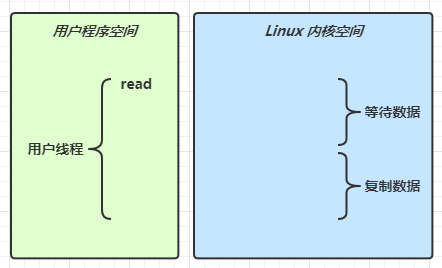
当调用一次 channel.read 或 stream.read 后,会切换至操作系统内核态来完成真正数据读取,而读取又分为两个阶段,分别为:
等待数据阶段
复制数据阶段
![]()
根据UNIX 网络编程 - 卷 I,IO模型主要有以下几种
阻塞 IO

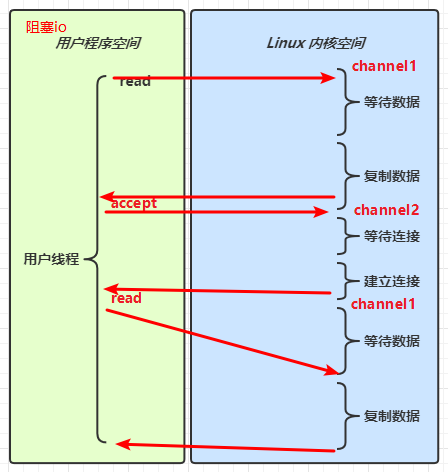
用户线程进行read操作时,需要等待操作系统执行实际的read操作,此期间用户线程是被阻塞的,无法执行其他操作
非阻塞 IO

用户线程
在一个循环中一直调用read方法,若内核空间中还没有数据可读,立即返回
只是在等待阶段非阻塞
用户线程发现内核空间中有数据后,等待内核空间执行复制数据,待复制结束后返回结果
多路复用
![]()
阻塞 IO vs 多路复用
![]()
![]()


Java中通过Selector实现多路复用
- 当没有事件时,调用select方法会被阻塞住
- 一旦有一个或多个事件发生后,就会处理对应的事件,从而实现多路复用
多路复用与阻塞IO的区别
- 阻塞IO模式下,若线程因accept事件被阻塞,发生read事件后,仍需等待accept事件执行完成后,才能去处理read事件
- 多路复用模式下,一个事件发生后,若另一个事件处于阻塞状态,不会影响该事件的执行
信号驱动
异步 IO
![]()

- 线程1调用方法后理解返回,不会被阻塞也不需要立即获取结果
- 当方法的运行结果出来以后,由线程2将结果返回给线程1
# 🔖 参考
UNIX 网络编程 - 卷 I
# 零拷贝
零拷贝指的是数据无需拷贝到 JVM 内存中,同时具有以下三个优点
- 更少的用户态与内核态的切换
- 不利用 cpu 计算,减少 cpu 缓存伪共享
- 零拷贝适合小文件传输
# 传统 IO 问题
传统的 IO 将一个文件通过 socket 写出
File f = new File("helloword/data.txt");
RandomAccessFile file = new RandomAccessFile(file, "r");

byte[] buf = new byte[(int)f.length()];
file.read(buf);

Socket socket = ...;
socket.getOutputStream().write(buf);
2
3
4
5
6
7
8
内部工作流如下
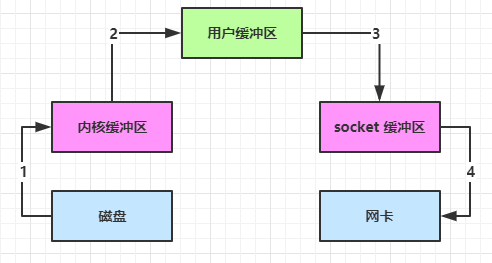
java 本身并不具备 IO 读写能力,因此 read 方法调用后,要从 java 程序的用户态切换至内核态,去调用操作系统(Kernel)的读能力,将数据读入内核缓冲区。这期间用户线程阻塞,操作系统使用 DMA(Direct Memory Access)来实现文件读,其间也不会使用 cpu
DMA 也可以理解为硬件单元,用来解放 cpu 完成文件 IO
从内核态切换回用户态,将数据从内核缓冲区读入用户缓冲区(即 byte[] buf),这期间 cpu 会参与拷贝,无法利用 DMA
调用 write 方法,这时将数据从用户缓冲区(byte[] buf)写入 socket 缓冲区,cpu 会参与拷贝
接下来要向网卡写数据,这项能力 java 又不具备,因此又得从用户态切换至内核态,调用操作系统的写能力,使用 DMA 将 socket 缓冲区的数据写入网卡,不会使用 cpu
可以看到中间环节较多,java 的 IO 实际不是物理设备级别的读写,而是缓存的复制,底层的真正读写是操作系统来完成的
- 用户态与内核态的切换发生了 3 次,这个操作比较重量级
- 数据拷贝了共 4 次
# NIO 优化
通过 DirectByteBuf
ByteBuffer.allocate(10)HeapByteBuffer使用的还是 java 内存ByteBuffer.allocateDirect(10)DirectByteBuffer使用的是操作系统内存

大部分步骤与优化前相同,不再赘述。唯有一点:java 可以使用 DirectByteBuf 将堆外内存映射到 jvm 内存中来直接访问使用
- 这块内存不受 jvm 垃圾回收的影响,因此内存地址固定,有助于 IO 读写
- java 中的 DirectByteBuf 对象仅维护了此内存的虚引用,内存回收分成两步
- DirectByteBuf 对象被垃圾回收,将虚引用加入引用队列
- 通过专门线程访问引用队列,根据虚引用释放堆外内存
- 减少了一次数据拷贝,用户态与内核态的切换次数没有减少
以下两种方式都是零拷贝,即无需将数据拷贝到用户缓冲区中(JVM内存中)
# 优化1
底层采用了 linux 2.1 后提供的 sendFile 方法,Java 中对应着两个 channel 调用 transferTo/transferFrom 方法拷贝数据
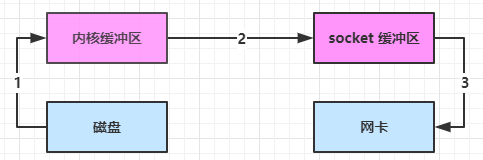
- Java 调用 transferTo 方法后,要从 Java 程序的用户态切换至内核态,使用 DMA将数据读入内核缓冲区,不会使用 CPU
- 数据从内核缓冲区传输到 socket 缓冲区,CPU 会参与拷贝
- 最后使用 DMA 将 socket 缓冲区的数据写入网卡,不会使用 CPU
这种方法下
- 只发生了1次用户态与内核态的切换
- 数据拷贝了 3 次
# 优化2
linux 2.4 对上述方法再次进行了优化
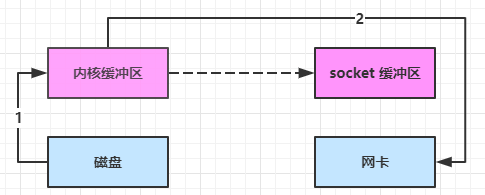
- Java 调用 transferTo 方法后,要从 Java 程序的用户态切换至内核态,使用 DMA将数据读入内核缓冲区,不会使用 CPU
- 只会将一些 offset 和 length 信息拷入 socket 缓冲区,几乎无消耗
- 使用 DMA 将 内核缓冲区的数据写入网卡,不会使用 CPU
整个过程仅只发生了1次用户态与内核态的切换,数据拷贝了 2 次
所谓的【零拷贝】,并不是真正无拷贝,而是在不会拷贝重复数据到 jvm 内存中,零拷贝的优点有
- 更少的用户态与内核态的切换
- 不利用 cpu 计算,减少 cpu 缓存伪共享
- 零拷贝适合小文件传输
# AIO
AIO 用来解决数据复制阶段的阻塞问题
- 同步意味着,在进行读写操作时,线程需要等待结果,还是相当于闲置
- 异步意味着,在进行读写操作时,线程不必等待结果,而是将来由操作系统来通过回调方式由另外的线程来获得结果
异步模型需要底层操作系统(Kernel)提供支持
- Windows 系统通过 IOCP 实现了真正的异步 IO
- Linux 系统异步 IO 在 2.6 版本引入,但其底层实现还是用多路复用模拟了异步 IO,性能没有优势
# 文件 AIO
先来看看 AsynchronousFileChannel
@Slf4j
public class AioDemo1 {
    public static void main(String[] args) throws IOException {
        try{
            AsynchronousFileChannel s =
                AsynchronousFileChannel.open(
                	Paths.get("1.txt"), StandardOpenOption.READ);
            ByteBuffer buffer = ByteBuffer.allocate(2);
            log.debug("begin...");
            s.read(buffer, 0, null, new CompletionHandler<Integer, ByteBuffer>() {
                @Override
                public void completed(Integer result, ByteBuffer attachment) {
                    log.debug("read completed...{}", result);
                    buffer.flip();
                    debug(buffer);
                }

                @Override
                public void failed(Throwable exc, ByteBuffer attachment) {
                    log.debug("read failed...");
                }
            });

        } catch (IOException e) {
            e.printStackTrace();
        }
        log.debug("do other things...");
        System.in.read();
    }
}
2
3
4
5
6
7
8
9
10
11
12
13
14
15
16
17
18
19
20
21
22
23
24
25
26
27
28
29
30
输出
13:44:56 [DEBUG] [main] c.i.aio.AioDemo1 - begin...
13:44:56 [DEBUG] [main] c.i.aio.AioDemo1 - do other things...
13:44:56 [DEBUG] [Thread-5] c.i.aio.AioDemo1 - read completed...2
         +-------------------------------------------------+
         |  0  1  2  3  4  5  6  7  8  9  a  b  c  d  e  f |
+--------+-------------------------------------------------+----------------+
|00000000| 61 0d                                           |a.              |
+--------+-------------------------------------------------+----------------+
2
3
4
5
6
7
8
可以看到
- 响应文件读取成功的是另一个线程 Thread-5
- 主线程并没有 IO 操作阻塞
# 💡 守护线程
默认文件 AIO 使用的线程都是守护线程,所以最后要执行 System.in.read() 以避免守护线程意外结束
# 网络 AIO
public class AioServer {
    public static void main(String[] args) throws IOException {
        AsynchronousServerSocketChannel ssc = AsynchronousServerSocketChannel.open();
        ssc.bind(new InetSocketAddress(8080));
        ssc.accept(null, new AcceptHandler(ssc));
        System.in.read();
    }

    private static void closeChannel(AsynchronousSocketChannel sc) {
        try {
            System.out.printf("[%s] %s close\n", Thread.currentThread().getName(), sc.getRemoteAddress());
            sc.close();
        } catch (IOException e) {
            e.printStackTrace();
        }
    }

    private static class ReadHandler implements CompletionHandler<Integer, ByteBuffer> {
        private final AsynchronousSocketChannel sc;

        public ReadHandler(AsynchronousSocketChannel sc) {
            this.sc = sc;
        }

        @Override
        public void completed(Integer result, ByteBuffer attachment) {
            try {
                if (result == -1) {
                    closeChannel(sc);
                    return;
                }
                System.out.printf("[%s] %s read\n", Thread.currentThread().getName(), sc.getRemoteAddress());
                attachment.flip();
                System.out.println(Charset.defaultCharset().decode(attachment));
                attachment.clear();
                // 处理完第一个 read 时,需要再次调用 read 方法来处理下一个 read 事件
                sc.read(attachment, attachment, this);
            } catch (IOException e) {
                e.printStackTrace();
            }
        }

        @Override
        public void failed(Throwable exc, ByteBuffer attachment) {
            closeChannel(sc);
            exc.printStackTrace();
        }
    }

    private static class WriteHandler implements CompletionHandler<Integer, ByteBuffer> {
        private final AsynchronousSocketChannel sc;

        private WriteHandler(AsynchronousSocketChannel sc) {
            this.sc = sc;
        }

        @Override
        public void completed(Integer result, ByteBuffer attachment) {
            // 如果作为附件的 buffer 还有内容,需要再次 write 写出剩余内容
            if (attachment.hasRemaining()) {
                sc.write(attachment);
            }
        }

        @Override
        public void failed(Throwable exc, ByteBuffer attachment) {
            exc.printStackTrace();
            closeChannel(sc);
        }
    }

    private static class AcceptHandler implements CompletionHandler<AsynchronousSocketChannel, Object> {
        private final AsynchronousServerSocketChannel ssc;

        public AcceptHandler(AsynchronousServerSocketChannel ssc) {
            this.ssc = ssc;
        }

        @Override
        public void completed(AsynchronousSocketChannel sc, Object attachment) {
            try {
                System.out.printf("[%s] %s connected\n", Thread.currentThread().getName(), sc.getRemoteAddress());
            } catch (IOException e) {
                e.printStackTrace();
            }
            ByteBuffer buffer = ByteBuffer.allocate(16);
            // 读事件由 ReadHandler 处理
            sc.read(buffer, buffer, new ReadHandler(sc));
            // 写事件由 WriteHandler 处理
            sc.write(Charset.defaultCharset().encode("server hello!"), ByteBuffer.allocate(16), new WriteHandler(sc));
            // 处理完第一个 accpet 时,需要再次调用 accept 方法来处理下一个 accept 事件
            ssc.accept(null, this);
        }

        @Override
        public void failed(Throwable exc, Object attachment) {
            exc.printStackTrace();
        }
    }
}
2
3
4
5
6
7
8
9
10
11
12
13
14
15
16
17
18
19
20
21
22
23
24
25
26
27
28
29
30
31
32
33
34
35
36
37
38
39
40
41
42
43
44
45
46
47
48
49
50
51
52
53
54
55
56
57
58
59
60
61
62
63
64
65
66
67
68
69
70
71
72
73
74
75
76
77
78
79
80
81
82
83
84
85
86
87
88
89
90
91
92
93
94
95
96
97
98
99
100