
 Netty进阶
# 粘包与半包
# 粘包现象
服务端代码
public class HelloWorldServer {
    static final Logger log = LoggerFactory.getLogger(HelloWorldServer.class);
    void start() {
        NioEventLoopGroup boss = new NioEventLoopGroup(1);
        NioEventLoopGroup worker = new NioEventLoopGroup();
        try {
            ServerBootstrap serverBootstrap = new ServerBootstrap();
            serverBootstrap.channel(NioServerSocketChannel.class);
            serverBootstrap.group(boss, worker);
            serverBootstrap.childHandler(new ChannelInitializer<SocketChannel>() {
                @Override
                protected void initChannel(SocketChannel ch) throws Exception {
                    ch.pipeline().addLast(new LoggingHandler(LogLevel.DEBUG));
                    ch.pipeline().addLast(new ChannelInboundHandlerAdapter() {
                        @Override
                        public void channelActive(ChannelHandlerContext ctx) throws Exception {
                            log.debug("connected {}", ctx.channel());
                            super.channelActive(ctx);
                        }

                        @Override
                        public void channelInactive(ChannelHandlerContext ctx) throws Exception {
                            log.debug("disconnect {}", ctx.channel());
                            super.channelInactive(ctx);
                        }
                    });
                }
            });
            ChannelFuture channelFuture = serverBootstrap.bind(8080);
            log.debug("{} binding...", channelFuture.channel());
            channelFuture.sync();
            log.debug("{} bound...", channelFuture.channel());
            channelFuture.channel().closeFuture().sync();
        } catch (InterruptedException e) {
            log.error("server error", e);
        } finally {
            boss.shutdownGracefully();
            worker.shutdownGracefully();
            log.debug("stoped");
        }
    }

    public static void main(String[] args) {
        new HelloWorldServer().start();
    }
}
2
3
4
5
6
7
8
9
10
11
12
13
14
15
16
17
18
19
20
21
22
23
24
25
26
27
28
29
30
31
32
33
34
35
36
37
38
39
40
41
42
43
44
45
46
客户端代码希望发送 10 个消息,每个消息是 16 字节
public class HelloWorldClient {
    static final Logger log = LoggerFactory.getLogger(HelloWorldClient.class);
    public static void main(String[] args) {
        NioEventLoopGroup worker = new NioEventLoopGroup();
        try {
            Bootstrap bootstrap = new Bootstrap();
            bootstrap.channel(NioSocketChannel.class);
            bootstrap.group(worker);
            bootstrap.handler(new ChannelInitializer<SocketChannel>() {
                @Override
                protected void initChannel(SocketChannel ch) throws Exception {
                    log.debug("connetted...");
                    ch.pipeline().addLast(new ChannelInboundHandlerAdapter() {
                        @Override
                        public void channelActive(ChannelHandlerContext ctx) throws Exception {
                            log.debug("sending...");
                            Random r = new Random();
                            char c = 'a';
                            for (int i = 0; i < 10; i++) {
                                ByteBuf buffer = ctx.alloc().buffer();
                                buffer.writeBytes(new byte[]{0, 1, 2, 3, 4, 5, 6, 7, 8, 9, 10, 11, 12, 13, 14, 15});
                                ctx.writeAndFlush(buffer);
                            }
                        }
                    });
                }
            });
            ChannelFuture channelFuture = bootstrap.connect("127.0.0.1", 8080).sync();
            channelFuture.channel().closeFuture().sync();

        } catch (InterruptedException e) {
            log.error("client error", e);
        } finally {
            worker.shutdownGracefully();
        }
    }
}
2
3
4
5
6
7
8
9
10
11
12
13
14
15
16
17
18
19
20
21
22
23
24
25
26
27
28
29
30
31
32
33
34
35
36
37
服务器端的某次输出,可以看到一次就接收了 160 个字节,而非分 10 次接收
08:24:46 [DEBUG] [main] c.i.n.HelloWorldServer - [id: 0x81e0fda5] binding...
08:24:46 [DEBUG] [main] c.i.n.HelloWorldServer - [id: 0x81e0fda5, L:/0:0:0:0:0:0:0:0:8080] bound...
08:24:55 [DEBUG] [nioEventLoopGroup-3-1] i.n.h.l.LoggingHandler - [id: 0x94132411, L:/127.0.0.1:8080 - R:/127.0.0.1:58177] REGISTERED
08:24:55 [DEBUG] [nioEventLoopGroup-3-1] i.n.h.l.LoggingHandler - [id: 0x94132411, L:/127.0.0.1:8080 - R:/127.0.0.1:58177] ACTIVE
08:24:55 [DEBUG] [nioEventLoopGroup-3-1] c.i.n.HelloWorldServer - connected [id: 0x94132411, L:/127.0.0.1:8080 - R:/127.0.0.1:58177]
08:24:55 [DEBUG] [nioEventLoopGroup-3-1] i.n.h.l.LoggingHandler - [id: 0x94132411, L:/127.0.0.1:8080 - R:/127.0.0.1:58177] READ: 160B
         +-------------------------------------------------+
         |  0  1  2  3  4  5  6  7  8  9  a  b  c  d  e  f |
+--------+-------------------------------------------------+----------------+
|00000000| 00 01 02 03 04 05 06 07 08 09 0a 0b 0c 0d 0e 0f |................|
|00000010| 00 01 02 03 04 05 06 07 08 09 0a 0b 0c 0d 0e 0f |................|
|00000020| 00 01 02 03 04 05 06 07 08 09 0a 0b 0c 0d 0e 0f |................|
|00000030| 00 01 02 03 04 05 06 07 08 09 0a 0b 0c 0d 0e 0f |................|
|00000040| 00 01 02 03 04 05 06 07 08 09 0a 0b 0c 0d 0e 0f |................|
|00000050| 00 01 02 03 04 05 06 07 08 09 0a 0b 0c 0d 0e 0f |................|
|00000060| 00 01 02 03 04 05 06 07 08 09 0a 0b 0c 0d 0e 0f |................|
|00000070| 00 01 02 03 04 05 06 07 08 09 0a 0b 0c 0d 0e 0f |................|
|00000080| 00 01 02 03 04 05 06 07 08 09 0a 0b 0c 0d 0e 0f |................|
|00000090| 00 01 02 03 04 05 06 07 08 09 0a 0b 0c 0d 0e 0f |................|
+--------+-------------------------------------------------+----------------+
08:24:55 [DEBUG] [nioEventLoopGroup-3-1] i.n.h.l.LoggingHandler - [id: 0x94132411, L:/127.0.0.1:8080 - R:/127.0.0.1:58177] READ COMPLETE
2
3
4
5
6
7
8
9
10
11
12
13
14
15
16
17
18
19
20
21
可见虽然客户端是分别以16字节为单位,通过channel向服务器发送了10次数据,可是服务器端却只接收了一次,接收数据的大小为160B,即客户端发送的数据总大小,将多次发送的数据一次性接收,这就是粘包现象
# 半包现象
客户端代码希望发送 1 个消息,这个消息是 160 字节,代码改为
ByteBuf buffer = ctx.alloc().buffer();
for (int i = 0; i < 10; i++) {
    buffer.writeBytes(new byte[]{0, 1, 2, 3, 4, 5, 6, 7, 8, 9, 10, 11, 12, 13, 14, 15});
}
ctx.writeAndFlush(buffer);
2
3
4
5
为现象明显,服务端修改一下接收缓冲区,其它代码不变
serverBootstrap.option(ChannelOption.SO_RCVBUF, 10);
服务器端的某次输出,可以看到接收的消息被分为两节,第一次 20 字节,第二次 140 字节
08:43:49 [DEBUG] [main] c.i.n.HelloWorldServer - [id: 0x4d6c6a84] binding...
08:43:49 [DEBUG] [main] c.i.n.HelloWorldServer - [id: 0x4d6c6a84, L:/0:0:0:0:0:0:0:0:8080] bound...
08:44:23 [DEBUG] [nioEventLoopGroup-3-1] i.n.h.l.LoggingHandler - [id: 0x1719abf7, L:/127.0.0.1:8080 - R:/127.0.0.1:59221] REGISTERED
08:44:23 [DEBUG] [nioEventLoopGroup-3-1] i.n.h.l.LoggingHandler - [id: 0x1719abf7, L:/127.0.0.1:8080 - R:/127.0.0.1:59221] ACTIVE
08:44:23 [DEBUG] [nioEventLoopGroup-3-1] c.i.n.HelloWorldServer - connected [id: 0x1719abf7, L:/127.0.0.1:8080 - R:/127.0.0.1:59221]
08:44:24 [DEBUG] [nioEventLoopGroup-3-1] i.n.h.l.LoggingHandler - [id: 0x1719abf7, L:/127.0.0.1:8080 - R:/127.0.0.1:59221] READ: 20B
         +-------------------------------------------------+
         |  0  1  2  3  4  5  6  7  8  9  a  b  c  d  e  f |
+--------+-------------------------------------------------+----------------+
|00000000| 00 01 02 03 04 05 06 07 08 09 0a 0b 0c 0d 0e 0f |................|
|00000010| 00 01 02 03                                     |....            |
+--------+-------------------------------------------------+----------------+
08:44:24 [DEBUG] [nioEventLoopGroup-3-1] i.n.h.l.LoggingHandler - [id: 0x1719abf7, L:/127.0.0.1:8080 - R:/127.0.0.1:59221] READ COMPLETE
08:44:24 [DEBUG] [nioEventLoopGroup-3-1] i.n.h.l.LoggingHandler - [id: 0x1719abf7, L:/127.0.0.1:8080 - R:/127.0.0.1:59221] READ: 140B
         +-------------------------------------------------+
         |  0  1  2  3  4  5  6  7  8  9  a  b  c  d  e  f |
+--------+-------------------------------------------------+----------------+
|00000000| 04 05 06 07 08 09 0a 0b 0c 0d 0e 0f 00 01 02 03 |................|
|00000010| 04 05 06 07 08 09 0a 0b 0c 0d 0e 0f 00 01 02 03 |................|
|00000020| 04 05 06 07 08 09 0a 0b 0c 0d 0e 0f 00 01 02 03 |................|
|00000030| 04 05 06 07 08 09 0a 0b 0c 0d 0e 0f 00 01 02 03 |................|
|00000040| 04 05 06 07 08 09 0a 0b 0c 0d 0e 0f 00 01 02 03 |................|
|00000050| 04 05 06 07 08 09 0a 0b 0c 0d 0e 0f 00 01 02 03 |................|
|00000060| 04 05 06 07 08 09 0a 0b 0c 0d 0e 0f 00 01 02 03 |................|
|00000070| 04 05 06 07 08 09 0a 0b 0c 0d 0e 0f 00 01 02 03 |................|
|00000080| 04 05 06 07 08 09 0a 0b 0c 0d 0e 0f             |............    |
+--------+-------------------------------------------------+----------------+
08:44:24 [DEBUG] [nioEventLoopGroup-3-1] i.n.h.l.LoggingHandler - [id: 0x1719abf7, L:/127.0.0.1:8080 - R:/127.0.0.1:59221] READ COMPLETE
2
3
4
5
6
7
8
9
10
11
12
13
14
15
16
17
18
19
20
21
22
23
24
25
26
27
28
注意
serverBootstrap.option(ChannelOption.SO_RCVBUF, 10)影响的底层接收缓冲区(即滑动窗口)大小,仅决定了 netty 读取的最小单位,netty 实际每次读取的一般是它的整数倍
可见客户端每次发送的数据,因channel容量不足,无法将发送的数据一次性接收,只能接受数据的一部分,便产生了半包现象
# 现象分析
滑动窗口
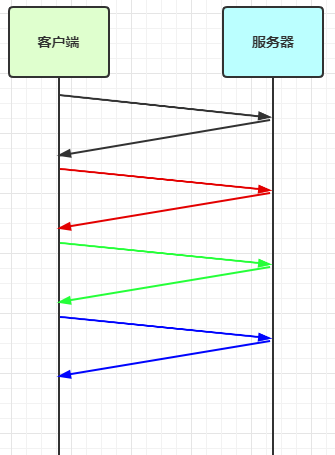
TCP 以一个段(segment)为单位,每发送一个段就需要进行一次确认应答(ack)处理,但如果这么做,缺点是包的往返时间越长性能就越差
![0049]()
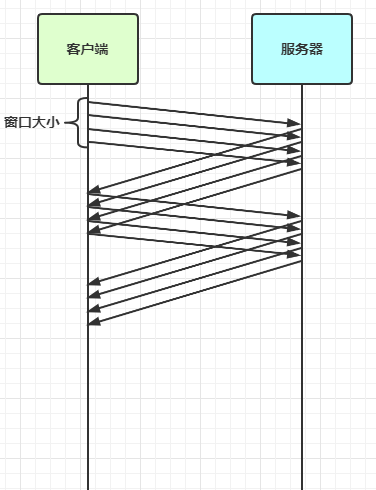
为了解决此问题,引入了窗口概念,窗口大小即决定了无需等待应答而可以继续发送的数据最大值
![0051]()
粘包
- 现象,发送
abc def,接收abcdef - 原因
- 应用层:接收方
ByteBuf设置太大(Netty 默认 1024) - 滑动窗口:假设发送方 256 bytes 表示一个完整报文,但由于接收方处理不及时且窗口大小足够大,这 256 bytes 字节就会缓冲在接收方的滑动窗口中,当滑动窗口中缓冲了多个报文就会粘包
- Nagle 算法:会造成粘包
- 应用层:接收方
半包
- 现象,发送
abcdef,接收abc def - 原因
- 应用层:接收方
ByteBuf小于实际发送数据量 - 滑动窗口:假设接收方的窗口只剩了 128 bytes,发送方的报文大小是 256 bytes,这时接收方窗口中无法容纳发送方的全部报文,发送方只能先发送前 128 bytes,等待 ack 后才能发送剩余部分,这就造成了半包
- MSS 限制:当发送的数据超过 MSS 限制后,会将数据切分发送,就会造成半包
- 应用层:接收方
本质是因为 TCP 是流式协议,消息无边界
MSS 限制
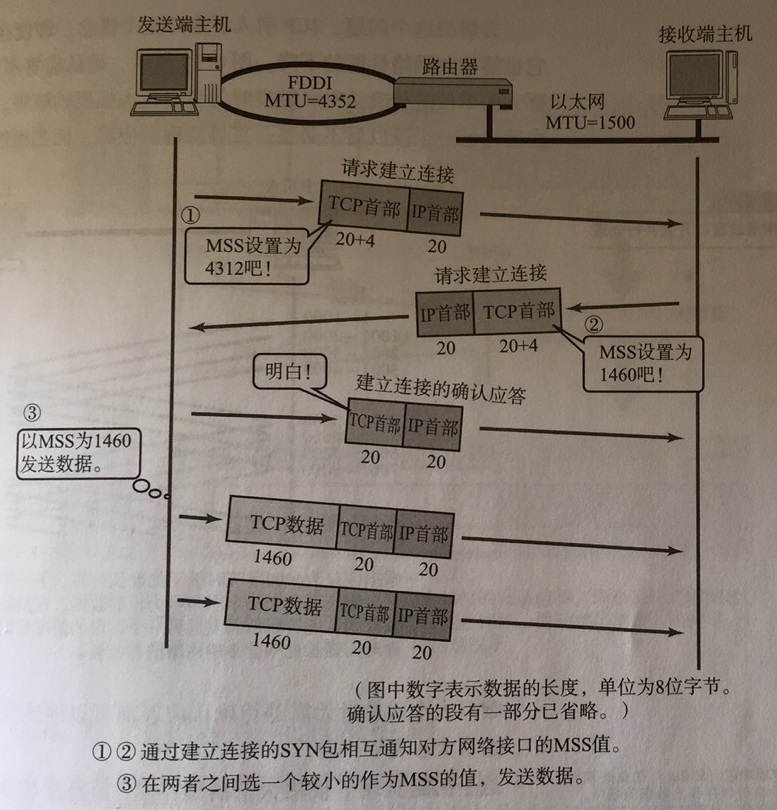
链路层对一次能够发送的最大数据有限制,这个限制称之为 MTU(maximum transmission unit),不同的链路设备的 MTU 值也有所不同,例如
以太网的 MTU 是 1500
FDDI(光纤分布式数据接口)的 MTU 是 4352
本地回环地址的 MTU 是 65535 - 本地测试不走网卡
MSS 是最大段长度(maximum segment size),它是 MTU 刨去 tcp 头和 ip 头后剩余能够作为数据传输的字节数
ipv4 tcp 头占用 20 bytes,ip 头占用 20 bytes,因此以太网 MSS 的值为 1500 - 40 = 1460
TCP 在传递大量数据时,会按照 MSS 大小将数据进行分割发送
MSS 的值在三次握手时通知对方自己 MSS 的值,然后在两者之间选择一个小值作为 MSS
Nagle 算法
- 即使发送一个字节,也需要加入 tcp 头和 ip 头,也就是总字节数会使用 41 bytes,非常不经济。因此为了提高网络利用率,tcp 希望尽可能发送足够大的数据,这就是 Nagle 算法产生的缘由
- 该算法是指发送端即使还有应该发送的数据,但如果这部分数据很少的话,则进行延迟发送
- 如果
SO_SNDBUF的数据达到 MSS,则需要发送- 如果
SO_SNDBUF中含有 FIN(表示需要连接关闭)这时将剩余数据发送,再关闭- 如果
TCP_NODELAY = true,则需要发送- 已发送的数据都收到
ack时,则需要发送- 上述条件不满足,但发生超时(一般为 200ms)则需要发送
- 除上述情况,延迟发送
# 解决方案
- 短链接,发一个包建立一次连接,这样连接建立到连接断开之间就是消息的边界,缺点效率太低。客户端每次向服务器发送数据以后,就与服务器断开连接,此时的消息边界为连接建立到连接断开。这时便无需使用滑动窗口等技术来缓冲数据,则不会发生粘包现象。但如果一次性数据发送过多,接收方无法一次性容纳所有数据,还是会发生半包现象,所以短链接无法解决半包现象
- 每一条消息采用固定长度,缺点浪费空间
- 每一条消息采用分隔符,例如 \n,缺点需要转义
- 每一条消息分为 head 和 body,head 中包含 body 的长度
# 方法1,短链接
以解决粘包为例
public class HelloWorldClient {
    static final Logger log = LoggerFactory.getLogger(HelloWorldClient.class);

    public static void main(String[] args) {
        // 分 10 次发送
        for (int i = 0; i < 10; i++) {
            send();
        }
    }

    private static void send() {
        NioEventLoopGroup worker = new NioEventLoopGroup();
        try {
            Bootstrap bootstrap = new Bootstrap();
            bootstrap.channel(NioSocketChannel.class);
            bootstrap.group(worker);
            bootstrap.handler(new ChannelInitializer<SocketChannel>() {
                @Override
                protected void initChannel(SocketChannel ch) throws Exception {
                    log.debug("conneted...");
                    ch.pipeline().addLast(new LoggingHandler(LogLevel.DEBUG));
                    ch.pipeline().addLast(new ChannelInboundHandlerAdapter() {
                        @Override
                        public void channelActive(ChannelHandlerContext ctx) throws Exception {
                            log.debug("sending...");
                            ByteBuf buffer = ctx.alloc().buffer();
                            buffer.writeBytes(new byte[]{0, 1, 2, 3, 4, 5, 6, 7, 8, 9, 10, 11, 12, 13, 14, 15});
                            ctx.writeAndFlush(buffer);
                            // 发完即关
                            ctx.close();
                        }
                    });
                }
            });
            ChannelFuture channelFuture = bootstrap.connect("localhost", 8080).sync();
            channelFuture.channel().closeFuture().sync();

        } catch (InterruptedException e) {
            log.error("client error", e);
        } finally {
            worker.shutdownGracefully();
        }
    }
}
2
3
4
5
6
7
8
9
10
11
12
13
14
15
16
17
18
19
20
21
22
23
24
25
26
27
28
29
30
31
32
33
34
35
36
37
38
39
40
41
42
43
44
输出
23:20:00.218 logback [nioEventLoopGroup-2-2] DEBUG i.n.handler.logging.LoggingHandler - [id: 0x78fccc24, L:/127.0.0.1:8089 - R:/127.0.0.1:50779] REGISTERED
23:20:00.218 logback [nioEventLoopGroup-2-2] DEBUG i.n.handler.logging.LoggingHandler - [id: 0x78fccc24, L:/127.0.0.1:8089 - R:/127.0.0.1:50779] ACTIVE
23:20:00.219 logback [nioEventLoopGroup-2-2] DEBUG i.n.handler.logging.LoggingHandler - [id: 0x78fccc24, L:/127.0.0.1:8089 - R:/127.0.0.1:50779] RECEIVED: 15B
         +-------------------------------------------------+
         |  0  1  2  3  4  5  6  7  8  9  a  b  c  d  e  f |
+--------+-------------------------------------------------+----------------+
|00000000| 01 02 03 04 05 06 07 08 09 0a 0b 0c 0d 0e 0f    |............... |
+--------+-------------------------------------------------+----------------+
23:20:00.219 logback [nioEventLoopGroup-2-2] DEBUG i.n.channel.DefaultChannelPipeline - Discarded inbound message PooledUnsafeDirectByteBuf(ridx: 0, widx: 15, cap: 1024) that reached at the tail of the pipeline. Please check your pipeline configuration.
23:20:00.220 logback [nioEventLoopGroup-2-2] DEBUG i.n.handler.logging.LoggingHandler - [id: 0x78fccc24, L:/127.0.0.1:8089 ! R:/127.0.0.1:50779] INACTIVE
23:20:00.220 logback [nioEventLoopGroup-2-2] DEBUG i.n.handler.logging.LoggingHandler - [id: 0x78fccc24, L:/127.0.0.1:8089 ! R:/127.0.0.1:50779] UNREGISTERED
23:20:00.230 logback [nioEventLoopGroup-2-3] DEBUG i.n.handler.logging.LoggingHandler - [id: 0xd649bba5, L:/127.0.0.1:8089 - R:/127.0.0.1:50796] REGISTERED
23:20:00.230 logback [nioEventLoopGroup-2-3] DEBUG i.n.handler.logging.LoggingHandler - [id: 0xd649bba5, L:/127.0.0.1:8089 - R:/127.0.0.1:50796] ACTIVE
23:20:00.231 logback [nioEventLoopGroup-2-3] DEBUG i.n.handler.logging.LoggingHandler - [id: 0xd649bba5, L:/127.0.0.1:8089 - R:/127.0.0.1:50796] RECEIVED: 15B
         +-------------------------------------------------+
         |  0  1  2  3  4  5  6  7  8  9  a  b  c  d  e  f |
+--------+-------------------------------------------------+----------------+
|00000000| 01 02 03 04 05 06 07 08 09 0a 0b 0c 0d 0e 0f    |............... |
+--------+-------------------------------------------------+----------------+
23:20:00.231 logback [nioEventLoopGroup-2-3] DEBUG i.n.channel.DefaultChannelPipeline - Discarded inbound message PooledUnsafeDirectByteBuf(ridx: 0, widx: 15, cap: 1024) that reached at the tail of the pipeline. Please check your pipeline configuration.
23:20:00.232 logback [nioEventLoopGroup-2-3] DEBUG i.n.handler.logging.LoggingHandler - [id: 0xd649bba5, L:/127.0.0.1:8089 ! R:/127.0.0.1:50796] INACTIVE
23:20:00.233 logback [nioEventLoopGroup-2-3] DEBUG i.n.handler.logging.LoggingHandler - [id: 0xd649bba5, L:/127.0.0.1:8089 ! R:/127.0.0.1:50796] UNREGISTERED
2
3
4
5
6
7
8
9
10
11
12
13
14
15
16
17
18
19
20
21
22
23
半包用这种办法还是不好解决,因为接收方的缓冲区大小是有限的
客户端先于服务器建立连接,此时控制台打印ACTIVE,之后客户端向服务器发送了16B的数据,发送后断开连接,此时控制台打印INACTIVE,未出现粘包现象
# 方法2,固定长度
客户端于服务器约定一个最大长度,保证客户端每次发送的数据长度都不会大于该长度。若发送数据长度不足则需要补齐至该长度
服务器接收数据时,将接收到的数据按照约定的最大长度进行拆分,即使发送过程中产生了粘包,也可以通过定长解码器将数据正确地进行拆分。服务端需要用到FixedLengthFrameDecoder对数据进行定长解码,具体使用方法如下
让所有数据包长度固定(假设长度为 8 字节),服务器端加入
ch.pipeline().addLast(new FixedLengthFrameDecoder(8));
客户端代码
客户端测试代码,注意, 采用这种方法后,客户端什么时候 flush 都可以
public class HelloWorldClient {
    static final Logger log = LoggerFactory.getLogger(HelloWorldClient.class);

    public static void main(String[] args) {
        NioEventLoopGroup worker = new NioEventLoopGroup();
        try {
            Bootstrap bootstrap = new Bootstrap();
            bootstrap.channel(NioSocketChannel.class);
            bootstrap.group(worker);
            bootstrap.handler(new ChannelInitializer<SocketChannel>() {
                @Override
                protected void initChannel(SocketChannel ch) throws Exception {
                    log.debug("connetted...");
                    ch.pipeline().addLast(new LoggingHandler(LogLevel.DEBUG));
                    ch.pipeline().addLast(new ChannelInboundHandlerAdapter() {
                        @Override
                        public void channelActive(ChannelHandlerContext ctx) throws Exception {
                            log.debug("sending...");
                            // 发送内容随机的数据包
                            Random r = new Random();
                            char c = 'a';
                            ByteBuf buffer = ctx.alloc().buffer();
                            for (int i = 0; i < 10; i++) {
                                // 定长byte数组,未使用部分会以0进行填充,约定最大长度为8
                                byte[] bytes = new byte[8];
                                // 生成长度为0~7的数据
                                for (int j = 0; j < r.nextInt(8); j++) {
                                    bytes[j] = (byte) c;
                                }
                                c++;
                                buffer.writeBytes(bytes);
                            }
                            ctx.writeAndFlush(buffer);
                        }
                    });
                }
            });
            ChannelFuture channelFuture = bootstrap.connect("192.168.0.103", 9090).sync();
            channelFuture.channel().closeFuture().sync();

        } catch (InterruptedException e) {
            log.error("client error", e);
        } finally {
            worker.shutdownGracefully();
        }
    }
}
2
3
4
5
6
7
8
9
10
11
12
13
14
15
16
17
18
19
20
21
22
23
24
25
26
27
28
29
30
31
32
33
34
35
36
37
38
39
40
41
42
43
44
45
46
47
客户端输出
12:07:00 [DEBUG] [nioEventLoopGroup-2-1] c.i.n.HelloWorldClient - connetted...
12:07:00 [DEBUG] [nioEventLoopGroup-2-1] i.n.h.l.LoggingHandler - [id: 0x3c2ef3c2] REGISTERED
12:07:00 [DEBUG] [nioEventLoopGroup-2-1] i.n.h.l.LoggingHandler - [id: 0x3c2ef3c2] CONNECT: /192.168.0.103:9090
12:07:00 [DEBUG] [nioEventLoopGroup-2-1] i.n.h.l.LoggingHandler - [id: 0x3c2ef3c2, L:/192.168.0.103:53155 - R:/192.168.0.103:9090] ACTIVE
12:07:00 [DEBUG] [nioEventLoopGroup-2-1] c.i.n.HelloWorldClient - sending...
12:07:00 [DEBUG] [nioEventLoopGroup-2-1] i.n.h.l.LoggingHandler - [id: 0x3c2ef3c2, L:/192.168.0.103:53155 - R:/192.168.0.103:9090] WRITE: 80B
         +-------------------------------------------------+
         |  0  1  2  3  4  5  6  7  8  9  a  b  c  d  e  f |
+--------+-------------------------------------------------+----------------+
|00000000| 61 61 61 61 00 00 00 00 62 00 00 00 00 00 00 00 |aaaa....b.......|
|00000010| 63 63 00 00 00 00 00 00 64 00 00 00 00 00 00 00 |cc......d.......|
|00000020| 00 00 00 00 00 00 00 00 66 66 66 66 00 00 00 00 |........ffff....|
|00000030| 67 67 67 00 00 00 00 00 68 00 00 00 00 00 00 00 |ggg.....h.......|
|00000040| 69 69 69 69 69 00 00 00 6a 6a 6a 6a 00 00 00 00 |iiiii...jjjj....|
+--------+-------------------------------------------------+----------------+
12:07:00 [DEBUG] [nioEventLoopGroup-2-1] i.n.h.l.LoggingHandler - [id: 0x3c2ef3c2, L:/192.168.0.103:53155 - R:/192.168.0.103:9090] FLUSH
2
3
4
5
6
7
8
9
10
11
12
13
14
15
16
服务器代码
使用FixedLengthFrameDecoder对粘包数据进行拆分,该handler需要添加在LoggingHandler之前,保证数据被打印时已被拆分
// 通过定长解码器对粘包数据进行拆分
ch.pipeline().addLast(new FixedLengthFrameDecoder(8));
ch.pipeline().addLast(new LoggingHandler(LogLevel.DEBUG));
2
3
服务端输出
12:06:51 [DEBUG] [main] c.i.n.HelloWorldServer - [id: 0xe3d9713f] binding...
12:06:51 [DEBUG] [main] c.i.n.HelloWorldServer - [id: 0xe3d9713f, L:/192.168.0.103:9090] bound...
12:07:00 [DEBUG] [nioEventLoopGroup-3-1] i.n.h.l.LoggingHandler - [id: 0xd739f137, L:/192.168.0.103:9090 - R:/192.168.0.103:53155] REGISTERED
12:07:00 [DEBUG] [nioEventLoopGroup-3-1] i.n.h.l.LoggingHandler - [id: 0xd739f137, L:/192.168.0.103:9090 - R:/192.168.0.103:53155] ACTIVE
12:07:00 [DEBUG] [nioEventLoopGroup-3-1] c.i.n.HelloWorldServer - connected [id: 0xd739f137, L:/192.168.0.103:9090 - R:/192.168.0.103:53155]
12:07:00 [DEBUG] [nioEventLoopGroup-3-1] i.n.h.l.LoggingHandler - [id: 0xd739f137, L:/192.168.0.103:9090 - R:/192.168.0.103:53155] READ: 8B
         +-------------------------------------------------+
         |  0  1  2  3  4  5  6  7  8  9  a  b  c  d  e  f |
+--------+-------------------------------------------------+----------------+
|00000000| 61 61 61 61 00 00 00 00                         |aaaa....        |
+--------+-------------------------------------------------+----------------+
12:07:00 [DEBUG] [nioEventLoopGroup-3-1] i.n.h.l.LoggingHandler - [id: 0xd739f137, L:/192.168.0.103:9090 - R:/192.168.0.103:53155] READ: 8B
         +-------------------------------------------------+
         |  0  1  2  3  4  5  6  7  8  9  a  b  c  d  e  f |
+--------+-------------------------------------------------+----------------+
|00000000| 62 00 00 00 00 00 00 00                         |b.......        |
+--------+-------------------------------------------------+----------------+
12:07:00 [DEBUG] [nioEventLoopGroup-3-1] i.n.h.l.LoggingHandler - [id: 0xd739f137, L:/192.168.0.103:9090 - R:/192.168.0.103:53155] READ: 8B
         +-------------------------------------------------+
         |  0  1  2  3  4  5  6  7  8  9  a  b  c  d  e  f |
+--------+-------------------------------------------------+----------------+
|00000000| 63 63 00 00 00 00 00 00                         |cc......        |
+--------+-------------------------------------------------+----------------+
12:07:00 [DEBUG] [nioEventLoopGroup-3-1] i.n.h.l.LoggingHandler - [id: 0xd739f137, L:/192.168.0.103:9090 - R:/192.168.0.103:53155] READ: 8B
         +-------------------------------------------------+
         |  0  1  2  3  4  5  6  7  8  9  a  b  c  d  e  f |
+--------+-------------------------------------------------+----------------+
|00000000| 64 00 00 00 00 00 00 00                         |d.......        |
+--------+-------------------------------------------------+----------------+
12:07:00 [DEBUG] [nioEventLoopGroup-3-1] i.n.h.l.LoggingHandler - [id: 0xd739f137, L:/192.168.0.103:9090 - R:/192.168.0.103:53155] READ: 8B
         +-------------------------------------------------+
         |  0  1  2  3  4  5  6  7  8  9  a  b  c  d  e  f |
+--------+-------------------------------------------------+----------------+
|00000000| 00 00 00 00 00 00 00 00                         |........        |
+--------+-------------------------------------------------+----------------+
12:07:00 [DEBUG] [nioEventLoopGroup-3-1] i.n.h.l.LoggingHandler - [id: 0xd739f137, L:/192.168.0.103:9090 - R:/192.168.0.103:53155] READ: 8B
         +-------------------------------------------------+
         |  0  1  2  3  4  5  6  7  8  9  a  b  c  d  e  f |
+--------+-------------------------------------------------+----------------+
|00000000| 66 66 66 66 00 00 00 00                         |ffff....        |
+--------+-------------------------------------------------+----------------+
12:07:00 [DEBUG] [nioEventLoopGroup-3-1] i.n.h.l.LoggingHandler - [id: 0xd739f137, L:/192.168.0.103:9090 - R:/192.168.0.103:53155] READ: 8B
         +-------------------------------------------------+
         |  0  1  2  3  4  5  6  7  8  9  a  b  c  d  e  f |
+--------+-------------------------------------------------+----------------+
|00000000| 67 67 67 00 00 00 00 00                         |ggg.....        |
+--------+-------------------------------------------------+----------------+
12:07:00 [DEBUG] [nioEventLoopGroup-3-1] i.n.h.l.LoggingHandler - [id: 0xd739f137, L:/192.168.0.103:9090 - R:/192.168.0.103:53155] READ: 8B
         +-------------------------------------------------+
         |  0  1  2  3  4  5  6  7  8  9  a  b  c  d  e  f |
+--------+-------------------------------------------------+----------------+
|00000000| 68 00 00 00 00 00 00 00                         |h.......        |
+--------+-------------------------------------------------+----------------+
12:07:00 [DEBUG] [nioEventLoopGroup-3-1] i.n.h.l.LoggingHandler - [id: 0xd739f137, L:/192.168.0.103:9090 - R:/192.168.0.103:53155] READ: 8B
         +-------------------------------------------------+
         |  0  1  2  3  4  5  6  7  8  9  a  b  c  d  e  f |
+--------+-------------------------------------------------+----------------+
|00000000| 69 69 69 69 69 00 00 00                         |iiiii...        |
+--------+-------------------------------------------------+----------------+
12:07:00 [DEBUG] [nioEventLoopGroup-3-1] i.n.h.l.LoggingHandler - [id: 0xd739f137, L:/192.168.0.103:9090 - R:/192.168.0.103:53155] READ: 8B
         +-------------------------------------------------+
         |  0  1  2  3  4  5  6  7  8  9  a  b  c  d  e  f |
+--------+-------------------------------------------------+----------------+
|00000000| 6a 6a 6a 6a 00 00 00 00                         |jjjj....        |
+--------+-------------------------------------------------+----------------+
12:07:00 [DEBUG] [nioEventLoopGroup-3-1] i.n.h.l.LoggingHandler - [id: 0xd739f137, L:/192.168.0.103:9090 - R:/192.168.0.103:53155] READ COMPLETE
2
3
4
5
6
7
8
9
10
11
12
13
14
15
16
17
18
19
20
21
22
23
24
25
26
27
28
29
30
31
32
33
34
35
36
37
38
39
40
41
42
43
44
45
46
47
48
49
50
51
52
53
54
55
56
57
58
59
60
61
62
63
64
65
66
缺点是,数据包的大小不好把握
- 长度定的太大,浪费
- 长度定的太小,对某些数据包又显得不够
# 方法3,固定分隔符(行解码器)
行解码器的是通过分隔符对数据进行拆分来解决粘包半包问题的
可以通过LineBasedFrameDecoder(int maxLength)来拆分以换行符(\n)为分隔符的数据,也可以通过DelimiterBasedFrameDecoder(int maxFrameLength, ByteBuf... delimiters)来指定通过什么分隔符来拆分数据(可以传入多个分隔符)
两种解码器都需要传入数据的最大长度,若超出最大长度,会抛出TooLongFrameException异常
以换行符 \n 为分隔符
客户端代码
// 约定最大长度为 64
final int maxLength = 64;
// 被发送的数据
char c = 'a';
for (int i = 0; i < 10; i++) {
    ByteBuf buffer = ctx.alloc().buffer(maxLength);
    // 生成长度为0~62的数据
    Random random = new Random();
    StringBuilder sb = new StringBuilder();
    for (int j = 0; j < (int)(random.nextInt(maxLength-2)); j++) {
        sb.append(c);
    }
    // 数据以 \n 结尾
    sb.append("\n");
    buffer.writeBytes(sb.toString().getBytes(StandardCharsets.UTF_8));
    c++;
    // 将数据发送给服务器
    ctx.writeAndFlush(buffer);
}
2
3
4
5
6
7
8
9
10
11
12
13
14
15
16
17
18
19
20
服务器代码
// 通过行解码器对粘包数据进行拆分,以 \n 为分隔符
// 需要指定最大长度
ch.pipeline().addLast(new DelimiterBasedFrameDecoder(64));
ch.pipeline().addLast(new LoggingHandler(LogLevel.DEBUG));
2
3
4
运行结果
22:28:53.080 logback [nioEventLoopGroup-2-5] DEBUG i.n.handler.logging.LoggingHandler - [id: 0x3d0b2fd0, L:/127.0.0.1:8089 - R:/127.0.0.1:57581] RECEIVED: 9B
         +-------------------------------------------------+
         |  0  1  2  3  4  5  6  7  8  9  a  b  c  d  e  f |
+--------+-------------------------------------------------+----------------+
|00000000| 30 30 30 30 30 30 30 30 30                      |000000000       |
+--------+-------------------------------------------------+----------------+
22:28:53.080 logback [nioEventLoopGroup-2-5] DEBUG i.n.channel.DefaultChannelPipeline - Discarded inbound message PooledSlicedByteBuf(ridx: 0, widx: 9, cap: 9/9, unwrapped: PooledUnsafeDirectByteBuf(ridx: 10, widx: 10, cap: 1024)) that reached at the tail of the pipeline. Please check your pipeline configuration.
22:28:53.081 logback [nioEventLoopGroup-2-5] DEBUG i.n.handler.logging.LoggingHandler - [id: 0x3d0b2fd0, L:/127.0.0.1:8089 - R:/127.0.0.1:57581] RECEIVED: 1B
         +-------------------------------------------------+
         |  0  1  2  3  4  5  6  7  8  9  a  b  c  d  e  f |
+--------+-------------------------------------------------+----------------+
|00000000| 31                                              |1               |
+--------+-------------------------------------------------+----------------+
22:28:53.081 logback [nioEventLoopGroup-2-5] DEBUG i.n.channel.DefaultChannelPipeline - Discarded inbound message PooledSlicedByteBuf(ridx: 0, widx: 1, cap: 1/1, unwrapped: PooledUnsafeDirectByteBuf(ridx: 2, widx: 2, cap: 1024)) that reached at the tail of the pipeline. Please check your pipeline configuration.
22:28:53.082 logback [nioEventLoopGroup-2-5] DEBUG i.n.handler.logging.LoggingHandler - [id: 0x3d0b2fd0, L:/127.0.0.1:8089 - R:/127.0.0.1:57581] RECEIVED: 7B
         +-------------------------------------------------+
         |  0  1  2  3  4  5  6  7  8  9  a  b  c  d  e  f |
+--------+-------------------------------------------------+----------------+
|00000000| 32 32 32 32 32 32 32                            |2222222         |
+--------+-------------------------------------------------+----------------+
22:28:53.082 logback [nioEventLoopGroup-2-5] DEBUG i.n.channel.DefaultChannelPipeline - Discarded inbound message PooledSlicedByteBuf(ridx: 0, widx: 7, cap: 7/7, unwrapped: PooledUnsafeDirectByteBuf(ridx: 8, widx: 56, cap: 512)) that reached at the tail of the pipeline. Please check your pipeline configuration.
22:28:53.083 logback [nioEventLoopGroup-2-5] DEBUG i.n.handler.logging.LoggingHandler - [id: 0x3d0b2fd0, L:/127.0.0.1:8089 - R:/127.0.0.1:57581] RECEIVED: 6B
         +-------------------------------------------------+
         |  0  1  2  3  4  5  6  7  8  9  a  b  c  d  e  f |
+--------+-------------------------------------------------+----------------+
|00000000| 33 33 33 33 33 33                               |333333          |
+--------+-------------------------------------------------+----------------+
22:28:53.083 logback [nioEventLoopGroup-2-5] DEBUG i.n.channel.DefaultChannelPipeline - Discarded inbound message PooledSlicedByteBuf(ridx: 0, widx: 6, cap: 6/6, unwrapped:
2
3
4
5
6
7
8
9
10
11
12
13
14
15
16
17
18
19
20
21
22
23
24
25
26
27
28
以自定义分隔符 \c 为分隔符
客户端代码
...
// 数据以 \c 结尾
sb.append("\\c");
buffer.writeBytes(sb.toString().getBytes(StandardCharsets.UTF_8));
...
2
3
4
5
服务器代码
// 将分隔符放入ByteBuf中
ByteBuf byteBuf1 = nioSocketChannel.alloc().buffer();
byteBuf1.writeBytes("\\c".getBytes(StandardCharsets.UTF_8));
// 通过行解码器对粘包数据进行拆分,以 \c 为分隔符
nioSocketChannel.pipeline().addLast(new DelimiterBasedFrameDecoder(1024, byteBuf1));
ch.pipeline().addLast(new LoggingHandler(LogLevel.DEBUG));
2
3
4
5
6
# 方法4,预设长度
在传送数据时可以在数据中添加一个用于表示有用数据长度的字段,在解码时读取出这个用于表明长度的字段,同时读取其他相关参数,即可知道最终需要的数据是什么样子的
LengthFieldBasedFrameDecoder解码器可以提供更为丰富的拆分方法,其构造方法有五个参数
public LengthFieldBasedFrameDecoder(
    int maxFrameLength, 		// 解析数据的最大长度
    int lengthFieldOffset, 		// 数据长度标识的起始偏移量
    int lengthFieldLength,		// 数据长度标识所占的字节数
    int lengthAdjustment,		// 有效数据与数据长度标识结束位置之间的偏移量
    int initialBytesToStrip)	// 截取的报文数据起始偏移量,从头开始剥离几个字节
2
3
4
5
6
参数解析
- maxFrameLength 数据最大长度
- 表示数据的最大长度(包括附加信息、长度标识等内容)
- lengthFieldOffset 数据长度标识的起始偏移量
- 用于指明数据第几个字节开始是用于标识有用字节长度的,因为前面可能还有其他附加信息
- lengthFieldLength 数据长度标识所占字节数(用于指明有用数据的长度)
- 数据中用于表示有用数据长度的标识所占的字节数
- lengthAdjustment 长度标识与有用数据的偏移量
- 用于指明数据长度标识和有用数据之间的距离,因为两者之间还可能有附加信息
- initialBytesToStrip 数据读取起点
- 读取起点,不读取 0 ~ initialBytesToStrip 之间的数据

2 bytes length field at offset 0, do not strip header
-- 2字节长度字段偏移0,不带标题

The value of the length field in this example is 12 (0x0C) which represents the length of "HELLO, WORLD". By default, the decoder assumes that the length field represents the number of the bytes that follows the length field. Therefore, it can be decoded with the simplistic parameter combination.
-- 长度字段的值在这个例子中是12 (0x000c)代表“HELLO, WORLD”的长度。默认情况下,译码器假设长度字段表示的数量后面的字节长度字段。因此,它可以解码简单的参数组合。

   lengthFieldOffset   = 0
   lengthFieldLength   = 2
   lengthAdjustment    = 0
   initialBytesToStrip = 0 (= do not strip header)

   BEFORE DECODE (14 bytes)         AFTER DECODE (14 bytes)
   +--------+----------------+      +--------+----------------+
   | Length | Actual Content |----->| Length | Actual Content |
   | 0x000C | "HELLO, WORLD" |      | 0x000C | "HELLO, WORLD" |
   +--------+----------------+      +--------+----------------+
2
3
4
5
6
7
8
9
10
11
12
13
14
15
16
从0开始即为长度标识,长度标识长度为2个字节,后面的12字节是数据的长度0x000C 标识12,即为后面 HELLO, WORLD的长度
2 bytes length field at offset 0, strip header
-- 2字节长度字段偏移0,带标题

Because we can get the length of the content by calling ByteBuf.readableBytes(), you might want to strip the length field by specifying initialBytesToStrip. In this example, we specified 2, that is same with the length of the length field, to strip the first two bytes.
-- 因为我们可以通过调用ByteBuf.readableBytes内容的长度(),您可能想要通过指定initialBytesToStrip带长度字段。在这个示例中,我们指定2,与长度字段的长度相同,带开头的两个字节。

   lengthFieldOffset   = 0
   lengthFieldLength   = 2
   lengthAdjustment    = 0
   initialBytesToStrip = 2 (= the length of the Length field)

   BEFORE DECODE (14 bytes)         AFTER DECODE (12 bytes)
   +--------+----------------+      +----------------+
   | Length | Actual Content |----->| Actual Content |
   | 0x000C | "HELLO, WORLD" |      | "HELLO, WORLD" |
   +--------+----------------+      +----------------+
2
3
4
5
6
7
8
9
10
11
12
13
14
15
16
17
从0开始即为长度标识,长度标识长度为2个字节,读取时从第二个字节后开始读取(此处即跳过长度标识2个字节)
因为跳过了用于表示长度的2个字节,所以此处直接读取HELLO, WORLD
2 bytes length field at offset 0, do not strip header, the length field represents the length of the whole message
-- 2字节长度字段偏移0,不带标题,长度字段表示整个消息的长度

In most cases, the length field represents the length of the message body only, as shown in the previous examples. However, in some protocols, the length field represents the length of the whole message, including the message header. In such a case, we specify a non-zero lengthAdjustment. Because the length value in this example message is always greater than the body length by 2, we specify -2 as lengthAdjustment for compensation.
-- 在大多数情况下,长度字段仅表示消息体的长度,如前面的例子所示。但是,在某些协议,长度字段表示整个消息的长度,包括消息头。在这种情况下,我们指定一个非零lengthAdjustment。因为这个示例消息的长度值总是大于身体长度除以2,我们指定2 lengthAdjustment赔偿。

   lengthFieldOffset   =  0
   lengthFieldLength   =  2
   lengthAdjustment    = -2 (= the length of the Length field)
   initialBytesToStrip =  0

   BEFORE DECODE (14 bytes)         AFTER DECODE (14 bytes)
   +--------+----------------+      +--------+----------------+
   | Length | Actual Content |----->| Length | Actual Content |
   | 0x000E | "HELLO, WORLD" |      | 0x000E | "HELLO, WORLD" |
   +--------+----------------+      +--------+----------------+
2
3
4
5
6
7
8
9
10
11
12
13
14
15
16
17
从0开始即为长度标识,长度标识长度为2个字节,读取时从长度表示后的字节后开始读取,因为lengthAdjustment的值为-2,2+(-2)=0,所以此处有效数据为0x000E | HELLO, WORLD
3 bytes length field at the end of 5 bytes header, do not strip header
-- 3个字节的长度字段在5字节的头部的末尾,不带标题

The following message is a simple variation of the first example. An extra header value is prepended to the message. lengthAdjustment is zero again because the decoder always takes the length of the prepended data into account during frame length calculation.
-- 以下消息是一个简单的第一个例子。一个额外的头值返回消息。lengthAdjustment为零因为译码器总是考虑了前缀的长度数据帧长度的计算。

   lengthFieldOffset   = 2 (= the length of Header 1)
   lengthFieldLength   = 3
   lengthAdjustment    = 0
   initialBytesToStrip = 0

   BEFORE DECODE (17 bytes)                      AFTER DECODE (17 bytes)
   +----------+----------+----------------+      +----------+----------+----------------+
   | Header 1 |  Length  | Actual Content |----->| Header 1 |  Length  | Actual Content |
   |  0xCAFE  | 0x00000C | "HELLO, WORLD" |      |  0xCAFE  | 0x00000C | "HELLO, WORLD" |
   +----------+----------+----------------+      +----------+----------+----------------+
2
3
4
5
6
7
8
9
10
11
12
13
14
15
16
长度标识前面还有2个字节的其他内容(0xCAFE),第三个字节开始才是长度标识,长度表示长度为3个字节(0x00000C)
Header1中有附加信息,读取长度标识时需要跳过这些附加信息来获取长度
3 bytes length field at the beginning of 5 bytes header, do not strip header
-- 3个字节的长度字段在5字节的头部的头部,不带标题

This is an advanced example that shows the case where there is an extra header between the length field and the message body. You have to specify a positive lengthAdjustment so that the decoder counts the extra header into the frame length calculation.
-- 这是一种先进的例子显示的情况有一个额外的头字段长度和消息体之间。必须指定一个积极lengthAdjustment,译码器计算额外的头进入帧长度的计算。

   lengthFieldOffset   = 0
   lengthFieldLength   = 3
   lengthAdjustment    = 2 (= the length of Header 1)
   initialBytesToStrip = 0

   BEFORE DECODE (17 bytes)                      AFTER DECODE (17 bytes)
   +----------+----------+----------------+      +----------+----------+----------------+
   |  Length  | Header 1 | Actual Content |----->|  Length  | Header 1 | Actual Content |
   | 0x00000C |  0xCAFE  | "HELLO, WORLD" |      | 0x00000C |  0xCAFE  | "HELLO, WORLD" |
   +----------+----------+----------------+      +----------+----------+----------------+
2
3
4
5
6
7
8
9
10
11
12
13
14
15
16
从0开始即为长度标识,长度标识长度为3个字节,长度标识之后还有2个字节的其他内容(0xCAFE)
长度标识(0x00000C)表示的是从其后lengthAdjustment(2个字节)开始的数据的长度,即HELLO, WORLD,不包括0xCAFE
2 bytes length field at offset 1 in the middle of 4 bytes header, strip the first header field and the length field
-- 2字节长度字段偏移1 4个字节的头,带第一个头字段和字段长度

This is a combination of all the examples above. There are the prepended header before the length field and the extra header after the length field. The prepended header affects the lengthFieldOffset and the extra header affects the lengthAdjustment. We also specified a non-zero initialBytesToStrip to strip the length field and the prepended header from the frame. If you don't want to strip the prepended header, you could specify 0 for initialBytesToSkip.
-- 这是一个结合上面的示例。有位于前面的前缀头长度字段和额外的头后长度字段。前缀头影响lengthFieldOffset和额外的头影响lengthAdjustment。我们还指定一个非零initialBytesToStrip带钢长度字段和前缀头框架。如果你不想带前缀头,您可以指定为initialBytesToSkip 0。

   lengthFieldOffset   = 1 (= the length of HDR1)
   lengthFieldLength   = 2
   lengthAdjustment    = 1 (= the length of HDR2)
   initialBytesToStrip = 3 (= the length of HDR1 + LEN)

   BEFORE DECODE (16 bytes)                       AFTER DECODE (13 bytes)
   +------+--------+------+----------------+      +------+----------------+
   | HDR1 | Length | HDR2 | Actual Content |----->| HDR2 | Actual Content |
   | 0xCA | 0x000C | 0xFE | "HELLO, WORLD" |      | 0xFE | "HELLO, WORLD" |
   +------+--------+------+----------------+      +------+----------------+
2
3
4
5
6
7
8
9
10
11
12
13
14
15
16
长度标识前面有1个字节的其他内容,后面也有1个字节的其他内容,读取时从长度标识之后3个字节处开始读取,即读取 0xFE HELLO, WORLD
使用
通过 EmbeddedChannel 对 handler 进行测试
public class LongFieldDecoderTest {
    public static void main(String[] args) {
        EmbeddedChannel embeddedChannel = new EmbeddedChannel(
                new LengthFieldBasedFrameDecoder(4 * 1024, 1, 4, 1, 5),
                new LoggingHandler(LogLevel.DEBUG)
        );

        ByteBuf byteBuf = ByteBufAllocator.DEFAULT.buffer();
        send(byteBuf, "hello, world");
        send(byteBuf, "hi");
        embeddedChannel.writeInbound(byteBuf);
    }

    private static void send(ByteBuf byteBuf, String content) {
        // 得到数据的长度
        int length = content.length();
        // 将数据信息写入buf
        // 写入长度标识前的其他信息
        byteBuf.writeByte(0xA7);
        // 写入数据长度标识
        byteBuf.writeInt(length);
        // 写入长度标识后的其他信息
        byteBuf.writeByte(1);
        // 写入具体的数据
        byteBuf.writeBytes(content.getBytes(StandardCharsets.UTF_8));
    }
}
2
3
4
5
6
7
8
9
10
11
12
13
14
15
16
17
18
19
20
21
22
23
24
25
26
27
运行结果
[main] DEBUG i.n.handler.logging.LoggingHandler - [id: 0xembedded, L:embedded - R:embedded] READ: 13B
         +-------------------------------------------------+
         |  0  1  2  3  4  5  6  7  8  9  a  b  c  d  e  f |
+--------+-------------------------------------------------+----------------+
|00000000| 01 68 65 6c 6c 6f 2c 20 77 6f 72 6c 64          |.hello, world   |
+--------+-------------------------------------------------+----------------+
[main] DEBUG i.n.handler.logging.LoggingHandler - [id: 0xembedded, L:embedded - R:embedded] READ: 3B
         +-------------------------------------------------+
         |  0  1  2  3  4  5  6  7  8  9  a  b  c  d  e  f |
+--------+-------------------------------------------------+----------------+
|00000000| 01 68 69                                        |.hi             |
+--------+-------------------------------------------------+----------------+
[main] DEBUG i.n.handler.logging.LoggingHandler - [id: 0xembedded, L:embedded - R:embedded] READ COMPLETE
2
3
4
5
6
7
8
9
10
11
12
13
# 协议设计与解析
# 协议的作用
TCP/IP 中消息传输基于流的方式,没有边界
协议的目的就是划定消息的边界,制定通信双方要共同遵守的通信规则
# Redis协议
如果向Redis服务器发送一条set name Nyima的指令,需要遵守如下协议
// 该指令一共有3部分,每条指令之后都要添加回车与换行符
*3\r\n
// 第一个指令的长度是3
$3\r\n
// 第一个指令是set指令
set\r\n
// 下面的指令以此类推
$4\r\n
name\r\n
$4\r\n
test\r\n
2
3
4
5
6
7
8
9
10
11
客户端代码如下
public class RedisClient {
    static final Logger log = LoggerFactory.getLogger(StudyServer.class);
    public static void main(String[] args) {
                NioEventLoopGroup eventExecutors = new NioEventLoopGroup();
        ChannelFuture channelFuture = new Bootstrap()
                .group(eventExecutors)
                .channel(NioSocketChannel.class)
                .handler(new ChannelInitializer<NioSocketChannel>() {
                    @Override
                    protected void initChannel(NioSocketChannel ch) throws Exception {
                        ch.pipeline().addLast(new LoggingHandler(LogLevel.DEBUG));
                        ch.pipeline().addLast(new ChannelInboundHandlerAdapter() {
                            @Override
                            public void channelActive(ChannelHandlerContext ctx) throws Exception {
                                // 定义换行符
                                final byte[] newLine = {'\r', '\n'};
                                // 获得ByteBuf
                                ByteBuf buffer = ctx.alloc().buffer();
                                buffer.writeBytes("*3".getBytes(StandardCharsets.UTF_8));
                                buffer.writeBytes(newLine);
                                buffer.writeBytes("$3".getBytes(StandardCharsets.UTF_8));
                                buffer.writeBytes(newLine);
                                buffer.writeBytes("set".getBytes(StandardCharsets.UTF_8));
                                buffer.writeBytes(newLine);
                                buffer.writeBytes("$19".getBytes(StandardCharsets.UTF_8));
                                buffer.writeBytes(newLine);
                                buffer.writeBytes("redis:protocol:name".getBytes(StandardCharsets.UTF_8));
                                buffer.writeBytes(newLine);
                                buffer.writeBytes("$4".getBytes(StandardCharsets.UTF_8));
                                buffer.writeBytes(newLine);
                                buffer.writeBytes("test".getBytes(StandardCharsets.UTF_8));
                                buffer.writeBytes(newLine);
                                ctx.writeAndFlush(buffer);
                            }

                            @Override
                            public void channelRead(ChannelHandlerContext ctx, Object msg) throws Exception {
                                super.channelRead(ctx, msg);
                            }
                        });
                    }
                })
                .connect(new InetSocketAddress("localhost", 6379));
        try {
            ChannelFuture future = channelFuture.sync();
            ChannelFuture closeFuture = future.channel().closeFuture().sync();
        } catch (InterruptedException e) {
            log.error("client error:", e);
        } finally {
            // 优雅的关闭事件组
            eventExecutors.shutdownGracefully();
        }
    }
}
2
3
4
5
6
7
8
9
10
11
12
13
14
15
16
17
18
19
20
21
22
23
24
25
26
27
28
29
30
31
32
33
34
35
36
37
38
39
40
41
42
43
44
45
46
47
48
49
50
51
52
53
54
控制台打印结果
13:50:07.574 logback [nioEventLoopGroup-2-1] DEBUG i.n.util.ResourceLeakDetectorFactory - Loaded default ResourceLeakDetector: io.netty.util.ResourceLeakDetector@69d8739a
13:50:07.579 logback [nioEventLoopGroup-2-1] DEBUG i.n.handler.logging.LoggingHandler - [id: 0xc932319f, L:/10.130.208.230:52118 - R:/localhost:6379] WRITE: 49B
         +-------------------------------------------------+
         |  0  1  2  3  4  5  6  7  8  9  a  b  c  d  e  f |
+--------+-------------------------------------------------+----------------+
|00000000| 2a 33 0d 0a 24 33 0d 0a 73 65 74 0d 0a 24 31 39 |*3..$3..set..$19|
|00000010| 0d 0a 72 65 64 69 73 3a 70 72 6f 74 6f 63 6f 6c |..redis:protocol|
|00000020| 3a 6e 61 6d 65 0d 0a 24 34 0d 0a 74 65 73 74 0d |:name..$4..test.|
|00000030| 0a                                              |.               |
+--------+-------------------------------------------------+----------------+
13:50:07.580 logback [nioEventLoopGroup-2-1] DEBUG i.n.handler.logging.LoggingHandler - [id: 0xc932319f, L:/10.130.208.230:52118 - R:/localhost:6379] FLUSH
13:50:07.688 logback [nioEventLoopGroup-2-1] DEBUG i.n.handler.logging.LoggingHandler - [id: 0xc932319f, L:/10.130.208.230:52118 - R:/localhost:6379] RECEIVED: 5B
         +-------------------------------------------------+
         |  0  1  2  3  4  5  6  7  8  9  a  b  c  d  e  f |
+--------+-------------------------------------------------+----------------+
|00000000| 2b 4f 4b 0d 0a                                  |+OK..           |
+--------+-------------------------------------------------+----------------+
13:50:07.688 logback [nioEventLoopGroup-2-1] INFO  c.p.n.c2.RedisProtocolTest - PooledUnsafeDirectByteBuf(ridx: 0, widx: 5, cap: 1024)
2
3
4
5
6
7
8
9
10
11
12
13
14
15
16
17
18
Redis中查询执行结果

# HTTP协议
HTTP协议在请求行请求头中都有很多的内容,自己实现较为困难,可以使用HttpServerCodec作为服务器端的解码器与编码器,来处理HTTP请求
// HttpServerCodec 中既有请求的解码器 HttpRequestDecoder 又有响应的编码器 HttpResponseEncoder
// Codec(CodeCombine) 一般代表该类既作为 编码器 又作为 解码器

/**
 * A combination of {@link HttpRequestDecoder} and {@link HttpResponseEncoder}
 * which enables easier server side HTTP implementation.
 *
 * @see HttpClientCodec
 */
public final class HttpServerCodec extends CombinedChannelDuplexHandler<HttpRequestDecoder, HttpResponseEncoder>
        implements HttpServerUpgradeHandler.SourceCodec {...}
2
3
4
5
6
7
8
9
10
11
服务器代码
public class HttpServer {
    static final Logger log = LoggerFactory.getLogger(StudyServer.class);

    public static void main(String[] args) {
        NioEventLoopGroup eventLoopGroup = new NioEventLoopGroup(2);
        new ServerBootstrap()
                .group(eventLoopGroup)
                .channel(NioServerSocketChannel.class)
                .childHandler(new ChannelInitializer<NioSocketChannel>() {
                    @Override
                    protected void initChannel(NioSocketChannel ch) throws Exception {
                        ch.pipeline().addLast(new LoggingHandler(LogLevel.DEBUG));
                        ch.pipeline().addLast(new HttpServerCodec());
                        // 作为服务端,处理客户端发起的请求
                        ch.pipeline().addLast(new SimpleChannelInboundHandler<HttpRequest>() {
                            @Override
                            protected void channelRead0(ChannelHandlerContext ctx, HttpRequest msg) throws Exception {
                                // 获取请求相关信息
                                log.info("request uri={}", msg.uri());
                                // 创建相应数据对象
                                DefaultFullHttpResponse httpResponse = new
                                        DefaultFullHttpResponse(HttpVersion.HTTP_1_1, HttpResponseStatus.OK);
                                // 添加相应数据
                                byte[] responseByte = "<h1>hello, http protocol</h1>".getBytes(StandardCharsets.UTF_8);
                                // 写入相应数据
                                httpResponse.content().writeBytes(responseByte);
                                // 写入数据的响应长度
                                httpResponse.headers().setInt(HttpHeaderNames.CONTENT_LENGTH, responseByte.length);
                                // 将数据写出进行响应
                                ctx.writeAndFlush(httpResponse);
                            }
                        });
                    }
                })
                .bind(8089);
    }
}
2
3
4
5
6
7
8
9
10
11
12
13
14
15
16
17
18
19
20
21
22
23
24
25
26
27
28
29
30
31
32
33
34
35
36
37
服务器负责处理请求并响应浏览器。所以只需要处理HTTP请求即可
// 服务器只处理HTTPRequest
ch.pipeline().addLast(new SimpleChannelInboundHandler<HttpRequest>()
2
获得请求后,需要返回响应给浏览器。需要创建响应对象DefaultFullHttpResponse,设置HTTP版本号及状态码,为避免浏览器获得响应后,因为获得CONTENT_LENGTH而一直空转,需要添加CONTENT_LENGTH字段,表明响应体中数据的具体长度
// 获得完整响应,设置版本号与状态码
DefaultFullHttpResponse response = new DefaultFullHttpResponse(msg.protocolVersion(), HttpResponseStatus.OK);
// 添加相应数据
byte[] responseByte = "<h1>hello, http protocol</h1>".getBytes(StandardCharsets.UTF_8);
// 写入相应数据
httpResponse.content().writeBytes(responseByte);
// 写入数据的响应长度,防止浏览器一直处于等待加载状态
httpResponse.headers().setInt(HttpHeaderNames.CONTENT_LENGTH, responseByte.length);
// 将数据写出进行响应
ctx.writeAndFlush(httpResponse);
2
3
4
5
6
7
8
9
10
运行结果
浏览器

控制台
[nioEventLoopGroup-2-2] DEBUG i.n.channel.DefaultChannelPipeline - Discarded message pipeline : [LoggingHandler#0, HttpServerCodec#0, HttpServer$1$1#0, DefaultChannelPipeline$TailContext#0]. Channel : [id: 0x3a48182c, L:/0:0:0:0:0:0:0:1:8089 - R:/0:0:0:0:0:0:0:1:61039].
[nioEventLoopGroup-2-2] DEBUG i.n.handler.logging.LoggingHandler - [id: 0x3a48182c, L:/0:0:0:0:0:0:0:1:8089 - R:/0:0:0:0:0:0:0:1:61039] READ COMPLETE
[nioEventLoopGroup-2-2] DEBUG i.n.handler.logging.LoggingHandler - [id: 0x3a48182c, L:/0:0:0:0:0:0:0:1:8089 - R:/0:0:0:0:0:0:0:1:61039] READ: 930B
         +-------------------------------------------------+
         |  0  1  2  3  4  5  6  7  8  9  a  b  c  d  e  f |
+--------+-------------------------------------------------+----------------+
|00000000| 47 45 54 20 2f 66 61 76 69 63 6f 6e 2e 69 63 6f |GET /favicon.ico|
|00000010| 20 48 54 54 50 2f 31 2e 31 0d 0a 48 6f 73 74 3a | HTTP/1.1..Host:|
|00000020| 20 6c 6f 63 61 6c 68 6f 73 74 3a 38 30 38 39 0d | localhost:8089.|
|00000030| 0a 43 6f 6e 6e 65 63 74 69 6f 6e 3a 20 6b 65 65 |.Connection: kee|
|00000040| 70 2d 61 6c 69 76 65 0d 0a 73 65 63 2d 63 68 2d |p-alive..sec-ch-|
|00000050| 75 61 2d 70 6c 61 74 66 6f 72 6d 3a 20 22 57 69 |ua-platform: "Wi|
|00000060| 6e 64 6f 77 73 22 0d 0a 55 73 65 72 2d 41 67 65 |ndows"..User-Age|
|00000070| 6e 74 3a 20 4d 6f 7a 69 6c 6c 61 2f 35 2e 30 20 |nt: Mozilla/5.0 |
|00000080| 28 57 69 6e 64 6f 77 73 20 4e 54 20 31 30 2e 30 |(Windows NT 10.0|
|00000090| 3b 20 57 69 6e 36 34 3b 20 78 36 34 29 20 41 70 |; Win64; x64) Ap|
|000000a0| 70 6c 65 57 65 62 4b 69 74 2f 35 33 37 2e 33 36 |pleWebKit/537.36|
|000000b0| 20 28 4b 48 54 4d 4c 2c 20 6c 69 6b 65 20 47 65 | (KHTML, like Ge|
|000000c0| 63 6b 6f 29 20 43 68 72 6f 6d 65 2f 31 33 35 2e |cko) Chrome/135.|
|000000d0| 30 2e 30 2e 30 20 53 61 66 61 72 69 2f 35 33 37 |0.0.0 Safari/537|
|000000e0| 2e 33 36 0d 0a 73 65 63 2d 63 68 2d 75 61 3a 20 |.36..sec-ch-ua: |
|000000f0| 22 47 6f 6f 67 6c 65 20 43 68 72 6f 6d 65 22 3b |"Google Chrome";|
|00000100| 76 3d 22 31 33 35 22 2c 20 22 4e 6f 74 2d 41 2e |v="135", "Not-A.|
|00000110| 42 72 61 6e 64 22 3b 76 3d 22 38 22 2c 20 22 43 |Brand";v="8", "C|
|00000120| 68 72 6f 6d 69 75 6d 22 3b 76 3d 22 31 33 35 22 |hromium";v="135"|
|00000130| 0d 0a 73 65 63 2d 63 68 2d 75 61 2d 6d 6f 62 69 |..sec-ch-ua-mobi|
|00000140| 6c 65 3a 20 3f 30 0d 0a 41 63 63 65 70 74 3a 20 |le: ?0..Accept: |
|00000150| 69 6d 61 67 65 2f 61 76 69 66 2c 69 6d 61 67 65 |image/avif,image|
|00000160| 2f 77 65 62 70 2c 69 6d 61 67 65 2f 61 70 6e 67 |/webp,image/apng|
|00000170| 2c 69 6d 61 67 65 2f 73 76 67 2b 78 6d 6c 2c 69 |,image/svg+xml,i|
|00000180| 6d 61 67 65 2f 2a 2c 2a 2f 2a 3b 71 3d 30 2e 38 |mage/*,*/*;q=0.8|
|00000190| 0d 0a 53 65 63 2d 46 65 74 63 68 2d 53 69 74 65 |..Sec-Fetch-Site|
|000001a0| 3a 20 73 61 6d 65 2d 6f 72 69 67 69 6e 0d 0a 53 |: same-origin..S|
|000001b0| 65 63 2d 46 65 74 63 68 2d 4d 6f 64 65 3a 20 6e |ec-Fetch-Mode: n|
|000001c0| 6f 2d 63 6f 72 73 0d 0a 53 65 63 2d 46 65 74 63 |o-cors..Sec-Fetc|
|000001d0| 68 2d 44 65 73 74 3a 20 69 6d 61 67 65 0d 0a 52 |h-Dest: image..R|
|000001e0| 65 66 65 72 65 72 3a 20 68 74 74 70 3a 2f 2f 6c |eferer: http://l|
|000001f0| 6f 63 61 6c 68 6f 73 74 3a 38 30 38 39 2f 0d 0a |ocalhost:8089/..|
|00000200| 41 63 63 65 70 74 2d 45 6e 63 6f 64 69 6e 67 3a |Accept-Encoding:|
|00000210| 20 67 7a 69 70 2c 20 64 65 66 6c 61 74 65 2c 20 | gzip, deflate, |
|00000220| 62 72 2c 20 7a 73 74 64 0d 0a 41 63 63 65 70 74 |br, zstd..Accept|
|00000230| 2d 4c 61 6e 67 75 61 67 65 3a 20 7a 68 2d 43 4e |-Language: zh-CN|
|00000240| 2c 7a 68 3b 71 3d 30 2e 39 2c 65 6e 3b 71 3d 30 |,zh;q=0.9,en;q=0|
|00000250| 2e 38 2c 65 6e 2d 55 53 3b 71 3d 30 2e 37 0d 0a |.8,en-US;q=0.7..|
|00000260| 43 6f 6f 6b 69 65 3a 20 49 64 65 61 2d 33 32 62 |Cookie: Idea-32b|
|00000270| 36 30 36 30 33 3d 37 66 64 64 65 33 39 37 2d 66 |60603=7fdde397-f|
|00000280| 33 33 39 2d 34 61 66 33 2d 39 38 62 33 2d 39 35 |339-4af3-98b3-95|
|00000290| 35 34 30 34 66 63 35 30 39 34 3b 20 48 6d 5f 6c |5404fc5094; Hm_l|
|000002a0| 76 74 5f 63 30 35 62 62 31 36 65 61 39 30 38 32 |vt_c05bb16ea9082|
|000002b0| 39 32 61 66 39 66 36 63 35 31 33 30 38 37 61 31 |92af9f6c513087a1|
|000002c0| 63 63 33 3d 31 37 33 35 32 37 30 33 32 38 3b 20 |cc3=1735270328; |
|000002d0| 69 31 38 6e 5f 72 65 64 69 72 65 63 74 65 64 3d |i18n_redirected=|
|000002e0| 7a 68 2d 43 4e 3b 20 48 6d 5f 6c 76 74 5f 65 66 |zh-CN; Hm_lvt_ef|
|000002f0| 63 63 63 30 34 63 62 34 34 66 63 34 39 66 61 64 |ccc04cb44fc49fad|
|00000300| 64 61 63 35 38 37 36 31 38 30 62 33 36 39 3d 31 |dac5876180b369=1|
|00000310| 37 33 36 32 33 35 34 35 34 3b 20 48 6d 5f 6c 76 |736235454; Hm_lv|
|00000320| 74 5f 30 34 61 32 35 31 37 66 65 65 61 66 39 66 |t_04a2517feeaf9f|
|00000330| 30 64 34 64 35 30 37 63 65 65 39 37 30 35 37 64 |0d4d507cee97057d|
|00000340| 37 63 3d 31 37 34 35 33 30 39 34 39 37 3b 20 48 |7c=1745309497; H|
|00000350| 4d 41 43 43 4f 55 4e 54 3d 45 34 34 39 45 33 36 |MACCOUNT=E449E36|
|00000360| 45 42 44 30 45 38 45 34 44 3b 20 48 6d 5f 6c 70 |EBD0E8E4D; Hm_lp|
|00000370| 76 74 5f 30 34 61 32 35 31 37 66 65 65 61 66 39 |vt_04a2517feeaf9|
|00000380| 66 30 64 34 64 35 30 37 63 65 65 39 37 30 35 37 |f0d4d507cee97057|
|00000390| 64 37 63 3d 31 37 34 35 35 35 31 33 35 37 0d 0a |d7c=1745551357..|
|000003a0| 0d 0a                                           |..              |
+--------+-------------------------------------------------+----------------+
[nioEventLoopGroup-2-2] INFO  c.w.b.n.EventLoopGroup.HttpServer - request uri=/favicon.ico
[nioEventLoopGroup-2-2] DEBUG i.n.handler.logging.LoggingHandler - [id: 0x3a48182c, L:/0:0:0:0:0:0:0:1:8089 - R:/0:0:0:0:0:0:0:1:61039] WRITE: 68B
         +-------------------------------------------------+
         |  0  1  2  3  4  5  6  7  8  9  a  b  c  d  e  f |
+--------+-------------------------------------------------+----------------+
|00000000| 48 54 54 50 2f 31 2e 31 20 32 30 30 20 4f 4b 0d |HTTP/1.1 200 OK.|
|00000010| 0a 63 6f 6e 74 65 6e 74 2d 6c 65 6e 67 74 68 3a |.content-length:|
|00000020| 20 32 39 0d 0a 0d 0a 3c 68 31 3e 68 65 6c 6c 6f | 29....<h1>hello|
|00000030| 2c 20 68 74 74 70 20 70 72 6f 74 6f 63 6f 6c 3c |, http protocol<|
|00000040| 2f 68 31 3e                                     |/h1>            |
+--------+-------------------------------------------------+----------------+
2
3
4
5
6
7
8
9
10
11
12
13
14
15
16
17
18
19
20
21
22
23
24
25
26
27
28
29
30
31
32
33
34
35
36
37
38
39
40
41
42
43
44
45
46
47
48
49
50
51
52
53
54
55
56
57
58
59
60
61
62
63
64
65
66
67
68
69
70
71
72
73
74
75
76
77
# 自定义协议
# 组成要素
- 魔数:用来在第一时间判定接收的数据是否为无效数据包
- 版本号:可以支持协议的升级
- 序列化算法:消息正文到底采用哪种序列化反序列化方式
- 如:json、protobuf、hessian、jdk
- 指令类型:是登录、注册、单聊、群聊… 跟业务相关
- 请求序号:为了双工通信,提供异步能力
- 正文长度
- 消息正文
# 编码器与解码器
@Slf4j
public class MessageCodec extends ByteToMessageCodec<Message> {

    @Override
    public void encode(ChannelHandlerContext ctx, Message msg, ByteBuf out) throws Exception {
        // 设置四字节 魔数
        out.writeBytes(new byte[]{'A', 'P', 'A', 'N'});
        // 设置一字节 版本号
        out.writeByte(1);
        // 设置一字节 序列化算法,此处使用jdk的序列化算法 jdk 0 , json 1
        out.writeByte(0);
        // 设置一字节 指令类型
        out.writeByte(msg.getMessageType());
        // 设置四字节 请求序号,目的提供双工通信,提供异步能力
        out.writeInt(msg.getSequenceId());
        // 附加信息最好是2的n次方位,4+1+1+1+4+4(内容长度字段)=15,最近的是16,因此添加一字节,补齐16
        out.writeByte(0x13);
        // 获取内容的字节数组
        ByteArrayOutputStream outputStream = new ByteArrayOutputStream();
        ObjectOutputStream objectOutputStream = new ObjectOutputStream(outputStream);
        objectOutputStream.writeObject(msg);
        byte[] bytes = outputStream.toByteArray();
        // 设置四字节 内容长度
        out.writeInt(bytes.length);
        // 写入内容
        out.writeBytes(bytes);
    }

    @Override
    public void decode(ChannelHandlerContext ctx, ByteBuf in, List<Object> out) throws Exception {
        // 根据加密进行获取相关的值
        // 获取魔数
        int magicNum = in.readInt();
        // 获取版本号
        byte version = in.readByte();
        // 获取序列化类型
        byte serializerType = in.readByte();
        // 获取指令类型
        byte messageType = in.readByte();
        // 获取请求序号
        int sequenceId = in.readInt();
        // 获取填充位
        byte fill = in.readByte();
        // 获取字段内容长度
        int length = in.readInt();
        // 获取传输的内容
        byte[] bytes = new byte[length];
        in.readBytes(bytes, 0, length);
        ObjectInputStream objectInputStream = new ObjectInputStream(new ByteArrayInputStream(bytes));
        Message message = (Message) objectInputStream.readObject();
        log.info("{},{},{},{},{},{},{}", magicNum, version, serializerType, messageType, sequenceId, fill, length);
        log.info("request message={}", message);
        // 将信息放入list,传递给下一个handler
        out.add(message);
    }
}
2
3
4
5
6
7
8
9
10
11
12
13
14
15
16
17
18
19
20
21
22
23
24
25
26
27
28
29
30
31
32
33
34
35
36
37
38
39
40
41
42
43
44
45
46
47
48
49
50
51
52
53
54
55
56
- 编码器与解码器方法源于父类ByteToMessageCodec,通过该类可以自定义编码器与解码器,泛型类型为被编码与被解码的类。此处使用了自定义类Message,代表消息
public class MessageCodec extends ByteToMessageCodec<Message>
编码器负责将附加信息与正文信息写入到ByteBuf中,其中附加信息总字节数最好为2^n,不足需要补齐。正文内容如果为对象,需要通过序列化将其放入到ByteBuf中
解码器负责将ByteBuf中的信息取出,并放入List中,该List用于将信息传递给下一个handler
关联的消息类message
@Data
public abstract class Message implements Serializable {

    /**
     * 根据消息类型字节,获得对应的消息 class
     * @param messageType 消息类型字节
     * @return 消息 class
     */
    public static Class<? extends Message> getMessageClass(int messageType) {
        return messageClasses.get(messageType);
    }

    private int sequenceId;

    private int messageType;

    /**
     * 获取消息类型
     *
     * @return 消息的类型
     */
    public abstract int getMessageType();

    /**
     * 登陆请求
     */
    public static final int LoginRequestMessage = 0;
    /**
     * 登陆响应
     */
    public static final int LoginResponseMessage = 1;
    /**
     * 聊天请求
     */
    public static final int ChatRequestMessage = 2;
    /**
     * 聊天响应
     */
    public static final int ChatResponseMessage = 3;
    /**
     * 组创建请求
     */
    public static final int GroupCreateRequestMessage = 4;
    /**
     * 组创建响应
     */
    public static final int GroupCreateResponseMessage = 5;
    /**
     * 组加入请求
     */
    public static final int GroupJoinRequestMessage = 6;
    /**
     * 组加入响应
     */
    public static final int GroupJoinResponseMessage = 7;
    /**
     * 组退出请求
     */
    public static final int GroupQuitRequestMessage = 8;
    /**
     * 组退出响应
     */
    public static final int GroupQuitResponseMessage = 9;
    /**
     * 组聊天请求
     */
    public static final int GroupChatRequestMessage = 10;
    /**
     * 组聊天响应
     */
    public static final int GroupChatResponseMessage = 11;
    /**
     * 组成员信息请求
     */
    public static final int GroupMembersRequestMessage = 12;
    /**
     * 组成员信息响应
     */
    public static final int GroupMembersResponseMessage = 13;
    /**
     * 连接ping请求
     */
    public static final int PingMessage = 14;
    /**
     * 连接pong响应
     */
    public static final int PongMessage = 15;
    /**
     * 请求类型 byte 值
     */
    public static final int RPC_MESSAGE_TYPE_REQUEST = 101;
    /**
     * 响应类型 byte 值
     */
    public static final int  RPC_MESSAGE_TYPE_RESPONSE = 102;

    /**
     * 消息事件集合
     */
    private static final Map<Integer, Class<? extends Message>> messageClasses = new HashMap<>();

    static {
        messageClasses.put(LoginRequestMessage, LoginRequestMessage.class);
        messageClasses.put(LoginResponseMessage, LoginResponseMessage.class);
        messageClasses.put(ChatRequestMessage, ChatRequestMessage.class);
        messageClasses.put(ChatResponseMessage, ChatResponseMessage.class);
        messageClasses.put(GroupCreateRequestMessage, GroupCreateRequestMessage.class);
        messageClasses.put(GroupCreateResponseMessage, GroupCreateResponseMessage.class);
        messageClasses.put(GroupJoinRequestMessage, GroupJoinRequestMessage.class);
        messageClasses.put(GroupJoinResponseMessage, GroupJoinResponseMessage.class);
        messageClasses.put(GroupQuitRequestMessage, GroupQuitRequestMessage.class);
        messageClasses.put(GroupQuitResponseMessage, GroupQuitResponseMessage.class);
        messageClasses.put(GroupChatRequestMessage, GroupChatRequestMessage.class);
        messageClasses.put(GroupChatResponseMessage, GroupChatResponseMessage.class);
        messageClasses.put(GroupMembersRequestMessage, GroupMembersRequestMessage.class);
        messageClasses.put(GroupMembersResponseMessage, GroupMembersResponseMessage.class);
        messageClasses.put(RPC_MESSAGE_TYPE_REQUEST, RpcRequestMessage.class);
        messageClasses.put(RPC_MESSAGE_TYPE_RESPONSE, RpcResponseMessage.class);
    }

}
2
3
4
5
6
7
8
9
10
11
12
13
14
15
16
17
18
19
20
21
22
23
24
25
26
27
28
29
30
31
32
33
34
35
36
37
38
39
40
41
42
43
44
45
46
47
48
49
50
51
52
53
54
55
56
57
58
59
60
61
62
63
64
65
66
67
68
69
70
71
72
73
74
75
76
77
78
79
80
81
82
83
84
85
86
87
88
89
90
91
92
93
94
95
96
97
98
99
100
101
102
103
104
105
106
107
108
109
110
111
112
113
114
115
116
117
118
119
120
121
后面聊天业务用到的类,详见message.zip
关联的具体消息类LoginRequestMessage
@Data
@ToString(callSuper = true)
public class LoginRequestMessage extends Message {
    private String username;
    private String password;

    public LoginRequestMessage() {
    }

    public LoginRequestMessage(String username, String password) {
        this.username = username;
        this.password = password;
    }

    @Override
    public int getMessageType() {
        return LoginRequestMessage;
    }
}
2
3
4
5
6
7
8
9
10
11
12
13
14
15
16
17
18
19
编写测试类
public class MessageCodecTest {
    private final static Logger logger = LoggerFactory.getLogger(MessageCodecTest.class);

    public static void main(String[] args) throws Exception {
        EmbeddedChannel embeddedChannel = new EmbeddedChannel();
        // 添加长度字段解码器,防止出现粘包,半包问题
        embeddedChannel.pipeline().addLast(new LengthFieldBasedFrameDecoder(1024, 12, 4, 0, 0));
        // 添加日志handler
        embeddedChannel.pipeline().addLast(new LoggingHandler(LogLevel.DEBUG));
        // 添加自定义的消息解码器
        embeddedChannel.pipeline().addLast(new MessageCodec());

        // 添加信息
        LoginRequestMessage requestMessage = new LoginRequestMessage("panApe", "123pan321");
        // 设置编码
        ByteBuf byteBuf = ByteBufAllocator.DEFAULT.buffer();
        // 创建消息编码对象
        new MessageCodec().encode(null, requestMessage, byteBuf);
        // 使用 EmbeddedChannel写入inbound入站中
        embeddedChannel.writeInbound(byteBuf);
    }
}
2
3
4
5
6
7
8
9
10
11
12
13
14
15
16
17
18
19
20
21
22
- 测试类中用到了LengthFieldBasedFrameDecoder,避免粘包半包问题
- 通过MessageCodec的encode方法将附加信息与正文写入到ByteBuf中,通过channel执行入站操作。入站时会调用decode方法进行解码
运行结果
[main] DEBUG i.n.util.ResourceLeakDetectorFactory - Loaded default ResourceLeakDetector: io.netty.util.ResourceLeakDetector@578486a3
[main] DEBUG i.n.handler.logging.LoggingHandler - [id: 0xembedded, L:embedded - R:embedded] READ: 244B
         +-------------------------------------------------+
         |  0  1  2  3  4  5  6  7  8  9  a  b  c  d  e  f |
+--------+-------------------------------------------------+----------------+
|00000000| 41 50 41 4e 01 00 00 00 00 00 00 13 00 00 00 e4 |APAN............|
|00000010| ac ed 00 05 73 72 00 32 63 61 69 32 2e 77 61 6e |....sr.2cai2.wan|
|00000020| 67 2e 62 75 73 69 6e 65 73 73 2e 6e 65 74 74 79 |g.business.netty|
|00000030| e8 bf 9b e9 98 b6 2e 4c 6f 67 69 6e 52 65 71 75 |.......LoginRequ|
|00000040| 65 73 74 4d 65 73 73 61 67 65 60 b6 c3 7d e1 26 |estMessage`..}.&|
|00000050| f9 95 02 00 02 4c 00 08 70 61 73 73 77 6f 72 64 |.....L..password|
|00000060| 74 00 12 4c 6a 61 76 61 2f 6c 61 6e 67 2f 53 74 |t..Ljava/lang/St|
|00000070| 72 69 6e 67 3b 4c 00 08 75 73 65 72 6e 61 6d 65 |ring;L..username|
|00000080| 71 00 7e 00 01 78 72 00 26 63 61 69 32 2e 77 61 |q.~..xr.&cai2.wa|
|00000090| 6e 67 2e 62 75 73 69 6e 65 73 73 2e 6e 65 74 74 |ng.business.nett|
|000000a0| 79 e8 bf 9b e9 98 b6 2e 4d 65 73 73 61 67 65 e3 |y.......Message.|
|000000b0| f5 0d aa 83 5a d5 e3 02 00 02 49 00 0b 6d 65 73 |....Z.....I..mes|
|000000c0| 73 61 67 65 54 79 70 65 49 00 0a 73 65 71 75 65 |sageTypeI..seque|
|000000d0| 6e 63 65 49 64 78 70 00 00 00 00 00 00 00 00 74 |nceIdxp........t|
|000000e0| 00 09 31 32 33 70 61 6e 33 32 31 74 00 06 70 61 |..123pan321t..pa|
|000000f0| 6e 41 70 65                                     |nApe            |
+--------+-------------------------------------------------+----------------+
[main] INFO  c.wang.business.netty进阶.MessageCodec - 1095778638,1,0,0,0,19,228
[main] INFO  c.wang.business.netty进阶.MessageCodec - request message=LoginRequestMessage(super=Message(sequenceId=0, messageType=0), username=panApe, password=123pan321)
[main] DEBUG i.n.handler.logging.LoggingHandler - [id: 0xembedded, L:embedded - R:embedded] READ COMPLETE
2
3
4
5
6
7
8
9
10
11
12
13
14
15
16
17
18
19
20
21
22
23
24
25

41 50 41 4e 代表的是魔数A P A N,对应的十进制是1095778638
# @Sharable注解
为了提高handler的复用率,可以将handler创建为handler对象,然后在不同的channel中使用该handler对象进行处理操作
LoggingHandler loggingHandler = new LoggingHandler(LogLevel.DEBUG);
// 不同的channel中使用同一个handler对象,提高复用率
channel1.pipeline().addLast(loggingHandler);
channel2.pipeline().addLast(loggingHandler);
2
3
4
但是并不是所有的handler都能通过这种方法来提高复用率的,例如LengthFieldBasedFrameDecoder。如果多个channel中使用同一个LengthFieldBasedFrameDecoder对象,则可能发生如下问题
- channel1中收到了一个半包,LengthFieldBasedFrameDecoder发现不是一条完整的数据,则没有继续向下传播
- 此时channel2中也收到了一个半包,因为两个channel使用了同一个LengthFieldBasedFrameDecoder,存入其中的数据刚好拼凑成了一个完整的数据包。LengthFieldBasedFrameDecoder让该数据包继续向下传播,最终引发数据错误
为了提高handler的复用率,同时又避免出现一些并发问题,Netty中原生的handler中用@Sharable注解来标明,该handler能否在多个channel中共享。
只有带有该注解,才能通过对象的方式被共享,否则无法被共享
# 自定义编解码器能否使用@Sharable注解
这需要根据自定义的handler的处理逻辑进行分析
我们的MessageCodec本身接收的是LengthFieldBasedFrameDecoder处理之后的数据,那么数据肯定是完整的,按分析来说是可以添加@Sharable注解的
但是实际情况我们并不能添加该注解,会抛出异常信息ChannelHandler cn.XXX.MessageCodec is not allowed to be shared

因为MessageCodec继承自ByteToMessageCodec,ByteToMessageCodec类的注解如下
![]()
这就意味着ByteToMessageCodec不能被多个channel所共享的
原因:因为该类的目标是:将ByteBuf转化为Message,意味着传进该handler的数据还未被处理过。所以传过来的ByteBuf可能并不是完整的数据,如果共享则会出现问题
ByteToMessageCodec构造器首先判断子类是否添加可共享的
![]()
如何子类添加注解,则会抛出异常,@Sharable annotation is not allowed
![]()


如果想要共享,需要怎么办呢?
继承MessageToMessageDecoder即可。该类的目标是:将已经被处理的完整数据再次被处理。传过来的Message如果是被处理过的完整数据,那么被共享也就不会出现问题了,也就可以使用@Sharable注解了。实现方式与ByteToMessageCodec类似
@Slf4j
@ChannelHandler.Sharable
public class MessageShareCodec extends MessageToMessageCodec<ByteBuf, Message> {

    @Override
    protected void encode(ChannelHandlerContext ctx, Message msg, List<Object> outList) throws Exception {
        ByteBuf out = ctx.alloc().buffer();
        // 设置四字节 魔数
        out.writeBytes(new byte[]{'A', 'P', 'A', 'N'});
        // 设置一字节 版本号
        out.writeByte(1);
        // 设置一字节 序列化算法,此处使用jdk的序列化算法 jdk 0 , json 1
        out.writeByte(0);
        // 设置一字节 指令类型
        out.writeByte(msg.getMessageType());
        // 设置四字节 请求序号,目的提供双工通信,提供异步能力
        out.writeInt(msg.getSequenceId());
        // 附加信息最好是2的n次方位,4+1+1+1+4+4(内容长度字段)=15,最近的是16,因此添加一字节,补齐16
        out.writeByte(0x13);
        // 获取内容的字节数组
        ByteArrayOutputStream outputStream = new ByteArrayOutputStream();
        ObjectOutputStream objectOutputStream = new ObjectOutputStream(outputStream);
        objectOutputStream.writeObject(msg);
        byte[] bytes = outputStream.toByteArray();
        // 设置四字节 内容长度
        out.writeInt(bytes.length);
        // 写入内容
        out.writeBytes(bytes);
    }

    @Override
    protected void decode(ChannelHandlerContext ctx, ByteBuf in, List<Object> out) throws Exception {
        // 根据加密进行获取相关的值
        // 获取魔数
        int magicNum = in.readInt();
        // 获取版本号
        byte version = in.readByte();
        // 获取序列化类型
        byte serializerType = in.readByte();
        // 获取指令类型
        byte messageType = in.readByte();
        // 获取请求序号
        int sequenceId = in.readInt();
        // 获取填充位
        byte fill = in.readByte();
        // 获取字段内容长度
        int length = in.readInt();
        // 获取传输的内容
        byte[] bytes = new byte[length];
        in.readBytes(bytes, 0, length);
        ObjectInputStream objectInputStream = new ObjectInputStream(new ByteArrayInputStream(bytes));
        Message message = (Message) objectInputStream.readObject();
        log.info("{},{},{},{},{},{},{}", magicNum, version, serializerType, messageType, sequenceId, fill, length);
        log.info("request message={}", message);
        // 将信息放入list,传递给下一个handler
        out.add(message);
    }
}
2
3
4
5
6
7
8
9
10
11
12
13
14
15
16
17
18
19
20
21
22
23
24
25
26
27
28
29
30
31
32
33
34
35
36
37
38
39
40
41
42
43
44
45
46
47
48
49
50
51
52
53
54
55
56
57
58
# 在线聊天室
# 聊天室业务
# 用户登录接口
public interface UserService {

    /**
     * 登录
     * @param username 用户名
     * @param password 密码
     * @return 登录成功返回 true, 否则返回 false
     */
    boolean login(String username, String password);
}
2
3
4
5
6
7
8
9
10
# 用户会话接口
public interface Session {

    /**
     * 绑定会话
     * @param channel 哪个 channel 要绑定会话
     * @param username 会话绑定用户
     */
    void bind(Channel channel, String username);

    /**
     * 解绑会话
     * @param channel 哪个 channel 要解绑会话
     */
    void unbind(Channel channel);

    /**
     * 获取属性
     * @param channel 哪个 channel
     * @param name 属性名
     * @return 属性值
     */
    Object getAttribute(Channel channel, String name);

    /**
     * 设置属性
     * @param channel 哪个 channel
     * @param name 属性名
     * @param value 属性值
     */
    void setAttribute(Channel channel, String name, Object value);

    /**
     * 根据用户名获取 channel
     * @param username 用户名
     * @return channel
     */
    Channel getChannel(String username);
}
2
3
4
5
6
7
8
9
10
11
12
13
14
15
16
17
18
19
20
21
22
23
24
25
26
27
28
29
30
31
32
33
34
35
36
37
38
# 群聊会话接口
public interface GroupSession {

    /**
     * 创建一个聊天组, 如果不存在才能创建成功, 否则返回 null
     * @param name 组名
     * @param members 成员
     * @return 成功时返回组对象, 失败返回 null
     */
    Group createGroup(String name, Set<String> members);

    /**
     * 加入聊天组
     * @param name 组名
     * @param member 成员名
     * @return 如果组不存在返回 null, 否则返回组对象
     */
    Group joinMember(String name, String member);

    /**
     * 移除组成员
     * @param name 组名
     * @param member 成员名
     * @return 如果组不存在返回 null, 否则返回组对象
     */
    Group removeMember(String name, String member);

    /**
     * 移除聊天组
     * @param name 组名
     * @return 如果组不存在返回 null, 否则返回组对象
     */
    Group removeGroup(String name);

    /**
     * 获取组成员
     * @param name 组名
     * @return 成员集合, 如果群不存在或没有成员会返回 empty set
     */
    Set<String> getMembers(String name);

    /**
     * 获取组成员的 channel 集合, 只有在线的 channel 才会返回
     * @param name 组名
     * @return 成员 channel 集合
     */
    List<Channel> getMembersChannel(String name);

    /**
     * 判断群聊是否一被创建
     * @param name 群聊名称
     * @return 是否存在
     */
    boolean isCreated(String name);
}
2
3
4
5
6
7
8
9
10
11
12
13
14
15
16
17
18
19
20
21
22
23
24
25
26
27
28
29
30
31
32
33
34
35
36
37
38
39
40
41
42
43
44
45
46
47
48
49
50
51
52
53
54
整体结构
├─server
|   ├─ChatServer.java
|   ├─session
|   |    ├─Group.java
|   |    ├─GroupSession.java
|   |    ├─GroupSessionFactory.java
|   |    ├─GroupSessionMemoryImpl.java
|   |    ├─Session.java
|   |    ├─SessionFactory.java
|   |    └SessionMemoryImpl.java
|   ├─service
|   |    ├─UserService.java
|   |    ├─UserServiceFactory.java
|   |    └UserServiceMemoryImpl.java
├─protocol
|    ├─MessageCodec.java
|    ├─MessageCodecSharable.java
|    └ProcotolFrameDecoder.java
├─message
|    ├─AbstractResponseMessage.java
|    ├─ChatRequestMessage.java
|    ├─ChatResponseMessage.java
|    ├─GroupChatRequestMessage.java
|    ├─GroupChatResponseMessage.java
|    ├─GroupCreateRequestMessage.java
|    ├─GroupCreateResponseMessage.java
|    ├─GroupJoinRequestMessage.java
|    ├─GroupJoinResponseMessage.java
|    ├─GroupMembersRequestMessage.java
|    ├─GroupMembersResponseMessage.java
|    ├─GroupQuitRequestMessage.java
|    ├─GroupQuitResponseMessage.java
|    ├─LoginRequestMessage.java
|    ├─LoginResponseMessage.java
|    └Message.java
├─client
|   └ChatClient.java
2
3
4
5
6
7
8
9
10
11
12
13
14
15
16
17
18
19
20
21
22
23
24
25
26
27
28
29
30
31
32
33
34
35
36
37
- client包:存放客户端相关类
- message包:存放各种类型的消息
- protocol包:存放自定义协议
- server包:存放服务器相关类
- service包:存放用户相关类
- session包:单聊及群聊相关会话类
# 客户端代码结构
public class ChatClient {
    static final Logger log = LoggerFactory.getLogger(ChatClient.class);
    public static void main(String[] args) {
        NioEventLoopGroup group = new NioEventLoopGroup();
        LoggingHandler loggingHandler = new LoggingHandler(LogLevel.DEBUG);
        MessageSharableCodec messageSharableCodec = new MessageSharableCodec();
        try {
            Bootstrap bootstrap = new Bootstrap();
            bootstrap.group(group);
            bootstrap.channel(NioSocketChannel.class);
            bootstrap.handler(new ChannelInitializer<SocketChannel>() {
                @Override
                protected void initChannel(SocketChannel ch) throws Exception {
                    ch.pipeline().addLast(new ProtocolFrameDecoder());
                    ch.pipeline().addLast(loggingHandler);
                    ch.pipeline().addLast(messageSharableCodec);
                }
            });
            Channel channel = bootstrap.connect().sync().channel();
            channel.closeFuture().sync();
        } catch (InterruptedException e) {
            e.printStackTrace();
        } finally {
           group.shutdownGracefully();
        }
    }
}
2
3
4
5
6
7
8
9
10
11
12
13
14
15
16
17
18
19
20
21
22
23
24
25
26
27
# 服务器代码结构
public class ChatServer {
    static final Logger log = LoggerFactory.getLogger(ChatServer.class);
    public static void main(String[] args) {
        NioEventLoopGroup boss = new NioEventLoopGroup();
        NioEventLoopGroup worker = new NioEventLoopGroup();
        LoggingHandler loggingHandler = new LoggingHandler(LogLevel.DEBUG);
        MessageSharableCodec messageSharableCodec = new MessageSharableCodec();
        try {
            ServerBootstrap bootstrap = new ServerBootstrap();
            bootstrap.group(boss, worker);
            bootstrap.channel(NioServerSocketChannel.class);
            bootstrap.childHandler(new ChannelInitializer<SocketChannel>() {
                @Override
                protected void initChannel(SocketChannel ch) throws Exception {
                    ch.pipeline().addLast(new ProtocolFrameDecoder());
                    ch.pipeline().addLast(loggingHandler);
                    ch.pipeline().addLast(messageSharableCodec);
                }
            });
            Channel channel = bootstrap.bind(8080).sync().channel();
            channel.closeFuture().sync();
        } catch (InterruptedException e) {
            e.printStackTrace();
        } finally {
            boss.shutdownGracefully();
            worker.shutdownGracefully();
        }
    }
}
2
3
4
5
6
7
8
9
10
11
12
13
14
15
16
17
18
19
20
21
22
23
24
25
26
27
28
29
完整代码详见netty-demo.zip
# 登录
# 客户端代码
客户端添加如下handler,分别处理登录、聊天等操作
ch.pipeline().addLast(new ChannelInboundHandlerAdapter() {
    /**
     * 创建连接时执行的处理器,用于执行登陆操作
     */
    @Override
    public void channelActive(ChannelHandlerContext ctx) throws Exception {
        // 开辟额外线程,用于用户登陆及后续操作
        new Thread(()->{
            Scanner scanner = new Scanner(System.in);
            System.out.println("请输入用户名");
            String username = scanner.next();
            System.out.println("请输入密码");
            String password = scanner.next();
            // 创建包含登录信息的请求体
            LoginRequestMessage message = new LoginRequestMessage(username, password);
            // 发送到channel中
            ctx.writeAndFlush(message);
            System.out.println("等待后续操作...");
            // 阻塞,直到登陆成功后CountDownLatch被设置为0
            try {
                waitLogin.await();
            } catch (InterruptedException e) {
                e.printStackTrace();
            }
            // 执行后续操作
            if (!loginStatus.get()) {
                // 登陆失败,关闭channel并返回
                ctx.channel().close();
                return;
            }
            // 登录成功后,执行其他操作
            while (true) {
                System.out.println("==================================");
                System.out.println("send [username] [content]");
                System.out.println("gsend [group name] [content]");
                System.out.println("gcreate [group name] [m1,m2,m3...]");
                System.out.println("gmembers [group name]");
                System.out.println("gjoin [group name]");
                System.out.println("gquit [group name]");
                System.out.println("quit");
                System.out.println("==================================");
                String command = scanner.nextLine();
                // 获得指令及其参数,并发送对应类型消息
                String[] commands = command.split(" ");
                switch (commands[0]){
                    case "send":
                        ctx.writeAndFlush(new ChatRequestMessage(username, commands[1], commands[2]));
                        break;
                    case "gsend":
                        ctx.writeAndFlush(new GroupChatRequestMessage(username,commands[1], commands[2]));
                        break;
                    case "gcreate":
                        // 分割,获得群员名
                        String[] members = commands[2].split(",");
                        Set<String> set = new HashSet<>(Arrays.asList(members));
                        // 把自己加入到群聊中
                        set.add(username);
                        ctx.writeAndFlush(new GroupCreateRequestMessage(commands[1],set));
                        break;
                    case "gmembers":
                        ctx.writeAndFlush(new GroupMembersRequestMessage(commands[1]));
                        break;
                    case "gjoin":
                        ctx.writeAndFlush(new GroupJoinRequestMessage(username, commands[1]));
                        break;
                    case "gquit":
                        ctx.writeAndFlush(new GroupQuitRequestMessage(username, commands[1]));
                        break;
                    case "quit":
                        ctx.channel().close();
                        return;
                    default:
                        System.out.println("指令有误,请重新输入");
                        continue;
                }
            }
        }, "login channel").start();
    }

    @Override
    public void channelRead(ChannelHandlerContext ctx, Object msg) throws Exception {
        log.debug("{}", msg);
        if (msg instanceof LoginResponseMessage) {
            // 如果是登录响应信息
            LoginResponseMessage message = (LoginResponseMessage) msg;
            boolean isSuccess = message.isSuccess();
            // 登录成功,设置登陆标记
            if (isSuccess) {
                loginStatus.set(true);
            }
            // 登陆后,唤醒登陆线程
            waitLogin.countDown();
        }
    }
});
2
3
4
5
6
7
8
9
10
11
12
13
14
15
16
17
18
19
20
21
22
23
24
25
26
27
28
29
30
31
32
33
34
35
36
37
38
39
40
41
42
43
44
45
46
47
48
49
50
51
52
53
54
55
56
57
58
59
60
61
62
63
64
65
66
67
68
69
70
71
72
73
74
75
76
77
78
79
80
81
82
83
84
85
86
87
88
89
90
91
92
93
94
95
# 服务器代码
服务器添加如下handler,并添加到对应的channel中,负责处理登录请求信息,并作出响应
@ChannelHandler.Sharable // 必须添加该注解
public class LoginRequestMessageHandler extends SimpleChannelInboundHandler<LoginRequestMessage> {
    @Override
    protected void channelRead0(ChannelHandlerContext ctx, LoginRequestMessage msg) throws Exception {
        // 获得登录信息
        String username = msg.getUsername();
        String password = msg.getPassword();
        // 校验登录信息
        boolean login = UserServiceFactory.getUserService().login(username, password);
        LoginResponseMessage message;
        if (login) {
            message = new LoginResponseMessage(true, "登陆成功");
            // 绑定channel与user
            SessionFactory.getSession().bind(ctx.channel(), username);
        } else {
            message = new LoginResponseMessage(false, "登陆失败");
        }
        ctx.writeAndFlush(message);
    }
}
// 该handler处理登录请求
LoginRequestMessageHandler loginRequestMessageHandler = new LoginRequestMessageHandler();
ch.pipeline().addLast(new LoginRequestMessageHandler());
2
3
4
5
6
7
8
9
10
11
12
13
14
15
16
17
18
19
20
21
22
23
# 运行结果
客户端
5665 [nioEventLoopGroup-2-1] DEBUG cn.nyimac.study.day8.protocol.MessageSharableCodec  - 1314474317, 1, 1, 1, 0, 279
5667 [nioEventLoopGroup-2-1] DEBUG cn.nyimac.study.day8.protocol.MessageSharableCodec  - message:AbstractResponseMessage{success=true, reason='登陆成功'}
5667 [nioEventLoopGroup-2-1] DEBUG cn.nyimac.study.day8.client.ChatClient  - AbstractResponseMessage{success=true, reason='登陆成功'}
success
2
3
4
服务器
11919 [nioEventLoopGroup-3-1] DEBUG cn.nyimac.study.day8.protocol.MessageSharableCodec  - 1314474317, 1, 1, 0, 0, 217
11919 [nioEventLoopGroup-3-1] DEBUG cn.nyimac.study.day8.protocol.MessageSharableCodec  - message:LoginRequestMessage{username='Nyima', password='123'}

7946 [nioEventLoopGroup-3-1] DEBUG io.netty.handler.logging.LoggingHandler  - [id: 0x8e7c07f6, L:/127.0.0.1:8080 - R:/127.0.0.1:60572] WRITE: 295B
         +-------------------------------------------------+
         |  0  1  2  3  4  5  6  7  8  9  a  b  c  d  e  f |
+--------+-------------------------------------------------+----------------+
|00000000| 4e 59 49 4d 01 01 01 00 00 00 00 ff 00 00 01 17 |NYIM............|
|00000010| ac ed 00 05 73 72 00 31 63 6e 2e 6e 79 69 6d 61 |....sr.1cn.nyima|
|00000020| 63 2e 73 74 75 64 79 2e 64 61 79 38 2e 6d 65 73 |c.study.day8.mes|
|00000030| 73 61 67 65 2e 4c 6f 67 69 6e 52 65 73 70 6f 6e |sage.LoginRespon|
|00000040| 73 65 4d 65 73 73 61 67 65 e2 34 49 24 72 52 f3 |seMessage.4I$rR.|
|00000050| 07 02 00 00 78 72 00 34 63 6e 2e 6e 79 69 6d 61 |....xr.4cn.nyima|
|00000060| 63 2e 73 74 75 64 79 2e 64 61 79 38 2e 6d 65 73 |c.study.day8.mes|
|00000070| 73 61 67 65 2e 41 62 73 74 72 61 63 74 52 65 73 |sage.AbstractRes|
|00000080| 70 6f 6e 73 65 4d 65 73 73 61 67 65 b3 7e 19 32 |ponseMessage.~.2|
|00000090| 9b 88 4d 7b 02 00 02 5a 00 07 73 75 63 63 65 73 |..M{...Z..succes|
|000000a0| 73 4c 00 06 72 65 61 73 6f 6e 74 00 12 4c 6a 61 |sL..reasont..Lja|
|000000b0| 76 61 2f 6c 61 6e 67 2f 53 74 72 69 6e 67 3b 78 |va/lang/String;x|
|000000c0| 72 00 24 63 6e 2e 6e 79 69 6d 61 63 2e 73 74 75 |r.$cn.nyimac.stu|
|000000d0| 64 79 2e 64 61 79 38 2e 6d 65 73 73 61 67 65 2e |dy.day8.message.|
|000000e0| 4d 65 73 73 61 67 65 dd e9 84 b7 21 db 18 52 02 |Message....!..R.|
|000000f0| 00 02 49 00 0b 6d 65 73 73 61 67 65 54 79 70 65 |..I..messageType|
|00000100| 49 00 0a 73 65 71 75 65 6e 63 65 49 64 78 70 00 |I..sequenceIdxp.|
|00000110| 00 00 00 00 00 00 00 01 74 00 0c e7 99 bb e9 99 |........t.......|
|00000120| 86 e6 88 90 e5 8a 9f                            |.......         |
+--------+-------------------------------------------------+----------------+
2
3
4
5
6
7
8
9
10
11
12
13
14
15
16
17
18
19
20
21
22
23
24
25
26
27
通过
# 单聊
客户端输入send username content即可发送单聊消息,需要服务器端添加处理ChatRequestMessage的handler
@ChannelHandler.Sharable // 必须添加该注解
public class ChatRequestMessageHandler extends SimpleChannelInboundHandler<ChatRequestMessage> {
    @Override
    protected void channelRead0(ChannelHandlerContext ctx, ChatRequestMessage msg) throws Exception {
        // 获得user所在的channel
        Channel channel = SessionFactory.getSession().getChannel(msg.getTo());
        // 如果双方都在线
        if (channel != null) {
            // 通过接收方与服务器之间的channel发送信息
            channel.writeAndFlush(new ChatResponseMessage(msg.getFrom(), msg.getContent()));
        } else {
            // 通过发送方与服务器之间的channel发送消息
            ctx.writeAndFlush(new ChatResponseMessage(false, "对方用户不存在或离线,发送失败"));
        }
    }
}C
// 该handler处理单聊请求
ChatRequestMessageHandler chatRequestMessageHandler = new ChatRequestMessageHandler();
ch.pipeline().addLast(chatRequestMessageHandler);
2
3
4
5
6
7
8
9
10
11
12
13
14
15
16
17
18
19
运行结果
发送方(zhangsan)
send lisi haha
接收方(lisi)
// 收到zhangsan发来的消息
10:57:06.566 logback [nioEventLoopGroup-2-1] INFO  com.panape.client.ChatClient - server callback info=ChatResponseMessage(super=AbstractResponseMessage(super=Message(sequenceId=0, messageType=3), success=false, reason=null), from=zhangsan, content=haha)
2
# 群聊
# 创建
添加处理GroupCreateRequestMessage的handler
@ChannelHandler.Sharable
public class GroupCreateMessageHandler extends SimpleChannelInboundHandler<GroupCreateRequestMessage> {
    @Override
    protected void channelRead0(ChannelHandlerContext ctx, GroupCreateRequestMessage msg) throws Exception {
        // 获得要创建的群聊名
        String groupName = msg.getGroupName();
        // 获得要创建的群聊的成员组
        Set<String> members = msg.getMembers();
        // 判断该群聊是否创建过,未创建返回null并创建群聊
        Group group = GroupSessionFactory.getGroupSession().createGroup(groupName, members);
        if (group == null) {
            // 发送创建成功消息
            GroupCreateResponseMessage groupCreateResponseMessage = new GroupCreateResponseMessage(true, groupName + "创建成功");
            ctx.writeAndFlush(groupCreateResponseMessage);
            // 获得在线群员的channel,给群员发送入群聊消息
            List<Channel> membersChannel = GroupSessionFactory.getGroupSession().getMembersChannel(groupName);
            groupCreateResponseMessage = new GroupCreateResponseMessage(true, "您已被拉入"+groupName);
            // 给每个在线群员发送消息
            for(Channel channel : membersChannel) {
                channel.writeAndFlush(groupCreateResponseMessage);
            }
        } else {
            // 发送失败消息
            GroupCreateResponseMessage groupCreateResponseMessage = new GroupCreateResponseMessage(false, groupName + "已存在");
            ctx.writeAndFlush(groupCreateResponseMessage);
        }
    }
}
// 该handler处理创建群聊请求
GroupCreateMessageHandler groupCreateMessageHandler = new GroupCreateMessageHandler();
ch.pipeline().addLast(groupCreateMessageHandler);
2
3
4
5
6
7
8
9
10
11
12
13
14
15
16
17
18
19
20
21
22
23
24
25
26
27
28
29
30
31
运行结果
创建者客户端
// 首次创建
gcreate Netty学习 zhangsan,lisi

31649 [nioEventLoopGroup-2-1] DEBUG cn.nyimac.study.day8.client.ChatClient  - AbstractResponseMessage{success=true, reason='Netty学习创建成功'}
15244 [nioEventLoopGroup-2-1] DEBUG cn.nyimac.study.day8.client.ChatClient  - AbstractResponseMessage{success=true, reason='您已被拉入Netty学习'}


// 再次创建
gcreate Netty学习 zhangsan,lisi
40771 [nioEventLoopGroup-2-1] DEBUG cn.nyimac.study.day8.client.ChatClient  - AbstractResponseMessage{success=false, reason='Netty学习已存在'}
2
3
4
5
6
7
8
9
10
群员客户端
28788 [nioEventLoopGroup-2-1] DEBUG cn.nyimac.study.day8.client.ChatClient - AbstractResponseMessage{success=true, reason='您已被拉入Netty学习'}
# 聊天
@ChannelHandler.Sharable
public class GroupChatMessageHandler extends SimpleChannelInboundHandler<GroupChatRequestMessage> {
    @Override
    protected void channelRead0(ChannelHandlerContext ctx, GroupChatRequestMessage msg) throws Exception {
        String groupName = msg.getGroupName();
        GroupSession groupSession = GroupSessionFactory.getGroupSession();
        // 判断群聊是否存在
        boolean isCreated = groupSession.isCreated(groupName);
        if (isCreated) {
            // 给群员发送信息
            List<Channel> membersChannel = groupSession.getMembersChannel(groupName);
            for(Channel channel : membersChannel) {
                channel.writeAndFlush(new GroupChatResponseMessage(msg.getFrom(), msg.getContent()));
            }
        } else {
            ctx.writeAndFlush(new GroupChatResponseMessage(false, "群聊不存在"));
        }
    }
}
// 该handler处理群聊聊天
GroupChatMessageHandler groupChatMessageHandler = new GroupChatMessageHandler();
ch.pipeline().addLast(groupChatMessageHandler);
2
3
4
5
6
7
8
9
10
11
12
13
14
15
16
17
18
19
20
21
22
运行结果
发送方(群聊存在)
gsend Netty学习 你们好

45408 [nioEventLoopGroup-2-1] DEBUG cn.nyimac.study.day8.client.ChatClient  - GroupChatResponseMessage{from='zhangsan', content='你们好'}
2
3
接收方
48082 [nioEventLoopGroup-2-1] DEBUG cn.nyimac.study.day8.client.ChatClient - GroupChatResponseMessage{from='zhangsan', content='你们好'}
发送方(群聊不存在)
gsend Spring学习 你们好

25140 [nioEventLoopGroup-2-1] DEBUG cn.nyimac.study.day8.client.ChatClient  - AbstractResponseMessage{success=false, reason='群聊不存在'}
2
3
# 加入
@ChannelHandler.Sharable
public class GroupJoinMessageHandler extends SimpleChannelInboundHandler<GroupJoinRequestMessage> {
    @Override
    protected void channelRead0(ChannelHandlerContext ctx, GroupJoinRequestMessage msg) throws Exception {
        GroupSession groupSession = GroupSessionFactory.getGroupSession();
        // 判断该用户是否在群聊中
        Set<String> members = groupSession.getMembers(msg.getGroupName());
        boolean joinFlag = false;
        // 群聊存在且用户未加入,才能加入
        if (!members.contains(msg.getUsername()) && groupSession.isCreated(msg.getGroupName())) {
            joinFlag = true;
        }

        if (joinFlag) {
            // 加入群聊
            groupSession.joinMember(msg.getGroupName(), msg.getUsername());
            ctx.writeAndFlush(new GroupJoinResponseMessage(true,"加入"+msg.getGroupName()+"成功"));
        } else {
            ctx.writeAndFlush(new GroupJoinResponseMessage(false, "加入失败,群聊未存在或您已加入该群聊"));
        }
    }
}Copy
// 该handler处理加入群聊
GroupJoinMessageHandler groupJoinMessageHandler = new GroupJoinMessageHandler();
ch.pipeline().addLast(groupJoinMessageHandler);
2
3
4
5
6
7
8
9
10
11
12
13
14
15
16
17
18
19
20
21
22
23
24
25
运行结果
正常加入群聊
94921 [nioEventLoopGroup-2-1] DEBUG cn.nyimac.study.day8.client.ChatClient - AbstractResponseMessage{success=true, reason='加入Netty学习成功'}
加入不存在或已加入的群聊
44025 [nioEventLoopGroup-2-1] DEBUG cn.nyimac.study.day8.client.ChatClient - AbstractResponseMessage{success=false, reason='加入失败,群聊未存在或您已加入该群聊'}
# 退出
@ChannelHandler.Sharable
public class GroupQuitMessageHandler extends SimpleChannelInboundHandler<GroupQuitRequestMessage> {
    @Override
    protected void channelRead0(ChannelHandlerContext ctx, GroupQuitRequestMessage msg) throws Exception {
        GroupSession groupSession = GroupSessionFactory.getGroupSession();
        String groupName = msg.getGroupName();
        Set<String> members = groupSession.getMembers(groupName);
        String username = msg.getUsername();
        // 判断用户是否在群聊中以及群聊是否存在
        boolean joinFlag = false;
        if (groupSession.isCreated(groupName) && members.contains(username)) {
            // 可以退出
            joinFlag = true;
        }

        if (joinFlag) {
            // 退出成功
            groupSession.removeMember(groupName, username);
            ctx.writeAndFlush(new GroupQuitResponseMessage(true, "退出"+groupName+"成功"));
        } else {
            // 退出失败
            ctx.writeAndFlush(new GroupQuitResponseMessage(false, "群聊不存在或您未加入该群,退出"+groupName+"失败"));
        }
    }
}
// 该handler处理退出群聊
GroupQuitMessageHandler groupQuitMessageHandler = new GroupQuitMessageHandler();
ch.pipeline().addLast(groupQuitMessageHandler);
2
3
4
5
6
7
8
9
10
11
12
13
14
15
16
17
18
19
20
21
22
23
24
25
26
27
28
运行结果
正常退出
32282 [nioEventLoopGroup-2-1] DEBUG cn.nyimac.study.day8.client.ChatClient - AbstractResponseMessage{success=true, reason='退出Netty学习成功'}
退出不存在或未加入的群聊
67404 [nioEventLoopGroup-2-1] DEBUG cn.nyimac.study.day8.client.ChatClient - AbstractResponseMessage{success=false, reason='群聊不存在或您未加入该群,退出Netty失败'}
# 查看成员
@ChannelHandler.Sharable
public class GroupMembersMessageHandler extends SimpleChannelInboundHandler<GroupMembersRequestMessage> {
    @Override
    protected void channelRead0(ChannelHandlerContext ctx, GroupMembersRequestMessage msg) throws Exception {
        ctx.writeAndFlush(new GroupMembersResponseMessage(GroupSessionFactory.getGroupSession().getMembers(msg.getGroupName())));
    }
}Copy
// 该handler处理查看成员
GroupMembersMessageHandler groupMembersMessageHandler = new GroupMembersMessageHandler();
ch.pipeline().addLast(groupMembersMessageHandler);
2
3
4
5
6
7
8
9
10
运行结果
46557 [nioEventLoopGroup-2-1] DEBUG cn.nyimac.study.day8.client.ChatClient - GroupMembersResponseMessage{members=[zhangsan, Nyima]}
# 退出聊天室
@ChannelHandler.Sharable
public class QuitHandler extends ChannelInboundHandlerAdapter {
    /**
     * 断开连接时触发 Inactive事件
     */
    @Override
    public void channelInactive(ChannelHandlerContext ctx) throws Exception {
        // 解绑
        SessionFactory.getSession().unbind(ctx.channel());
    }

    /**
     * 异常退出,需要解绑
     */
    @Override
    public void exceptionCaught(ChannelHandlerContext ctx, Throwable cause) throws Exception {
        // 解绑
        SessionFactory.getSession().unbind(ctx.channel());
    }
}
// 该handler处理退出聊天室
ch.pipeline().addLast(quitHandler);
GroupMembersMessageHandler groupMembersMessageHandler = new GroupMembersMessageHandler();
2
3
4
5
6
7
8
9
10
11
12
13
14
15
16
17
18
19
20
21
22
23
退出时,客户端会关闭channel并返回
case "quit":
	// 关闭channel并返回
    ctx.channel().close();
    return;
2
3
4
# 空闲检测
# 连接假死
原因
- 网络设备出现故障,例如网卡,机房等,底层的 TCP 连接已经断开了,但应用程序没有感知到,仍然占用着资源
- 公网网络不稳定,出现丢包。如果连续出现丢包,这时现象就是客户端数据发不出去,服务端也一直收不到数据,会白白地消耗资源
- 应用程序线程阻塞,无法进行数据读写
问题
- 假死的连接占用的资源不能自动释放
- 向假死的连接发送数据,得到的反馈是发送超时
# 解决方法
可以添加IdleStateHandler对空闲时间进行检测,通过构造函数可以传入三个参数
readerIdleTimeSeconds读空闲经过的秒数writerIdleTimeSeconds写空闲经过的秒数allIdleTimeSeconds读和写空闲经过的秒数
想要处理这些事件,需要自定义事件处理函数
服务器端代码
// 用于空闲连接的检测,5s内未读到数据,会触发READ_IDLE事件
ch.pipeline().addLast(new IdleStateHandler(5, 0, 0));
// 添加双向处理器,负责处理READER_IDLE事件
ch.pipeline().addLast(new ChannelDuplexHandler() {
    @Override
    public void userEventTriggered(ChannelHandlerContext ctx, Object evt) throws Exception {
        // 获得事件
        IdleStateEvent event = (IdleStateEvent) evt;
        if (event.state() == IdleState.READER_IDLE) {
            // 断开连接
            ctx.channel().close();
        }
    }
});
2
3
4
5
6
7
8
9
10
11
12
13
14
- 使用
IdleStateHandler进行空闲检测 - 使用双向处理器
ChannelDuplexHandler对入站与出站事件进行处理IdleStateHandler中的事件为特殊事件,需要实现ChannelDuplexHandler的userEventTriggered方法,判断事件类型并自定义处理方式,来对事件进行处理
为避免因非网络等原因引发的READ_IDLE事件,比如网络情况良好,只是用户本身没有输入数据,这时发生READ_IDLE事件,直接让服务器断开连接是不可取的
为避免此类情况,需要在客户端向服务器发送心跳包,发送频率要小于服务器设置的IdleTimeSeconds,一般设置为其值的一半
客户端代码
// 发送心跳包,让服务器知道客户端在线
// 3s未发生WRITER_IDLE,就向服务器发送心跳包
// 该值为服务器端设置的READER_IDLE触发时间的一半左右
ch.pipeline().addLast(new IdleStateHandler(0, 3, 0));
ch.pipeline().addLast(new ChannelDuplexHandler() {
    @Override
    public void userEventTriggered(ChannelHandlerContext ctx, Object evt) throws Exception {
        IdleStateEvent event = (IdleStateEvent) evt;
        if (event.state() == IdleState.WRITER_IDLE) {
            // 发送心跳包
            ctx.writeAndFlush(new PingMessage());
        }
    }
});
2
3
4
5
6
7
8
9
10
11
12
13
14